Another Day, Another Supply Chain Compromise: Here’s What We Know About the Axios Incident

Yotam Perkal
Mar 31, 2026・
7 min read

A maintainer account takeover, a cross-platform RAT, and a payload designed to vanish – inside the axios npm compromise and why network-level detection matters more than you think.
On March 31, 2026 (or late March 30th, depending where you are in the world), one of npm’s most popular packages – axios, with over 40 million weekly downloads – was compromised in a supply chain attack that deployed a cross-platform RAT to developer machines. The attack window was roughly 3 hours, but that was more than enough.
Here’s what happened, what it does, and why detecting it is harder than it looks.
The attacker compromised the npm (and GitHub) account of axios maintainer jasonsaayman. The account email was changed to ifstap@proton.me, and two malicious versions were published directly via the npm CLI:
axios@1.14.1 at 00:21 UTCaxios@0.30.4 at 01:00 UTCBoth versions added a new dependency: plain-crypto-js@4.2.1 – a package created the day before by a second attacker-controlled account (nrwise, email nrwise@proton.me). The name is clearly designed to pass a quick glance as the legitimate crypto-js.
A key forensic signal: legitimate axios releases are published via GitHub Actions with OIDC provenance signing. The malicious versions were published via npm CLI with no provenance attestation. This discrepancy is what tipped off the community.
Collaborator DigitalBrainJS attempted to respond but lacked admin privileges to revoke the compromised account. The attacker used their admin access to delete the initial compromise report issue. npm administration finally removed the malicious versions and revoked all tokens at approximately 03:40 UTC.
The attack chain is straightforward but well-executed:
npm install pulls plain-crypto-js@4.2.1 as a transitive dependencypostinstall hook runs setup.js automaticallysetup.js deobfuscates its payload (reversed Base64 + double XOR with key OrDeR_7077 and constant 333), detects the OS, and downloads a platform-specific RAT from sfrclak[.]com:8000npm install to full compromise: roughly 15 secondssetup.js self-deletes and replaces its package.json with a clean copy (package.md renamed), covering its tracksmacOS: A Mach-O universal binary (x86_64 + arm64) dropped to /Library/Caches/com.apple.act.mond – named to look like an Activity Monitor daemon. Deployed via AppleScript.
Windows: A PowerShell RAT at %PROGRAMDATA%\wt.exe with registry persistence (HKCU:\...\Run\MicrosoftUpdate) via a hidden system.bat file. Supports reflective .NET DLL injection – loading assemblies directly into memory without touching disk.
Linux: A Python RAT at /tmp/ld.py, executed via nohup python3. Performs hardware fingerprinting by reading /sys/class/dmi/id/ entries.
All three RAT variants share a common C2 protocol over plain HTTP (not HTTPS):
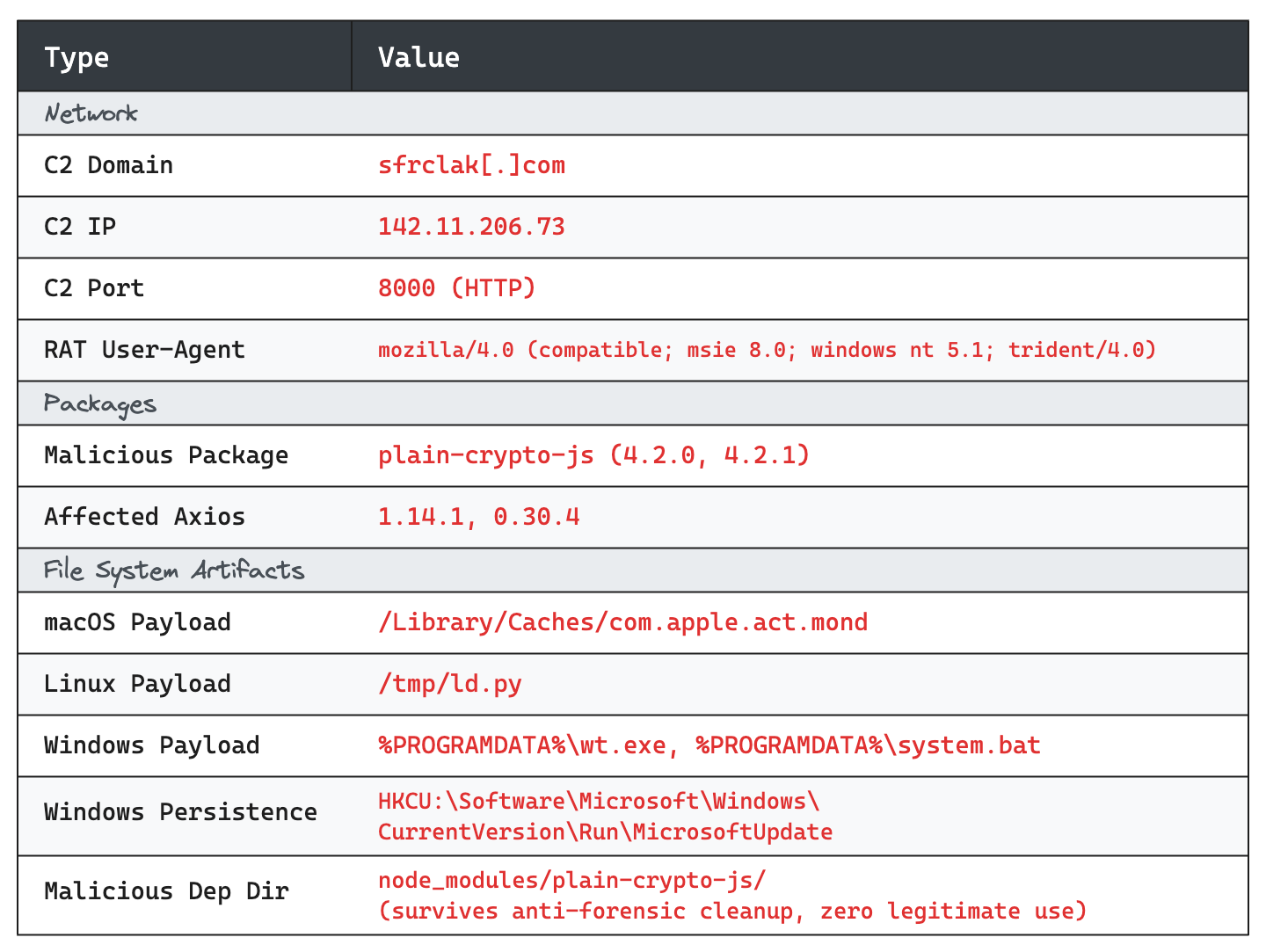
sfrclak[.]com (142.11.206.73:8000), running Express.jsmozilla/4.0 (compatible; msie 8.0; windows nt 5.1; trident/4.0)/product0 (macOS), /product1 (Windows), /product2 (Linux)On first execution, the RAT sends a FirstInfo beacon that enumerates the victim’s file system – specifically ~/Documents, ~/Desktop, ~/.config, ~/.ssh, and ~/.aws on Linux/macOS, and Documents, Desktop, OneDrive, and AppData\Roaming on Windows. Every subsequent beacon includes a full process list.
The RAT supports four commands: kill (self-terminate), peinject (execute binaries/inject DLLs), runscript (arbitrary code execution), and rundir (enumerate targeted directories).
This is where the attack gets interesting. The malware actively cleans up after itself:
setup.js deletes itself after executionpackage.json is replaced with a pre-staged clean copy6202033.vbs, 6202033.ps1) self-deleteThe result: a compromised node_modules/plain-crypto-js directory may appear completely clean after the payload has already executed. Lockfile analysis is more reliable than filesystem inspection for determining whether a machine was exposed.
We’ve been actively helping customers assess exposure to this attack, and one thing became clear quickly: filesystem-based detection alone is not reliable for this payload.
Here’s why. The malware’s anti-forensic cleanup doesn’t just remove the dropper – it’s designed to make a compromised environment look indistinguishable from a clean one:
setup.js (the dropper) is deleted immediately after executionpackage.json inside plain-crypto-js is replaced with a pre-staged clean copyplain-crypto-js directory in node_modules survives, but its contents appear cleannpm install, rm -rf node_modules, or a CI pipeline refresh), even the directory is goneIn practice, this means a machine that was fully compromised – RAT deployed, C2 active, credentials potentially exfiltrated – can show a completely clean filesystem by the time someone runs a scan. We’ve observed this firsthand in customer environments where we had confirmed C2 communication but no filesystem artifacts remained.
From our experience, Network-based detection is the most reliable approach. The RAT beacons every 60 seconds over plain HTTP to sfrclak[.]com:8000 with a distinctive user-agent string (mozilla/4.0 (compatible; msie 8.0; windows nt 5.1; trident/4.0)). This traffic is highly anomalous and detectable via:
sfrclak[.]com is a definitive indicator. There is no legitimate reason for this domain to appear in DNS logs.142.11.206.73:8000 or any traffic with the IE8 user-agent string from a modern development machine.Persistent filesystem artifacts are the next best option, but only if the malware hasn’t been cleaned up and the machine hasn’t been rebooted:
/Library/Caches/com.apple.act.mond – this persists across reboots and is the most durable file artifact.HKCU:\Software\Microsoft\Windows\CurrentVersion\Run\MicrosoftUpdate and %PROGRAMDATA%\system.bat – the persistence mechanism survives reboots even if wt.exe is removed./tmp/ld.py – cleared on reboot, so only useful if the machine has been running continuously since infection.Package-level indicators are useful but have caveats:
plain-crypto-js directory in node_modules is the single strongest filesystem IoC – this package has zero legitimate use. But it’s gone if the project was rebuilt.plain-crypto-js are definitive. Version-only matches on axios@1.14.1 in lockfiles produce false positives – many projects legitimately reference this version number.The key takeaway: if you’re relying solely on endpoint scans to determine exposure, you may be getting false negatives. DNS and network logs are the ground truth for this attack.
This attack is notable for a few reasons:
Scope. Axios gets 40M+ weekly downloads. Even a 3-hour window is significant.
Tradecraft. Multi-platform native payloads, reflective DLL injection, anti-forensic cleanup, and a staged dependency (publishing a clean plain-crypto-js@4.2.0 18 hours before the malicious 4.2.1 to bypass new-package heuristics) – this wasn’t a script kiddie.
The OIDC gap. Axios had OIDC-based trusted publishing via GitHub Actions – the right setup. But npm still allowed direct CLI publishes from the maintainer’s stolen credentials. The provenance mechanism detected the anomaly after the fact, but didn’t prevent publication. This is a systemic gap in npm’s security model that affects any package relying on OIDC publishing as a security control rather than an enforcement mechanism.
The response bottleneck. A collaborator identified the compromise quickly but couldn’t revoke the attacker’s access without admin privileges. The attacker used those same admin privileges to suppress the initial report. This highlights the need for multi-party controls on critical package operations.
Supply chain attacks are no longer theoretical edge cases – they’re a recurring operational reality. If your organization runs npm install anywhere, you need monitoring for unexpected dependency changes, egress controls on build systems, and a response plan that doesn’t start with “let me Google what to do.”
mes1s - Deep Analysis of the payload based on Reverse Engineering all 5 payloads downloaded from VT, in an isolated VM. Includes Yara, Sigma, and Suricata detection rules.