Inside Claude Cowork: How Anthropic’s Autonomous Agent Actually Works

Yotam Perkal
Apr 01, 2026・
19 min read

We reverse-engineered the security architecture of Claude’s autonomous desktop agent. Here’s what we found.
Computer use agents represent a new class of AI capability: systems that can see your screen, control your browser, read your files, and operate your desktop while you’re away. Claude Desktop’s Cowork – along with features like Dispatch and Computer Use – is among the most architecturally complex implementations in this category, combining a sandboxed VM, direct Chrome browser control, file system access, and remote phone dispatch into a single integrated product.
With this level of integration comes a fundamental tension: the more capable and autonomous you make an AI agent, the larger its attack surface becomes. An agent that can only answer questions is relatively safe. An agent that can browse the web, read your files, control your desktop, and operate from your phone? That’s a fundamentally different threat model.
We reverse-engineered Cowork’s architecture by analyzing log files, extracting and statically analyzing the Electron app source, mounting the VM disk image, and tracing session lifecycles. During this research, we also identified several security issues that are currently in the process of coordinated disclosure with Anthropic and are outside the scope of this post. Here are some of the more notable discoveries – each links to the full analysis later in the post:
NoNewPrivileges=no, ProtectSystem=false. The security boundary is the VM itself, not anything inside it. (The VM)nftables chains are empty with default ACCEPT policies. Network security is handled entirely by layers above. (Network Security)This post documents the architecture as we observed it. Our goal is to provide this research to anyone wanting to understand how these systems work, what risks are involved, and how to better manage those risks.
Computer use agents – AI systems that can see and control a desktop environment – are an emerging category distinct from AI-powered code builders (Cursor, Windsurf) or AI-enhanced browsers (Perplexity, Arc). Computer use agents aim to operate the full desktop: launching applications, filling forms, navigating websites, managing files.
The field is still young but moving fast. Google’s Project Mariner targets browser automation. OpenAI’s Operator provides web-based task completion. Microsoft’s Copilot Actions integrates with the Windows ecosystem. Perplexity Computer brings AI-driven desktop control to the Perplexity ecosystem. OpenClaw pushes toward highly autonomous computer operation. These are just a few examples – the category is expanding rapidly. Claude Desktop’s Cowork is notable for its depth of integration: a sandboxed VM for agent execution, direct Chrome browser control via MCP, file system access through VirtIO mounts, and remote dispatch from mobile devices.
Security research on computer use agents remains limited. This work aims to help bridge that gap – providing a detailed look at how these systems are architected, what capabilities they offer, and what security risks they introduce.
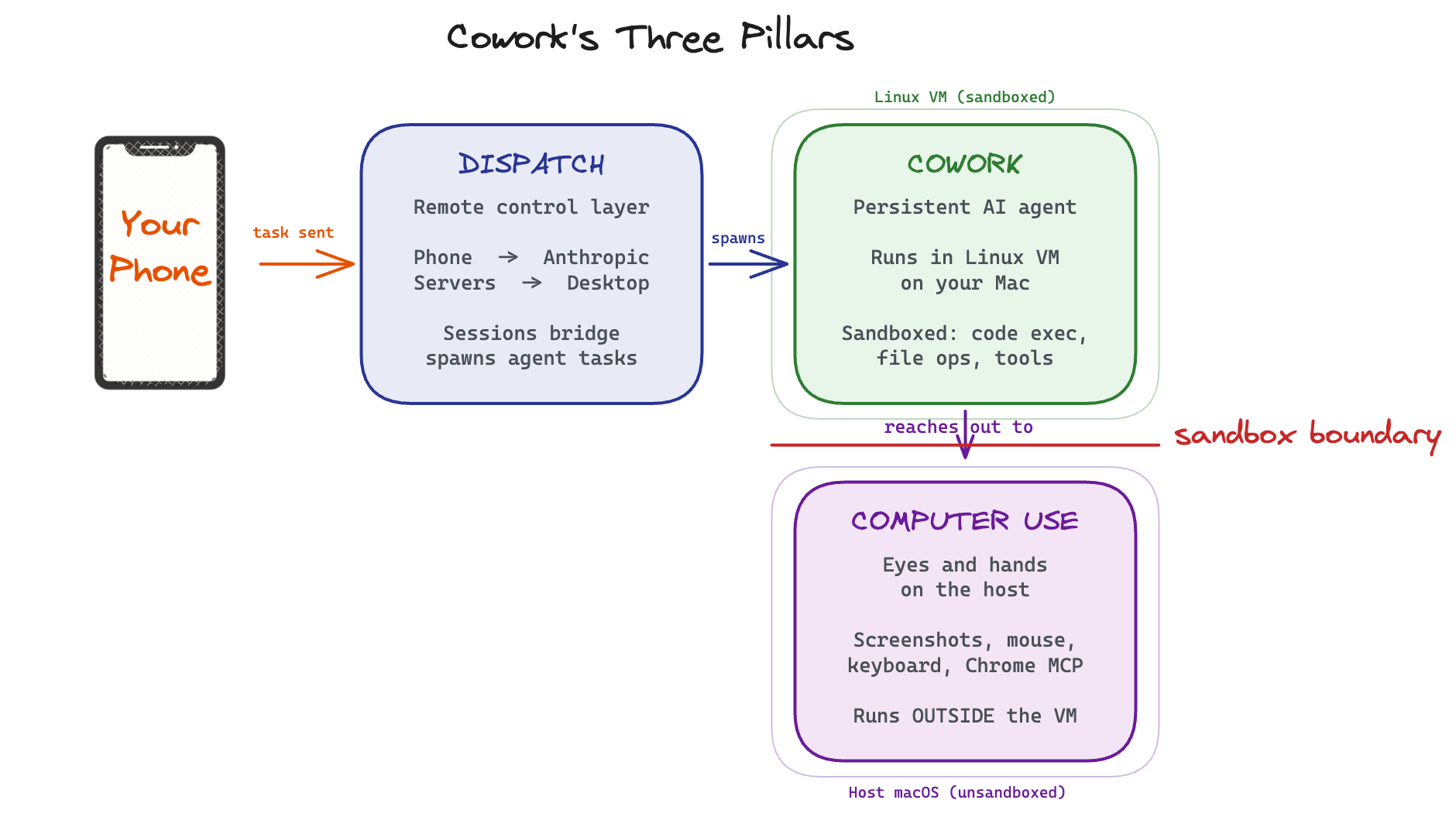
Claude Desktop’s autonomous capabilities consist of three interconnected systems, each with its own internal codename (more on those later):
Cowork is the persistent AI agent. It runs inside a Linux virtual machine on your Mac, isolated from the host operating system. The VM provides a sandboxed environment where the agent can execute code, process files, and run tools without direct access to your system.
Dispatch is the remote control layer. It enables you to send tasks from your phone (via the Claude iOS or Android app) to the agent running on your desktop. Your message routes through Anthropic’s servers to a local “sessions bridge” component, which spawns the appropriate agent session to handle the task. The agent works autonomously and reports results back to your phone.
Computer Use gives the agent eyes and hands on the host machine. It can take screenshots, move the mouse, type on the keyboard, and control the Chrome browser through dedicated MCP (Model Context Protocol) tools. Critically, Computer Use runs on the host, not in the VM. Anthropic is explicit about this: “Computer use runs outside the virtual machine that Cowork normally uses for working on your files and running commands. This means Claude is interacting with your actual desktop and apps, rather than an isolated sandbox.”
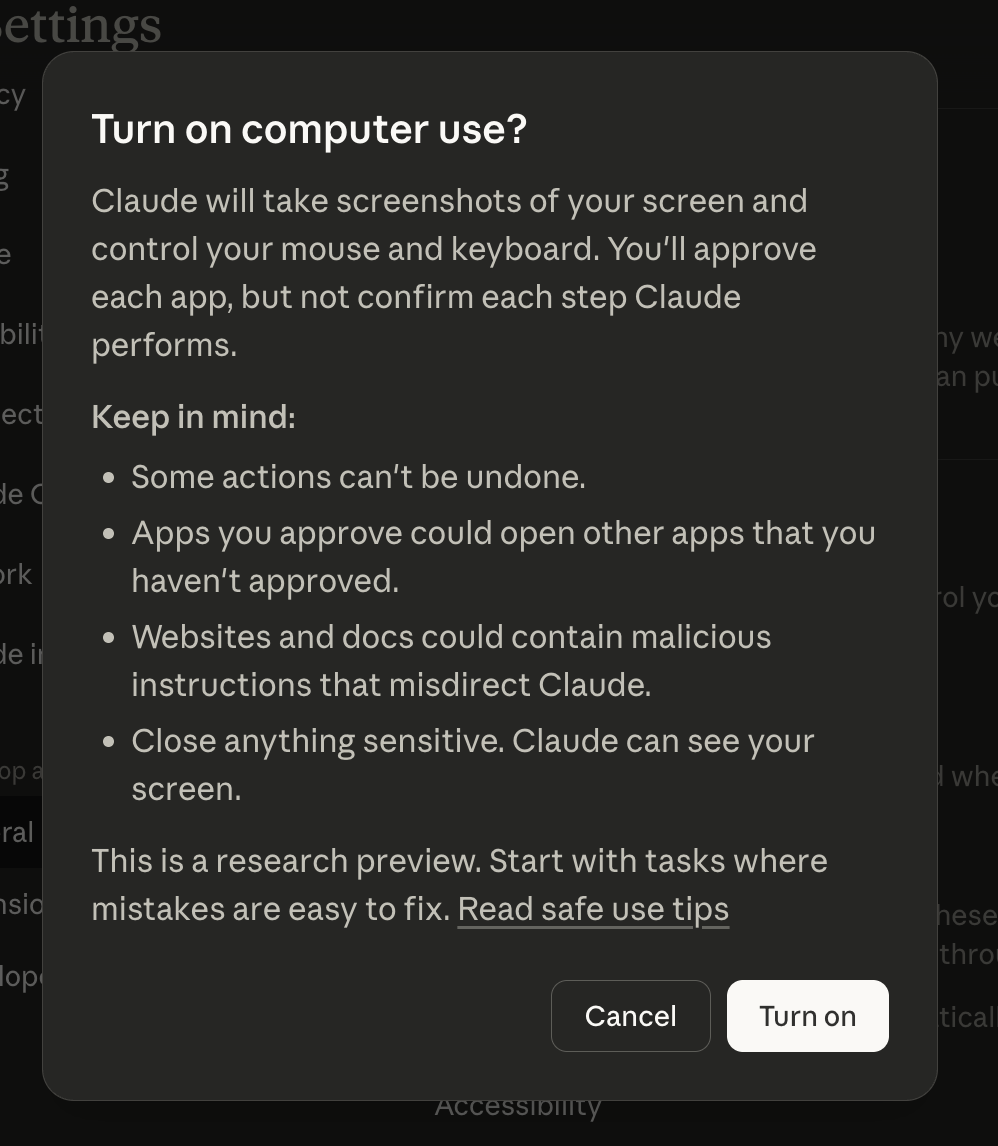
The UI also makes sure to warn about the potential risks:
These three systems work together: you dispatch a task from your phone, the Cowork agent receives it in the VM, and when it needs to interact with the desktop or browse the web, it reaches out through Computer Use tools that operate on the host.
The sandbox runs Ubuntu 22.04 with a root-privileged daemon, no firewall rules, and no custom AppArmor profiles. The VM boundary is doing all the heavy lifting.
The Cowork agent runs inside a Linux virtual machine managed by Apple’s Virtualization.framework. Here’s what we found by analyzing the VM disk image and log files:
Operating System: Ubuntu 22.04.5 LTS, with a 10GB root filesystem image (rootfs.img) stored at ~/Library/Application Support/Claude/vm_bundles/claudevm.bundle/.
Resources: 4 CPU cores, 4GB RAM (source: cowork_vm_swift.log – VM configuration parameters logged at each boot).
Network Stack: The VM uses gVisor, Google’s userspace application kernel, for network virtualization. gVisor provides fine-grained control over system calls, including the ability to block specific syscalls like socket() at the kernel level.
Session Isolation: Each Cowork session gets a dedicated user account with a Docker-style random name (like awesome-wizardly-volta or serene-vibrant-newton). These are visible in the VM’s /etc/passwd file. The session disk is formatted fresh with ext4 on each VM boot – nothing persists from previous sessions on the ephemeral storage (source: coworkd.log – “formatting session disk with ext4”).
The Daemon: The core service inside the VM is coworkd (internally renamed sdk-daemon). Examining the systemd service configuration from the rootfs image reveals it runs as root with security hardening explicitly disabled:
# From rootfs.img:/etc/systemd/system/coworkd.service

User=root

Group=root

NoNewPrivileges=no

ProtectSystem=false

ProtectHome=false

PrivateTmp=false
This means the daemon and any processes it spawns have full privileges within the VM. The security boundary is the VM itself, not process-level isolation within it.
Firewall: The VM’s nftables configuration (from rootfs.img:/etc/nftables.conf) contains empty chains with default ACCEPT policies:
flush ruleset

table inet filter {

chain input { type filter hook input priority 0; }

chain forward { type filter hook forward priority 0; }

chain output { type filter hook output priority 0; }

}
There are no firewall rules restricting network traffic within the VM. Network security is handled at layers above this.
AppArmor: While the kernel boot logs mention AppArmor, the /etc/apparmor.d/ directory on the rootfs contains only stock Ubuntu profiles (dhclient, rsyslogd, etc.). There are no custom AppArmor profiles for coworkd, sandbox-helper, or the Claude Code binary.
sandbox-helper: Alongside coworkd, there’s a sandbox-helper binary (2.1MB) that gets updated on each VM boot. The coworkd.log shows frequent hash changes across boots (e.g., sandbox-helper update detected (old=7f74b13e... new=d1b7c599...)), indicating active development. Its exact behavior could not be determined from our analysis – it likely provides additional sandboxing or process-level restrictions, but this remains an area that would benefit from further investigation.
Anthropic built three independent layers to prevent unauthorized network access from the VM – blocked syscalls, a MITM proxy with an ephemeral CA, and a domain allowlist.
One of the most thoughtful aspects of Cowork’s architecture is its approach to network security. Anthropic implemented three distinct layers to control what network requests the agent can make:
At the lowest level, gVisor blocks the socket() system call for processes inside the VM. We confirmed this by dispatching commands through the Cowork agent:
$ dig example.com

;; connection timed out; no servers could be reached

socket(): Operation not permitted
$ curl https://httpbin.org/get

curl: (56) Send failure: Connection reset by peer
The agent cannot open a network socket from the VM. DNS resolution, HTTP requests, raw TCP connections – all blocked at the syscall level. This is a robust foundation because it doesn’t rely on filtering specific protocols or ports; the fundamental networking primitive is disabled.
For legitimate outbound HTTPS traffic (like API calls), the VM routes through a Man-in-the-Middle proxy running on the host. From coworkd.log, we can see that each VM boot generates a fresh ephemeral CA certificate:
/var/run/mitm-proxy.sockThis means Anthropic can inspect and filter all HTTPS traffic from the agent. The ephemeral CA design is good security practice – it limits the window of exposure if the certificate were ever compromised.
The outermost layer is a host-side egress proxy that filters outbound requests by domain. When the agent uses the WebFetch tool (the primary mechanism for fetching web content), requests are routed through this proxy and checked against a domain allowlist.
We confirmed this by testing WebFetch against a domain not on the allowlist:
{

"error_type": "EGRESS_BLOCKED",

"domain": "example.com",

"message": "Access to example.com is blocked by the network egress proxy."

}
The WebSearch tool takes a different path – search queries are routed through Anthropic’s own infrastructure, so the VM never makes direct connections to search engines.
This three-layer approach is defense-in-depth done right. Even if one layer is bypassed, the others should provide independent protection. The design demonstrates that Anthropic takes the risk of uncontrolled agent network access seriously.
This is how it all looks like on a high level:
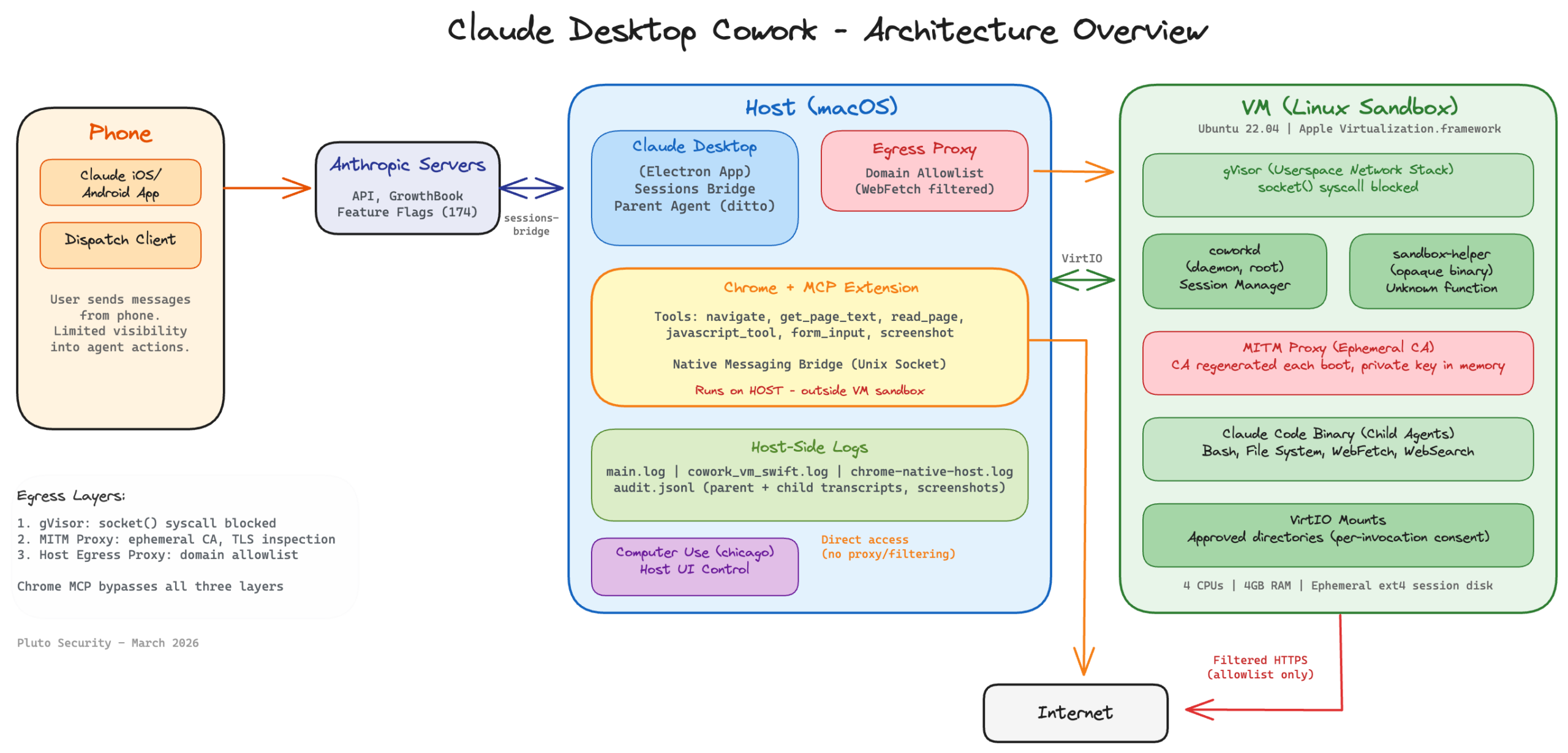
Rather than running a browser inside the sandboxed VM, Cowork controls your actual Chrome browser on the host through an opt-in extension. This gives the agent real browsing capabilities – but also means it operates outside the VM’s egress controls, in your real browser session.
So far, we’ve seen how the VM sandbox restricts the agent’s direct network access through three layers of egress control. But the agent still needs to browse the web as part of many tasks – checking dashboards, reading documentation, filling forms. Rather than running a browser inside the VM (which would be constrained by those same network restrictions), Claude Desktop uses the Chrome browser on the host machine through the Model Context Protocol (MCP).
Anthropic’s own documentation is explicit about this architectural choice and its implications. Their API documentation warns that computer use is “a feature with unique risks distinct from standard API features” and that “these risks are heightened when interacting with the internet”. Their safety guide provides specific guidance on using Chrome safely with Claude.
The Chrome MCP connection has three components:
/tmp/claude-mcp-browser-bridge-{username}/{pid}.sock (source: chrome-native-host.log). This is Chrome’s native messaging protocol, allowing the Electron app to send commands to the extension.The Chrome MCP provides a rich set of browser automation tools:
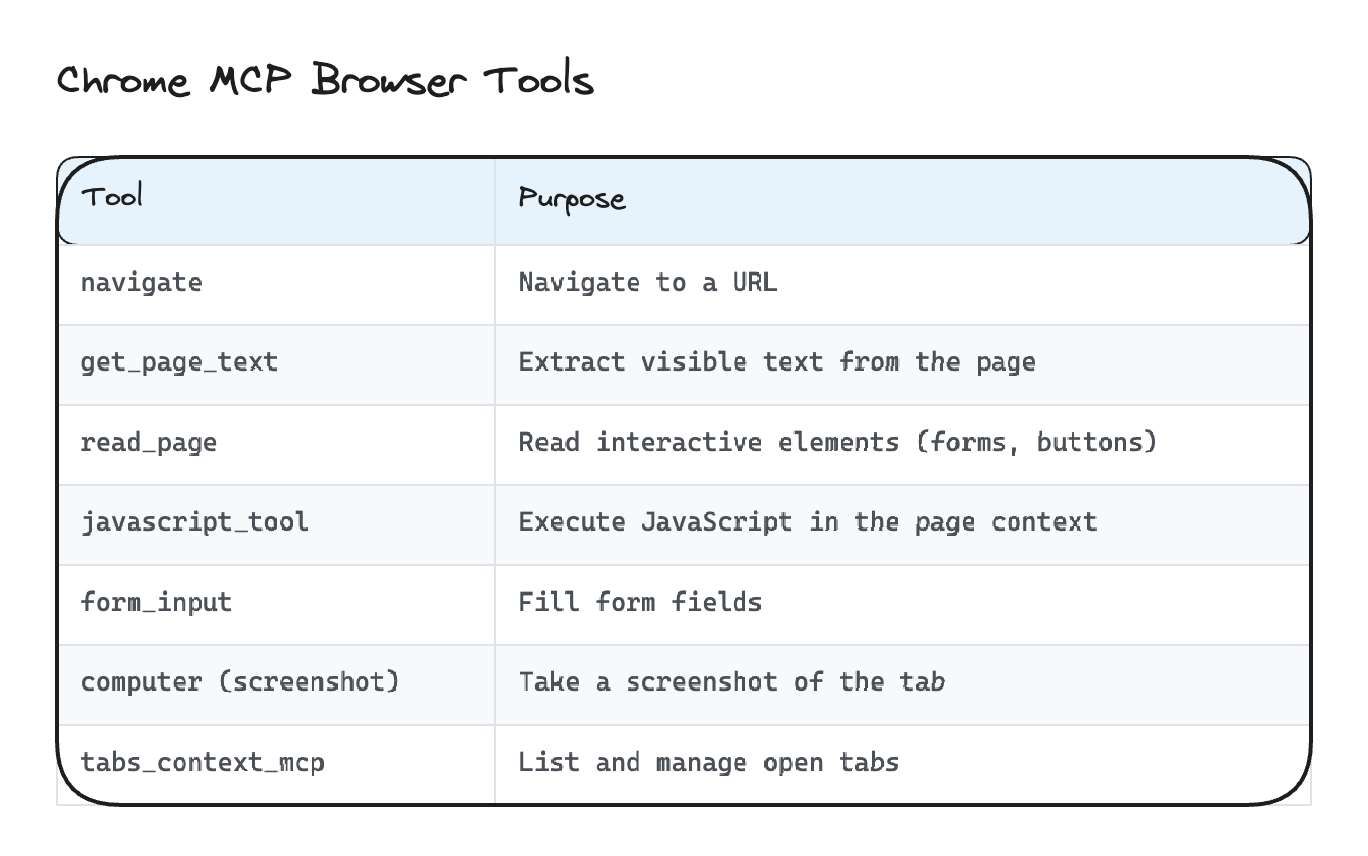
The javascript_tool is particularly worth understanding from a security perspective – it can execute arbitrary JavaScript in the context of any page the agent has open. Anthropic’s Chrome safety guide does address the risks of Chrome integration, but users should be aware of the scope of this capability.
One security detail worth noting: the get_page_text tool doesn’t just dump the raw DOM. It performs visibility-aware text extraction:
position: absolute; left: -9999px) are stripped<text> elements are included (SVG is DOM content)This means content that’s invisible to a human viewing the page is also (mostly) invisible to the agent when using text extraction. This is relevant for defending against prompt injection via hidden text on web pages. However, it’s important to note that the agent also processes screenshots visually – the model can read and interpret text rendered in images, so image-based injection remains a potential vector even when text extraction filters hidden content.
We’ve covered how the VM is sandboxed and how network access is controlled. But what about access to your local files and system capabilities? Cowork implements several layers of permission controls for this:
When the agent needs to read files from your Mac, it uses the request_cowork_directory MCP tool. This triggers a permission dialog asking you to approve access to a specific directory (e.g., ~/Desktop). The flow in main.log looks like:
Emitted tool permission request {uuid} for mcp__cowork__request_cowork_directory

Forwarded permission request ... as control_request

Bridge resolving permission {uuid}: behavior=allow

Added user selected folder: /Users/username/Desktop for session local_ditto_...

Mounted directory: /Users/username/Desktop -> /sessions/<name>/mnt/Desktop
Each directory must be individually approved. Inside the VM, approved directories appear at /sessions/<session-name>/mnt/<directory-name>/. The permission gate is per-invocation – the agent asks each time it needs access, and you approve or deny each request.
Anthropic uses GrowthBook for server-side feature flag management. This gives them a remote kill switch for capabilities:
chicago_config flagenabled=false to enabled=true during our research – it happened server-side with no client update requiredclipboardGuard, screenshotFilter, pixelValidation, mouseAnimationdispatchCuGrantTtlMs=1800000)The .claude.json config file inside the VM caches 174 GrowthBook feature flags under the tengu_* namespace (178 total). Notable security-relevant flags include:
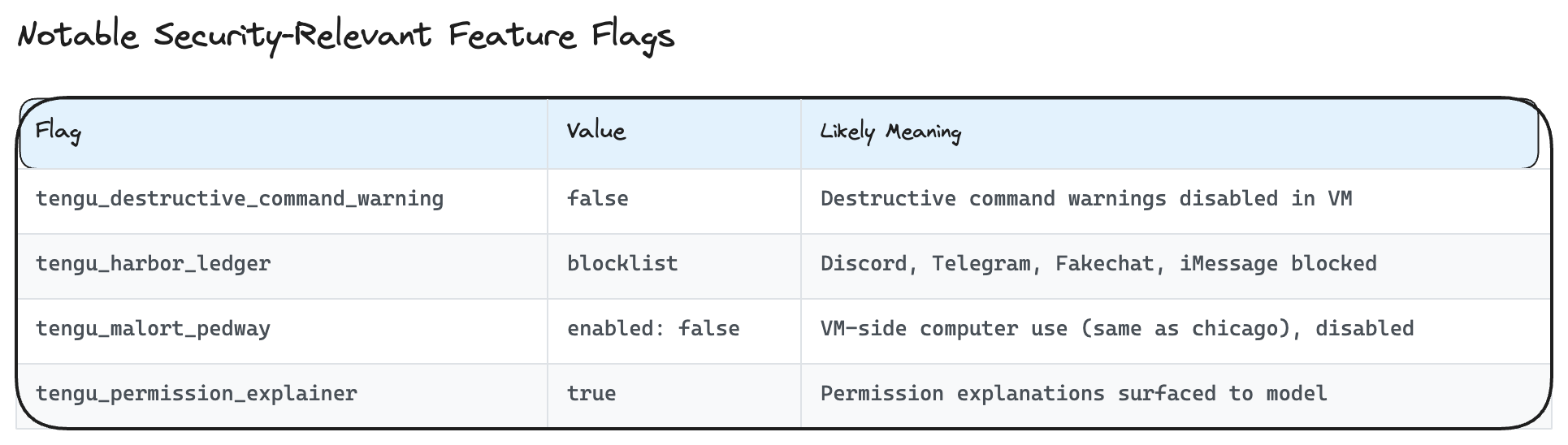
The tengu_harbor_ledger blocklist is interesting – it blocks specific communication channel plugins (deny-specific) rather than using an allowlist (allow-specific), meaning new communication plugins are allowed by default until explicitly blocked.
In the Electron app source (app.asar), we found an allowDangerouslySkipPermissions boolean parameter in the session initialization flow. It’s set to false, but its existence as a code path is worth noting for completeness.
Your phone becomes a remote control for an autonomous agent on your desktop – but the logs can’t tell whether a command came from the phone or the keyboard, and you have limited visibility into what the agent does between permission checkpoints.
So far, we’ve looked at the agent from the perspective of someone sitting at their Mac. But one of Cowork’s most distinctive features is Dispatch – the ability to send tasks from your phone that execute on your desktop computer while you’re away. Anthropic’s own documentation acknowledges this: “phones effectively become remote controls for desktop resources.” Here’s how it works under the hood:
In main.log, you can trace this flow:
[sessions-bridge] Received user message for session cse_XXXXX: "your message"

Using Claude VM spawn function for session

[DispatchMcp] Spawned child local_XXXXX ("task title") for parent local_ditto_XXXXX
One observation: the logs do not contain device metadata for incoming messages. There’s no client_type, user-agent, or platform field that distinguishes whether a command came from the phone or the desktop. The only platform field refers to the host OS (darwin), not the sending client.
The parent ditto agent and child agents have different capabilities:
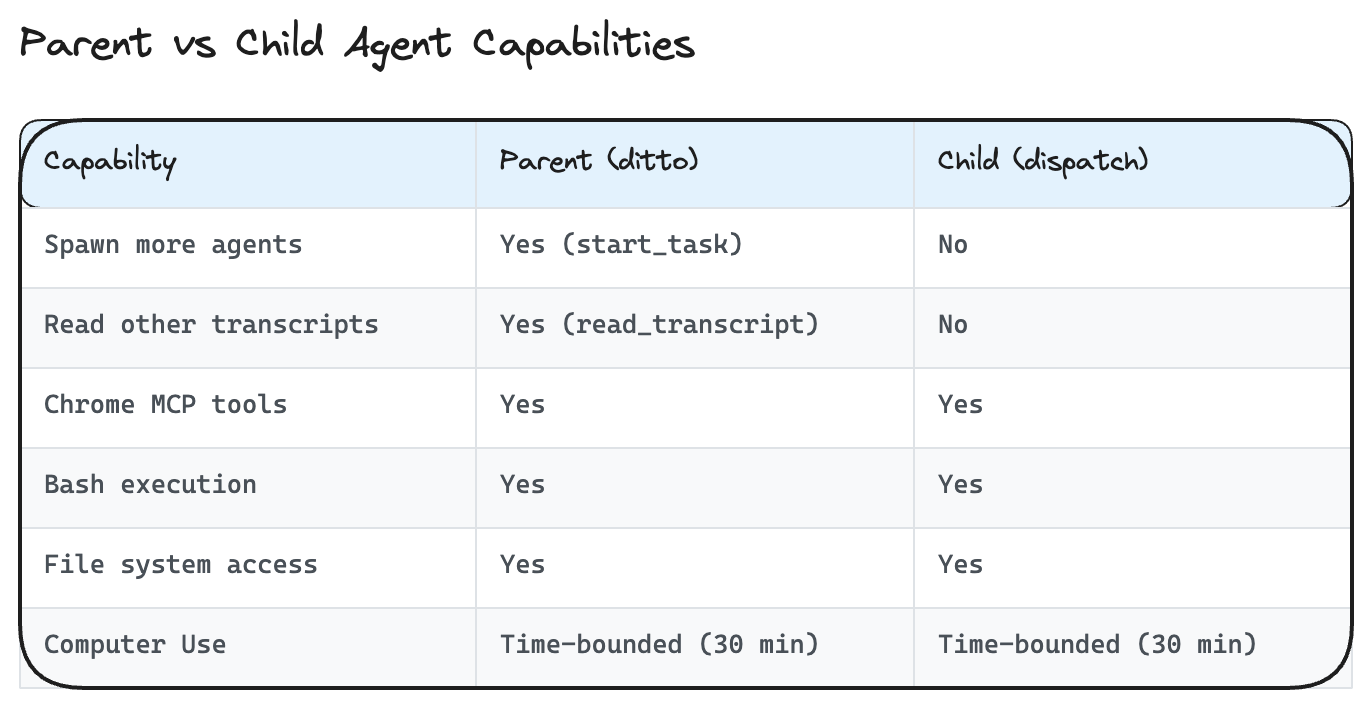
The parent orchestrates by dispatching tasks and polling for results. Children are isolated from each other – they can’t read other sessions’ transcripts or spawn further children. This limits the blast radius of any individual child agent.
An important consideration: when you dispatch from your phone, you have limited real-time visibility into what the child agent is doing. The parent polls the child’s transcript and relays results, but the child may perform many actions (file system traversal, Chrome navigation, screenshot capture) before the parent checks in. Permission requests are forwarded to your phone, but the approval context is limited – you see a directory name but may not fully understand what the agent plans to do with that access. We observed the agent trigger request_cowork_directory five times during a single session, each requiring manual approval. The CUA security literature notes that users tend to “grow used to always agreeing” to such dialogs – a risk amplified by the limited context available on a phone screen.
We also encountered several instances where the Dispatch phone view appeared stuck with no visible progress indicator, while the session on the desktop showed active agent execution. This may be a symptom of the feature’s relative newness, but it underscores the visibility gap when operating remotely.
Claude Desktop generates extensive local logs – complete tool transcripts, model reasoning chains, user messages in plaintext – all in world-readable files. Some of these survive even after you delete a session.
With all this complexity – a VM, a Chrome bridge, remote dispatch, parent-child agent orchestration – how do you actually see what the agent did? Claude Desktop generates extensive logging that provides surprisingly detailed visibility into agent behavior:
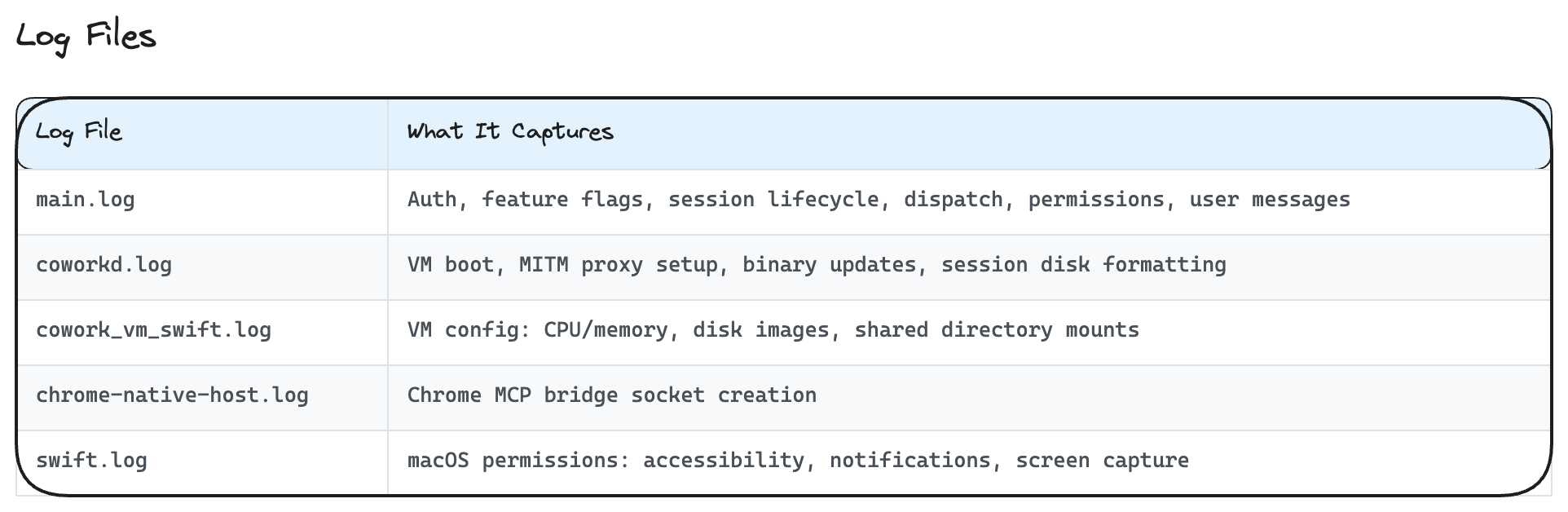
All log files we examined had 644 (world-readable) permissions, meaning any local process can read them.
Each Cowork session creates a directory tree at ~/Library/Application Support/Claude/local-agent-mode-sessions/:
audit.jsonl – The complete transcript of every tool invocation, including inputs, outputs, the model’s thinking chain, and timing. This is the definitive forensic record.outputs/screenshot-*.jpg – Full desktop screenshots taken by Computer Use, saved as JPEG images (~200KB, 1372×891 pixels in our tests) with 644 (world-readable) permissions. We tested the lifecycle: screenshots persist on disk during the active session, but are cleaned up when the session is deleted from the Claude Desktop UI. However, child session audit logs (which can contain base64-encoded screenshots inline) are NOT cleaned up on session deletion – see note below..claude.json – Session configuration including all cached GrowthBook feature flagsremote_cowork_plugins/manifest.json – Plugin manifest (currently empty in our observations – no security plugins loaded in VM agents)The bridge-state.json file at the Application Support root maps remote Anthropic session IDs (cse_*) to local ditto sessions (local_ditto_*), providing the link between phone dispatch and local execution.
A note on data persistence: We tested what happens when you delete a session from the Claude Desktop UI. The results are mixed:
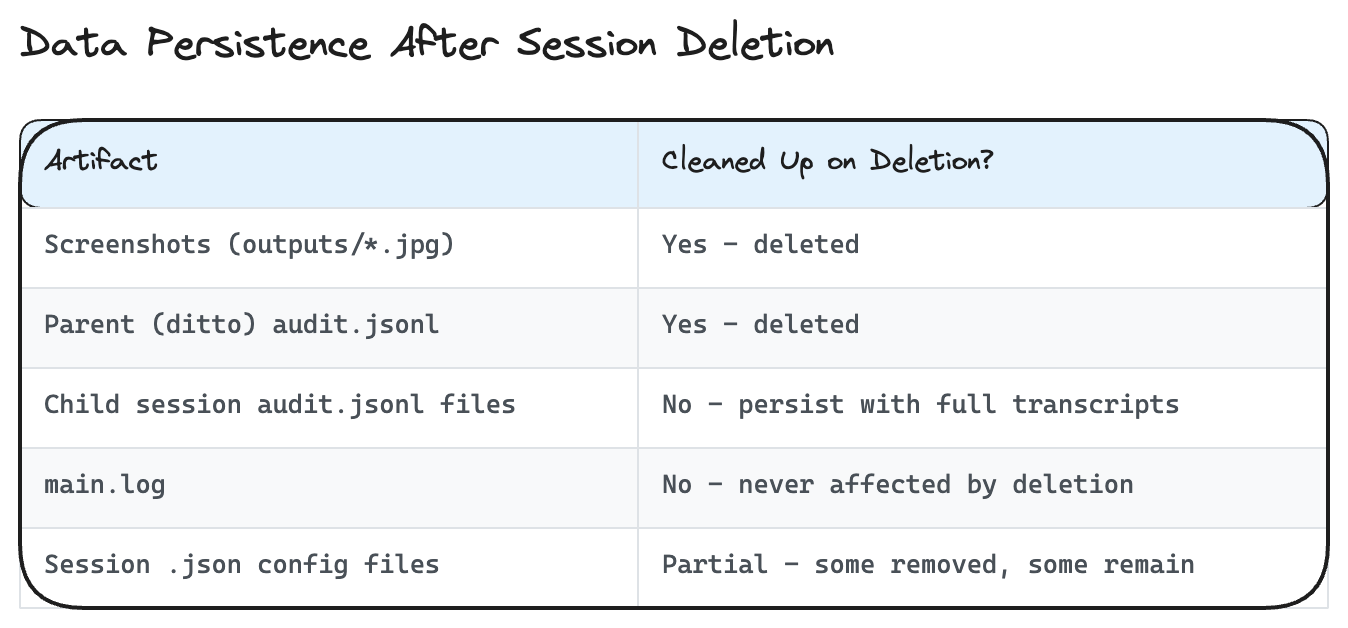
This means that even after deleting a session, complete transcripts of every tool invocation, model thinking chain, and file contents read by child agents remain on disk in world-readable files. The main.log file (also 644 permissions) retains the full conversation history including user messages in plaintext across all sessions, regardless of deletion.
Anthropic’s own documentation notes that “Cowork activity is not captured in audit logs, Compliance API, or data exports” – this refers to their cloud-side audit infrastructure. The local filesystem tells a different story.
Throughout this analysis, we’ve referenced internal codenames that appear in log files and configuration. Here’s the full map we assembled from log prefixes, feature flag namespaces, and session IDs:
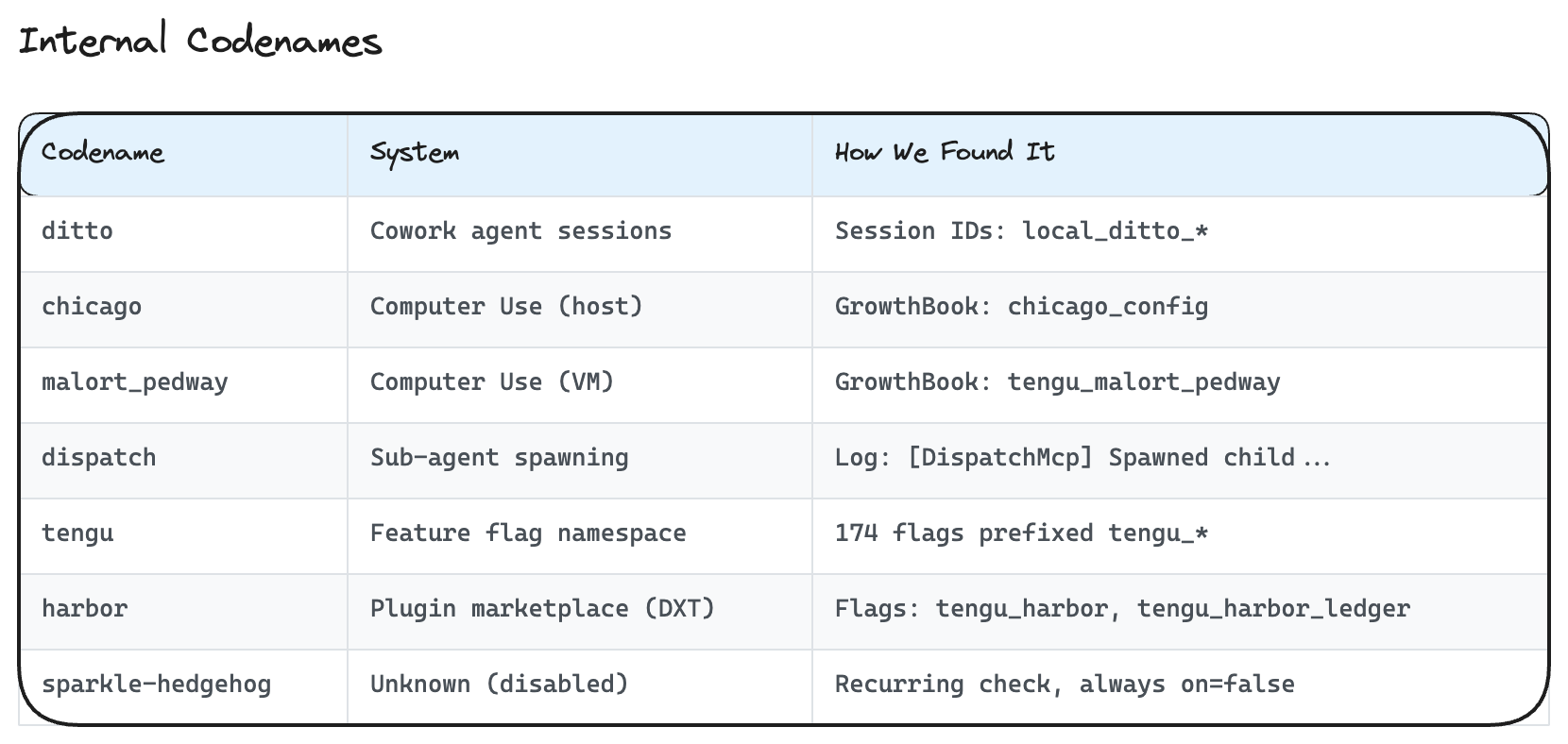
“Chicago” for computer use, “ditto” for the persistent agent session, “harbor” for the plugin marketplace. “Sparkle-hedgehog” remains a mystery – a feature gate that’s checked hourly but has never been enabled in our observation period.
Having mapped the full architecture, it’s worth stepping back to acknowledge what works well. Cowork’s security architecture shows serious engineering investment:
RunAsNode: Disabled, EnableNodeOptionsEnvironmentVariable: Disabled, EnableEmbeddedAsarIntegrityValidation: Enabled, OnlyLoadAppFromAsar: Enabled.These are real, defense-in-depth controls. They’re not perfect (no security architecture is), but they demonstrate thoughtful engineering around the threat model for autonomous agents.
That said, our analysis identified several areas where the security posture could be strengthened:
Incomplete cleanup on session deletion. When a user deletes a session, screenshots are properly cleaned up, but child session audit logs are not. These audit logs contain complete transcripts of every tool call and model reasoning chain – potentially including sensitive file contents the agent read. Additionally, main.log is never affected by session deletion and retains the full conversation history in plaintext.
No device authentication for remote dispatch. There’s no additional authentication for remote commands beyond the Claude session itself – no MFA, no device binding, no presence check on the desktop before executing actions. The logs don’t distinguish whether a command came from the phone or the desktop.
World-readable log files with sensitive content. main.log (644 permissions) contains full user messages in plaintext, file paths, subscription tier details, and organization IDs. The audit.jsonl files contain complete agent transcripts including the model’s internal reasoning. Any local process can read these.
Communication channel blocklist vs allowlist. The tengu_harbor_ledger blocks specific communication plugins (Discord, Telegram, iMessage) but uses a deny-specific approach. New communication plugins are allowed by default until explicitly blocked, which inverts the principle of least privilege.
Destructive command warnings disabled in VM. The tengu_destructive_command_warning flag is set to false inside the VM, meaning the agent won’t warn before executing potentially destructive commands like rm. The VM’s ephemeral storage mitigates some risk, but commands affecting mounted host directories wouldn’t benefit from warnings.
Based on our analysis and informed by Anthropic’s own guidance:
For individual users:
For security teams evaluating deployment:
main.log and audit.jsonl for agent behavior (we’ll cover detection strategies in detail in a future post)This analysis represents a point-in-time snapshot (March 2026, Claude Desktop for macOS). Anthropic ships updates frequently, and the architecture will evolve. We’ll continue monitoring and will publish updates as significant changes occur.
Computer use agents are a genuinely new capability category, and the security community is still developing frameworks for evaluating them. We hope this deep dive helps security professionals and users alike make informed decisions about deploying and securing these systems.
This is the first in a series of technical deep dives into the security architecture of AI tools and platforms. As the AI ecosystem evolves rapidly, we believe that security research plays an important role in helping the community understand what’s running under the hood. We’ll be publishing similar analyses of other AI agent platforms and tools in the coming months.