
AI agents are starting to act more like users than tools. They read tickets, call APIs, search internal documents, update records, and sometimes trigger actions across several systems without much pause in between.
This changes the security question. It is no longer only about who can sign in; it’s also about what an agent is allowed to see, what it can do with that access, and how far it can go before someone notices a problem.
What Is AI Agent Access Control?
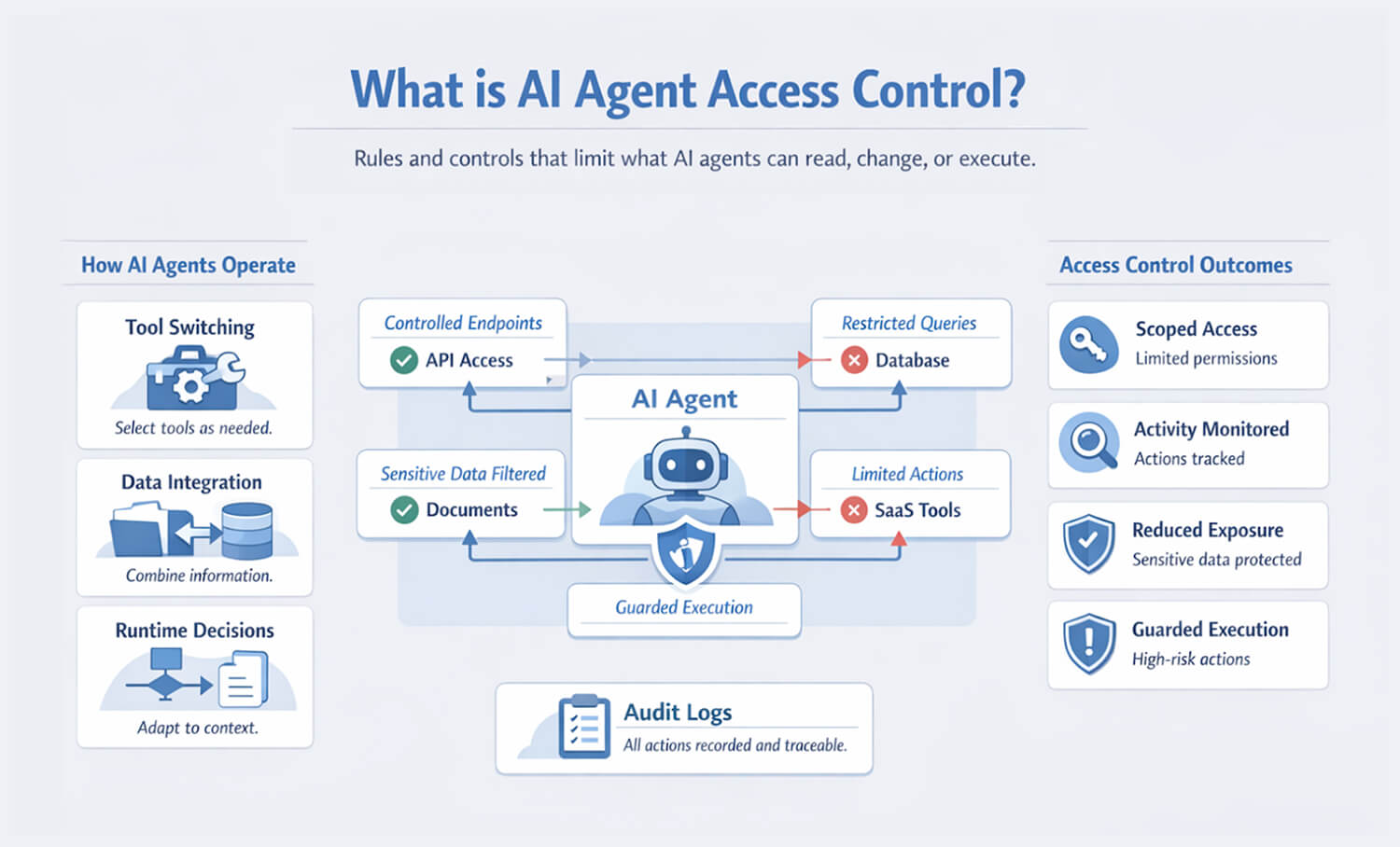
AI agent access control is the set of rules and technical checks that limit what an AI agent can read, modify, or execute inside a system. That includes permissions on APIs, databases, files, SaaS platforms, internal tools, and even browser-based workflows.
Traditional service accounts were already a challenge, but agents introduce a different type of risk. A normal integration usually follows a narrow path, while an agent often works from goals rather than fixed steps. It may inspect more data than expected, dynamically choose between tools, and combine information from sources that were never meant to be read together.
That is why agentic AI access control needs more than a static token with broad permissions. The control model must reflect that the software is making choices at runtime. Some of those choices will be useful. Some will be unsafe. A good design recognizes both possibilities.
Security Risks of Unrestricted AI Agent Access
The most obvious failure mode is overpermissioning. Teams want a prototype up and running quickly, so they give the agent access to the CRM, ticketing system, knowledge base, source repo, and messaging tools all at once, and it works. However, nobody comes back later to reduce the scope.
The problem is not always malicious use. Many incidents arise from normal behavior under weak constraints. For example, an agent might:
- Pull customer data from one system and include it in a support reply meant for another tenant.
- Read internal runbooks or secrets stored in docs and surface them in plain text.
- Trigger writes in production systems when the user only asks for analysis.
- Chain together low-risk permissions into a higher-risk outcome.
That last point is more important than many realize. A read-only permission in one system and a write permission in another can still create a serious issue when an agent joins the two. This is why AI agent access control has to be evaluated across workflows, not just within individual tools.
Monitoring AI Agent Activity and Data Access
Access control does not end when a token is issued. Agents need runtime monitoring because the real risks emerge during execution.
The first essential step is to treat the agent as an active principal with its own identity, rather than an invisible extension of the developer or end user. That identity should be visible in logs, policy decisions, and downstream systems. When an agent reads a table, calls an API, or posts into a channel, that action should be attributable.
A practical setup usually tracks a few things consistently:
- Agent identity, session, and delegated user context
- Tools invoked, arguments passed, and target systems reached
- Data categories accessed, especially regulated or sensitive material
- Approval events, denials, retries, and fallback behavior
While this step is essential, it is not enough on its own. Logs help after the fact, so teams often rely on platforms like Pluto Security for real-time visibility and guardrails that make AI-driven workflows easier to oversee before risky behavior turns into an incident. For higher-risk systems, runtime policy enforcement is usually needed. That might mean blocking specific tools unless a request is tagged as approved, stripping sensitive fields before the model sees them, or forcing human review before writes happen.
Identity management plays a big role here. Access controls for AI agent workflows are easier to maintain when the agent uses short-lived credentials, delegated scopes, and separate identities for specific tasks. A reporting agent should not share the same access profile as an automation agent that can change records. Grouping all agent behavior under a single generic service account makes the system more difficult to understand and much harder to contain during an incident.
Final Thoughts
AI systems do not become safer just because they use service accounts and familiar APIs. Once software starts choosing its own path through tools and data, the old permission model becomes increasingly inadequate.
Good agentic AI access control is usually less about one perfect policy and more about restraint. Narrow access, visible identity, runtime checks, and useful audit trails go a long way. That is what keeps an agent helpful without letting it quietly become overtrusted.
FAQ
1. Why do AI agents require different access controls than traditional software?
Traditional software usually follows predefined logic. AI agents choose actions based on prompts, context, and the tools available at runtime, which makes their behavior less predictable. Permissions that look safe in isolation can become risky when an agent combines tools, reads broad context, or takes action without a tightly fixed execution path.
2. What risks arise when AI agents access sensitive systems?
The risk is usually simple; the agent sees more than it should or does more than the user expects. That can mean exposing private data, editing the wrong record, or passing information from one system into another where it does not belong. Sometimes nothing is “hacked” at all-the problem is just too much access and not enough control around how the agent uses it.
3. How can organizations restrict AI agent permissions effectively?
Start small and keep it narrow. Give the agent access only to the tools it actually needs for one task, not every system it might use later. Break permissions by job, limit what each tool can return, and add an approval step before actions that change data or touch sensitive records. Then check how it behaves in real use, because the first permission model is rarely the right one.
4. What role does identity management play in AI agent security?
It makes the agent easier to control and easier to investigate. When each agent has its own identity and scoped access, you can see what it touched, revoke it cleanly, and avoid hiding everything behind a single shared account. Without that separation, mistakes blur together fast, and tracing a bad action becomes much harder.
5. Can AI agents unintentionally expose sensitive data?
Yes. An agent can leak data through summaries, generated responses, tool outputs, logs, or context passed to external models. It does not need malicious intent to cause damage. A loose prompt, an overly broad retrieval scope, or weak output filtering can be enough to expose information that should have remained internal.