Most people don’t immediately recognize a browser hijacker. It usually starts small. The homepage looks different. Search results feel off. A few extra ads show up. Nothing serious at first, so it gets ignored.
That delay is what allows it to settle in. Browser hijacking rarely arrives in an obvious way. It tends to come bundled with software, hidden inside extensions, or pushed through misleading prompts. By the time it becomes noticeable, the browser is already partially under control, often for quite some time before anyone realizes what has changed.
What is a Browser Hijacker?
A browser hijacker is unwanted software that changes how a browser behaves without the user’s clear consent. It can modify the homepage, default search engine, or new tab settings. Some versions also inject ads or quietly redirect traffic.
The goal is not complicated; it is usually about traffic and data. If a hijacker can route searches through its own engine or push users toward certain pages, that interaction can be monetized. In some cases, it also tracks browsing behavior along the way.
What makes this tricky is how it gets installed. It often comes through normal activity. A free installer includes extra components. An extension asks for permissions that seem harmless. A user clicks through without paying attention. Nothing about that feels risky at the moment.
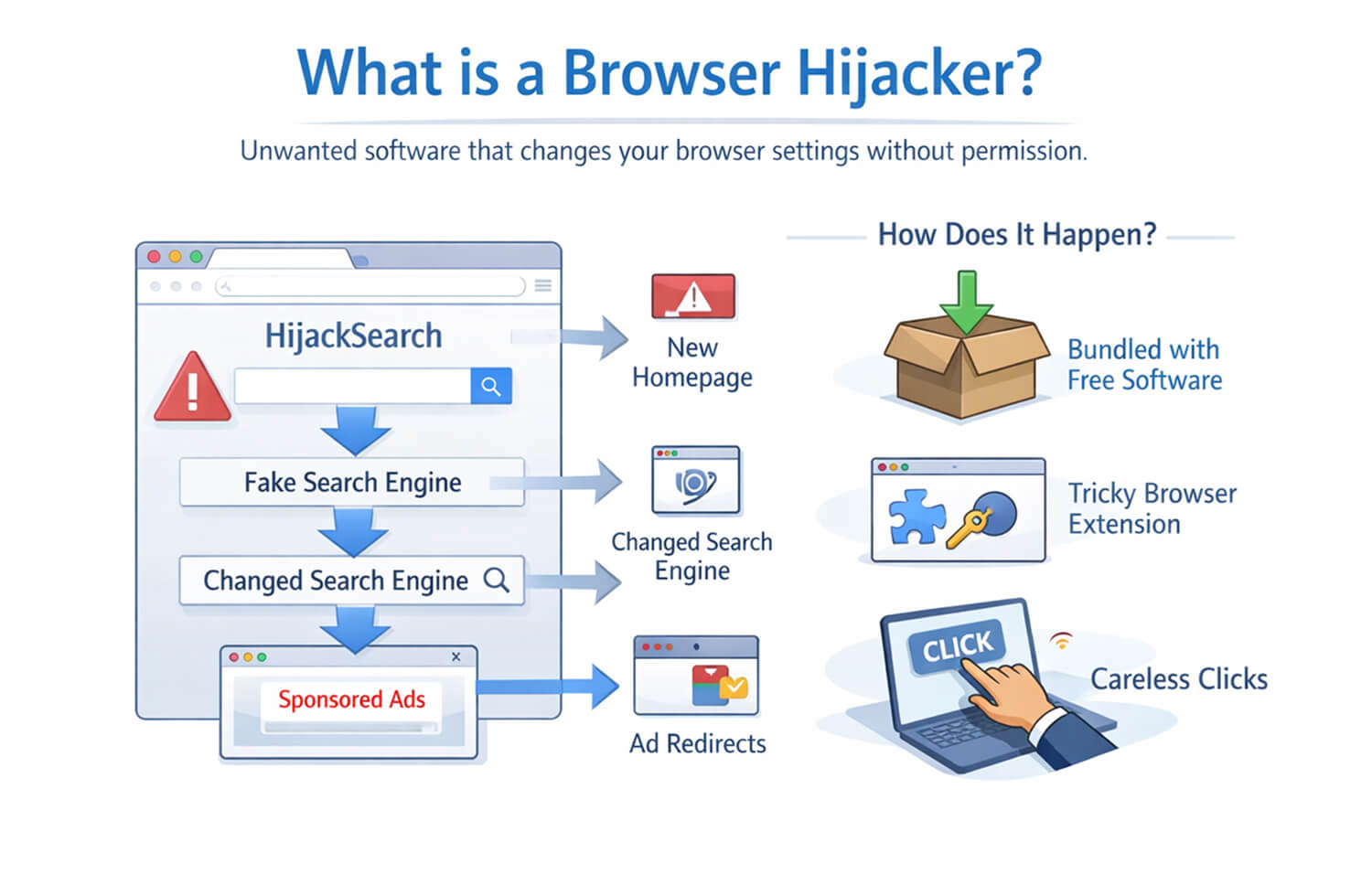
Signs Your Web Browser Has Been Hijacked
A hijacked browser still works, which is why it is easy to overlook. The changes are more behavioral than technical failures.
A few signs tend to show up together:
- Homepage changes: The browser opens to a page you did not set as the homepage.
- Search engine redirection: Queries go through a different provider.
- New extensions or toolbars: Add-ons appear without a clear install step.
- Constant pop-ups: Ads or redirect windows appear more frequently.
- Slower browsing: Tabs feel heavier or load inconsistently.
- Strange redirects: Clicking a result takes you somewhere unexpected first.
Some of these changes sit below the surface. You reset your homepage, and it comes back. You remove an extension, and it reappears. That usually means something else is still active in the background.
Another common pattern is resistance. Settings do not stay changed. You switch the search engine back, and it flips again later. That is not a browser glitch. It usually means the hijacker has more than one way of maintaining control, which is why partial cleanup often fails.
Security Risks Associated with Browser Hijacking
It is easy to treat this as just an inconvenience. That is where people underestimate it. Some hijackers collect browsing activity, search queries, and click behavior. Even without directly capturing credentials, that still exposes user patterns and can feed targeted scams or unwanted tracking.
The bigger issue is redirection. A hijacked browser can push users toward fake download pages, misleading alerts, or phishing sites. It does not need to be the final threat. Acting as a gateway is enough.
On work devices, the impact is different. Internal searches, session data, or access to company tools can be exposed through a compromised browser. That is where a small issue starts to extend beyond the browser itself.
This is also where visibility becomes important. In many environments, it is not obvious which tools, extensions, or workflows are interacting with browser data. Solutions like Pluto Security address that gap by providing teams with better visibility into workspace activity and applying guardrails that reduce risky behavior before it spreads.
How to Prevent and Remove Browser Hijackers
A lot of this comes down to ordinary habits that people usually rush through.
- Download software from places you trust.
- Pay attention during setup.
- Be careful with extensions that ask for too much access.
- Keep the browser and system updated.
If the browser is already affected, start with a trusted anti-malware scan. That often removes the main piece behind it, and sometimes the extras that help it stay in place. A browser hijack cleaner or browser hijacker removal tool can also help when the issue does not clear easily.
Then check installed extensions and recently added programs. Remove anything that looks unfamiliar. After that, reset the browser so that the homepage, startup behavior, and search settings return to normal.
It is also worth checking browser shortcuts. Some hijackers change them so a specific page keeps opening even after the browser has been reset. That part is easy to miss. If the same issue keeps coming back on a work device, it is better to stop there and report it. Trying random cleanup tools from the web can create a bigger mess.
Final Thoughts
A browser hijacker rarely starts as a serious problem, but it often points to something that slipped through unnoticed. Fixing it is one part. Avoiding the same path next time matters more.
FAQ
1. Are browser hijackers considered malware?
Yes, in most cases, they are treated as malware or potentially unwanted software. They change browser behavior without proper consent, redirect traffic, and may collect user data. Even when they appear minor, the behavior still introduces risk. The label can vary by vendor, but the security concern is usually the same.
2. Can enterprise security tools detect browser hijacking?
Yes, many enterprise tools can detect it, especially endpoint protection and EDR platforms. Some variants are caught quickly, while others appear through patterns like repeated redirects, suspicious extensions, or unexpected policy changes. Detection is usually easier when browser controls and device monitoring are centrally managed.
3. What steps should users take to remove a browser hijacker safely?
Users should run a trusted anti-malware scan, remove suspicious extensions and programs, reset browser settings, and check browser shortcuts. If the issue affects a work device, it is safer to report it instead of trying unverified cleanup tools. A quick review of startup items and installed apps also helps catch anything that brought it in.