
MCP is quickly becoming the connective tissue for agentic AI. It lets assistants reach tools, internal systems, and data through MCP servers. That is powerful, but it also expands the attack surface in a new way. If an attacker can influence what the agent sees or which tools it calls, they can trigger legitimate-looking actions in logs. MCP security is about preventing that drift from helpful automation into unintended access and damage.
What Is MCP Security?
Model Context Protocol (MCP) is a way for AI applications to connect to tools and data sources via an MCP server. In a typical setup, an MCP client within an agent communicates with one or more MCP servers that expose tools such as reading a repository, querying a database, or calling an internal API.
MCP security comprises the controls that protect those connections. It includes transport security, authentication, and authorization, as well as agent-specific risks such as indirect prompt injection, tool poisoning, and unsafe tool chaining.
Why MCP Security Matters for Agentic AI Applications
Agentic systems are built to take action, not just answer questions. That shift changes your threat model.
With a standard API client, you can assume a developer chose the endpoint and shaped the request. With an agent, the model decides which tool to call and which parameters to send. If the model is manipulated, it can still follow protocol while doing the wrong thing for your business.
MCP often sits close to sensitive zones:
- Data stores like documents, tickets, code, and customer records
- Privileged actions like creating issues, modifying files, or deploying changes
- Identity flows when servers run remotely and need delegated access.
So the real goal is not only to block external attackers but also to reduce the chance that a legitimate agent call becomes a harmful call.
Common MCP Security Vulnerabilities and Attack Vectors
Indirect prompt injection and tool poisoning
Attackers can hide instructions in tool descriptions, metadata, or retrieved content. The user never sees the malicious text, but the model does and may follow it. Microsoft describes this pattern as indirect prompt injection, which can lead to unintended actions and data exposure.
Elastic also documents tool manipulation patterns, such as orchestration injection and behavior redefinition over time. These patterns can quietly change how an agent interprets tools.
Confused deputy risks in delegated access
MCP servers sometimes act as proxies for other services, which can create a risk that the server uses its own authority on behalf of the wrong party. MCP security best practices explicitly address confused deputy issues, especially when dynamic client registration and browser consent handling can be abused.
Supply chain and server trust gaps
Teams often add third-party MCP servers quickly. But an MCP server still has elevated privileges. If you treat it like a simple connector, you can import risky defaults or insecure tool behavior into production. Aqua’s overview warns that MCP can become the weakest link if not treated as a true security boundary.
Vulnerability chaining
Classic security issues persist, including injection, path traversal, unsafe command execution, and weak validation. The difference is how easily an agent can chain multiple tools.
Researchers have shown that vulnerabilities in an official Git MCP server could become more severe when chained with vulnerabilities in other MCP servers, increasing the blast radius.
MCP Server Security Best Practices for Deployment
1. Treat MCP servers as privileged services
Give each server an owner, an inventory entry, and a lifecycle. Shadow servers pose a growing risk, with teams running unapproved MCP instances that use permissive defaults. OWASP lists Shadow MCP Servers as a key risk category.
2. Reduce exposure at the network layer
- Prefer local servers for developer use cases, but still assume local can be risky if tools touch files or run commands.
- For remote servers, restrict inbound access using private networking or a gateway.
- Require TLS and protect endpoints as you would any other internal service.
3. Keep tools small and scoped
Avoid tools that do too much, such as running any command. Build narrow tools with strict schemas and safe defaults. If a tool can change state, set its permissions and approvals more strictly than for read-only tools.
4. Log for investigations
Log tool calls with identity context, parameters, and outcomes. Include enough detail to trace tool chains. Agent incidents often appear normal until you see the full sequence.
5. Test with realistic abuse cases
Add regular tests for indirect injection and tool poisoning. MCP security guidance emphasizes defense-in-depth rather than relying on a single guardrail.
How to Secure Authentication and Authorization in MCP
MCP authorization for HTTP transports supports delegated access, often via OAuth-style flows. This lets a client access a restricted MCP server on behalf of a user with scoped permissions.
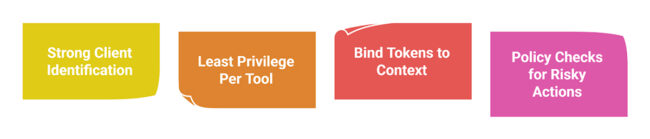
Use strong client identification
Know which client is calling, not just which user. Treat MCP clients as applications with trust levels. If you support dynamic client registration, restrict and monitor it, as consent-based flows can be abused if not implemented properly.
Enforce least privilege per tool
Do not stop at server-level permissions. Control access at the tool level and limit resource scope. Someone who can read tickets should not automatically be able to export everything or modify the workflow state.
Bind tokens to context and shorten lifetimes
Prefer short-lived access tokens, rotate credentials, and keep secrets out of prompts and tool descriptions. Token leakage remains a top operational risk, and the impact is greater when a token grants access to multiple tools.
Add policy checks for risky actions
For deleting data, pushing code, or issuing payments, add explicit policy checks and approvals. Agents are good at acting quickly. Your security controls should be good at slowing down at the right moments.
FAQs
1. What is the confused deputy problem in MCP security?
This occurs when a trusted MCP component, often a proxy server, is tricked into using its authority in a way the user did not intend. In MCP, this can occur in delegated access flows, where registration and consent-handling allow an attacker to gain access via a server acting as the trusted middle layer.
2. How does MCP differ from traditional API security?
Traditional API security assumes a developer selects the endpoint and controls the call path. MCP adds an agent that can dynamically decide which tools to use. That means you must secure tool descriptions, guard against indirect prompt injection, and control tool chaining, not just protect a single endpoint with auth and rate limits.
3. Can MCP servers run locally and remotely?
Yes. MCP servers can run locally for developer workflows, with the client and server on the same machine. They can also run remotely as shared services for teams or enterprises. Remote servers require stronger network controls, authentication, and monitoring because they are accessible across environments.
4. What role does OAuth play in MCP server security?
OAuth-style flows enable an MCP client to access a restricted MCP server on a user’s behalf using delegated permissions and scoped tokens. This approach helps avoid sharing raw credentials, but it must be implemented carefully to prevent consent abuse, token leakage, and confused deputy scenarios.
5. How can organizations prevent shadow MCP servers?
Start with governance and visibility. Maintain an approved server inventory, restrict network routes to approved endpoints, and monitor for unknown MCP services. Enforce secure deployment templates, remove permissive defaults, and conduct regular audits of tool catalogs. OWASP identifies shadow MCP servers as a major risk area.