Most teams are already using AI in some form, whether leadership planned for it or not. Engineers paste error logs into assistants, support teams draft responses, recruiters tidy up job descriptions, and content teams ask for first-pass outlines. The tool changes, but the pattern stays the same.
That is why an AI acceptable use policy is important. It gives employees a workable boundary before habits form in messy ways. It is less about banning tools and more about deciding what can be shared, what can be automated, and where human review still has to stay in the loop.
What Is an AI Acceptable Use Policy?
An acceptable AI use policy is an internal set of rules that governs how employees can and cannot use AI systems at work. It usually covers approved use cases, restricted data types, review expectations, and accountability when AI-generated output affects customers, systems, or business decisions.
A good AI use policy should work like an employee AUP and be specific enough to guide day-to-day work. Vague rules like “use AI responsibly” do not help much when someone is deciding whether to upload a customer contract into an assistant or use generated code in a production service. Tools like Pluto Security can help by providing real-time visibility and risk management, ensuring AI tools are used safely and in accordance with company policies.
Most organizations already have an acceptable use policy for devices, email, or internet access. AI needs its own layer because its risk profile differs. Employees are no longer just consuming software. They are feeding it internal context, customer data, source code, architecture notes, and unpublished plans.
Why Organizations Need an AI Acceptable Use Policy
The biggest risk isn’t dramatic misuse; it’s everyday convenience. A developer debugging a payment problem might paste logs into a public assistant. A marketer may upload draft launch messaging that includes confidential roadmap details. A support lead may summarize a customer complaint thread without checking whether the tool retains prompts. None of these actions feels unusual at the moment. They can still create security, privacy, and compliance problems.
A usable policy helps organizations do three things:
- Data boundaries – Define what employees must never enter into AI tools, including source code, secrets, regulated data, customer records, and internal financial information.
- Workflow boundaries – Clarify when AI can assist with drafting, analysis, or coding, and when a human must review or approve the result.
- Tool boundaries – List approved tools, prohibited tools, and the process for evaluating new ones.
This is also where AI assistant content policy restrictions become practical instead of theoretical. If a model provider says prompts may be stored, reviewed, or used for service improvement, the organization needs a rule for whether that tool is allowed for internal work at all. If a tool cannot support retention controls, audit needs, or enterprise access management, the policy should explicitly state that.
Key Components of an Effective AI Use Policy
A policy like this works best when it is short enough to read and concrete enough to enforce. Long policy documents tend to get ignored unless something goes wrong.
Then define the data rules. Keep this part straightforward.
- Public data – Usually safe for approved AI use, unless licensing or attribution rules say otherwise.
- Internal business data – Allowed only in approved tools with the right controls.
- Sensitive data – Blocked from AI systems unless there is a reviewed exception.
- Regulated data – Handled under existing legal and compliance rules, with explicit AI restrictions added.
An effective AI use policy should also assign responsibility. Security can define tool approval standards. Legal can review the contract and privacy impact. Engineering leadership can decide where generated code is acceptable. Managers still have to enforce the rule in daily work. Without designated owners, the policy becomes background noise.
How to Identify Malicious or Suspicious Browser Extensions
This shows up more often than teams expect. Employees install AI extensions to summarize pages, rewrite text, or answer questions in the browser. Some are useful. Some request broad permissions and quietly collect more data than anyone notices.
A policy should require employees to check extension permissions before installation, avoid tools from unknown publishers, and use only approved extensions for work involving internal systems. That prevents the AI acceptable use policy from focusing only on chat interfaces while ignoring the browser layer, where data leakage can also happen.
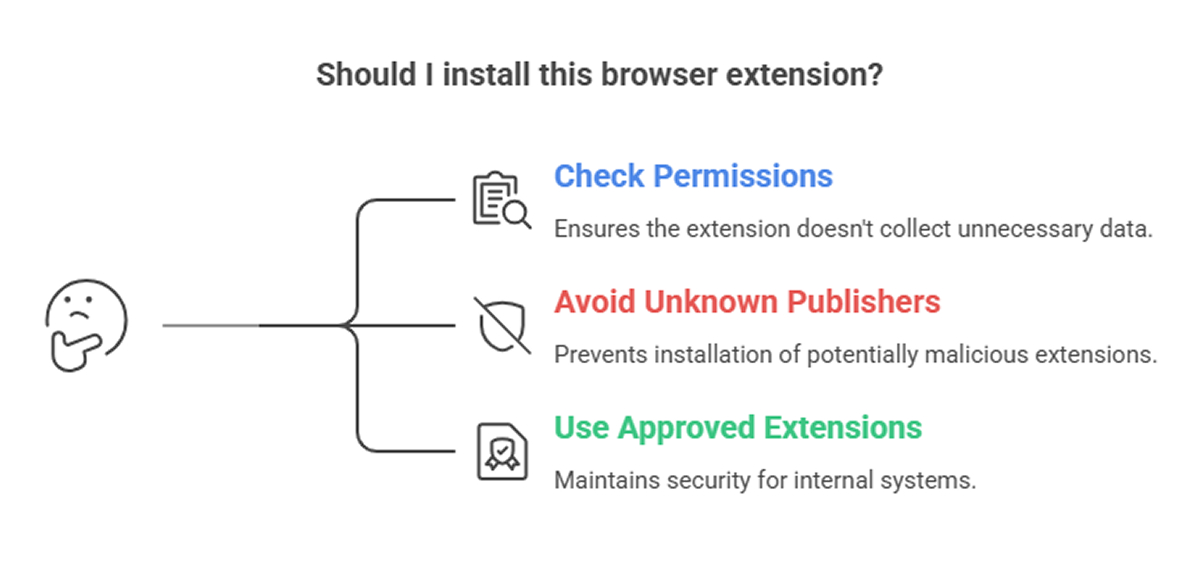
Steps to Perform a Chrome Extension Security Check
A lightweight review process is usually enough for most teams. Check who published the extension, what permissions it requests, whether it can read and modify data on visited websites, and whether the organization has already approved it. If the tool has access to internal apps, email, or documentation systems, the review should be stricter.
This belongs in the same conversation because browser add-ons often bypass the controls organizations expect from enterprise AI tools. A policy that ignores them leaves a fairly obvious gap.
Final Thoughts
A solid artificial intelligence acceptable use policy does not need to be clever. It must be clear, specific, and connected to actual work. If employees can understand it while writing code, reviewing documents, or using a browser assistant, it is more likely to be followed.
FAQ
1. What should an AI acceptable use policy include?
It should define approved tools, banned tools, data handling rules, review requirements, ownership, and enforcement. It should also explain which tasks AI can assist with and which ones need human sign-off. The strongest policies include real examples so employees can make quick decisions during normal work.
2. Who is responsible for enforcing an AI use policy in organizations?
Enforcement is usually shared. Security, legal, compliance, and engineering leadership define the rules and review tools. Managers apply those rules in team workflows. Employees are still responsible for following the policy and for escalating edge cases rather than guessing when the situation is unclear.
3. How does an AI policy reduce data security risks?
It reduces risk by limiting what employees can paste, upload, or connect to AI systems. It also narrows tool choice to approved platforms with known controls. This lowers the chance of exposing source code, credentials, customer data, or internal documents through routine use that might seem harmless at the moment.