
Most security incidents don’t end when access is gained; they end when the data leaves. That’s why data exfiltration is such a serious issue. The attacker might already be inside, using a valid account, and moving through normal systems before anyone notices. By the time the transfer becomes visible, the real questions aren’t whether something happened, but how much was taken, where it went, and if the path is still open.
What is Data Exfiltration?
Data exfiltration is the unauthorized movement of data from an internal system, cloud environment, endpoint, or application to a location outside approved control. That destination might be a personal cloud drive, external server, email inbox, removable device, or another environment that the attacker can access later.
A data exfiltration attack usually does not begin with the transfer itself. It normally starts with some earlier weakness, such as stolen credentials, malware on an endpoint, an exposed API, weak permissions, or misuse of a trusted internal account. Once access is established, the attacker identifies valuable records, stages them, and then tries to move them out without creating an obvious signal.
The key point is that attackers do not only want to read data. They want to exfiltrate it quietly. That changes how they operate. Files may be compressed, renamed, encrypted, split into smaller chunks, or sent through channels that look routine in a busy environment.
Common Data Exfiltration Techniques Used by Attackers
Some exfiltration methods are so simple that they get overlooked during design reviews. They rely less on clever malware and more on the misuse of ordinary business tools.
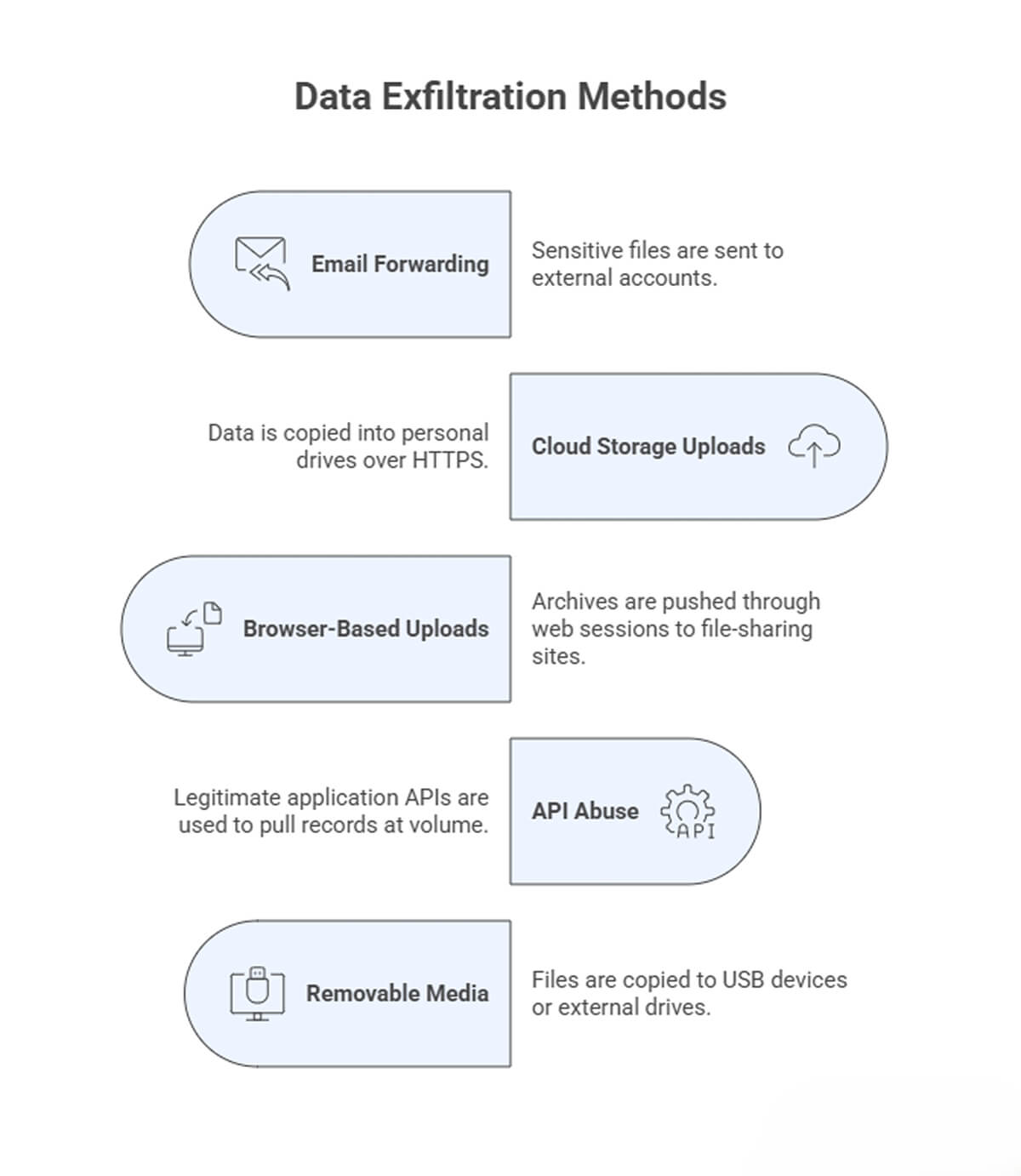
Those are some of the more direct routes security teams usually think about first. Attackers also use slower or less common paths when they want to stay unnoticed or work around tighter controls.
DNS tunneling is one example. It is not practical for moving large datasets, but it can still carry small amounts of high-value data in environments where DNS traffic gets little attention. Remote administration tools can also become transfer channels once an attacker controls the endpoint. In some incidents, the attacker first stages data on an internal host, then moves it out later through a different path to reduce the chance of detection.
Data Exfiltration Indicators Security Teams Should Monitor
Many exfiltration warning signs do not appear serious on their own. One archive file might be routine. One late-night login might have a valid reason. One connection to a new domain does not prove much. The problem usually shows up when a few of these things start happening around the same time.
That is why security teams need to look at patterns, not single events. A system sending out more data than usual, a user pulling large amounts of information after hours, and a series of small outbound transfers may all seem insignificant in isolation. Put together, they can point to someone moving data quietly through normal systems.
- Unusual outbound volume – More data leaving endpoints, servers, or cloud workloads than the typical backup, export, or sync activities.
- Unfamiliar destinations – Traffic heading to domains, IP addresses, or cloud services that the environment does not normally use.
- Unusual file handling – A machine that rarely prepares exports suddenly creating compressed, encrypted, or staged files.
- After-hours access – Accounts reading broad sets of data late at night, on weekends, or during holidays without a clear work-related reason.
- Privilege shifts – User or service accounts accessing far more data than their normal behavior would suggest.
- Repeated low-volume transfers – Small outbound sessions spread out over time so they are less likely to stand out.
- Mailbox or collaboration anomalies – Auto-forwarding rules, unusual attachment activity, or bulk downloads from shared platforms, especially when the attacker is relying on ordinary business tools rather than obvious malware.
How Data Exfiltration Attacks Impact Organizations
The extent of the damage depends on what was taken. Customer records and regulated data create one kind of problem. Source code, financial models, internal contracts, and product plans create another. In both cases, the immediate challenge is usually uncertainty.
Teams often know some data was moved before they know exactly which data was exposed. That slows the response. Engineering, security, legal, and operations teams all get pulled into the same incident, and normal delivery work starts to slip. At the same time, logs are reviewed, credentials are rotated, and access paths are locked down.
The impact usually shows up in a few areas:
- Operational disruption – Incident response work interrupts releases, support, and planned engineering tasks.
- Compliance and legal exposure – Exfiltrated data may trigger disclosure, reporting, or contractual obligations.
- Trust loss – Customers and partners may care more about the fact that protected data left the environment than about the technical root cause.
- Follow-on attacks – Stolen information often supports later phishing, fraud, or privilege escalation attempts.
- Competitive harm – Product designs, source code, pricing data, or negotiation records can be valuable long after the original incident.
One thing security teams learn quickly is that recovery is rarely just about blocking a single connection. If the attacker has already collected internal documentation, credentials, or relationship data between systems, the organization may face secondary risk for weeks after the initial containment step.
Data Exfiltration Prevention Strategies and Security Controls
Data exfiltration prevention works best as a layered effort. The goal is simple: make sensitive data harder to access, harder to collect, harder to move, and easier to detect.
Start with strong access control. Least privilege and data classification reduce unnecessary exposure and help teams focus on logging and monitoring where it matters most. On the outbound side, egress controls, DLP, and AI workspace security tools such as Pluto Security help teams see risky AI-driven workflows, understand where data is moving, and apply guardrails before sensitive information leaves via the wrong channel.
A practical approach usually includes:
- Least privilege and access reviews
- Data classification and targeted logging
- Egress filtering
- DLP for email, uploads, and transfers
- Endpoint controls for removable media and archive creation
- Scoped API tokens, rate limits, and audit logs
- Behavior monitoring for unusual download or admin activity
- Regular testing through realistic exfiltration scenarios
Final Thoughts
Data exfiltration is rarely conspicuous, which is a major part of the problem. It usually appears as normal traffic, normal tooling, and valid access used in the wrong way. Good defense depends less on one perfect blocker and more on a tighter system around the data itself. Limit unnecessary access, watch for small signals that line up into a pattern, and make it difficult for exfiltrated data to leave the environment without leaving traces.