

AI copilots are now sitting inside tools where employees already work. Email. Documents. Chat. Tickets. Internal knowledge bases. That makes them useful, but it also changes the security landscape of the environment.
Most copilot security risks do not begin with the model doing something magical. They begin with ordinary access problems that were already there. The copilot just makes those problems easier to trigger, search, summarize, and reuse.
How AI Copilots Access and Expose Sensitive Enterprise Data
An AI copilot usually combines a user prompt with data the user already has access to. In Microsoft 365, this can include emails, chats, documents, and other internal content. On paper, it still follows existing permissions.
The problem is that those permissions are often messy. A finance file may be shared too widely, old folders may still be visible to contractors, and a Teams channel may contain customer details, pricing notes, and legal comments together. Most of this goes unnoticed until the search becomes easier.
That is where AI Copilot data exposure differs from typical file oversharing. The data may not be breached, but a user can ask about a customer renewal, and the copilot may pull details from places they forgot they could access. For security teams, the real issue is what the organization has already allowed the copilot to see.
Permission Problems Become Easier to Exploit
Traditional access reviews often focus on assigned roles. AI copilots care about effective access. That includes group membership, inherited folder permissions, guest access, shared links, and app-level grants.
A few areas deserve closer review:
- Over-permissioned users: Employees with broad access can ask broader questions, and the copilot may return sensitive summaries from many systems.
- Stale group access: Old team groups often keep permissions long after the project ends.
- Guest and contractor access: External users may still have access to documents that later become available through AI-assisted search.
- Shared links: Broad or unmanaged links can quietly expand the data surface the copilot can reach.
This is why AI Copilot security work usually starts with boring controls. Clean permissions. Review groups. Classify sensitive content. Fix external sharing. None of this is exciting, but it matters.
Security Gaps Created by AI Copilot Integrations
Copilots rarely stay limited to one application. They connect to calendars, documents, CRM records, ticketing tools, code repositories, and internal data sources. Some integrations are native. Others are added later through agents, plugins, connectors, or workflow automation.
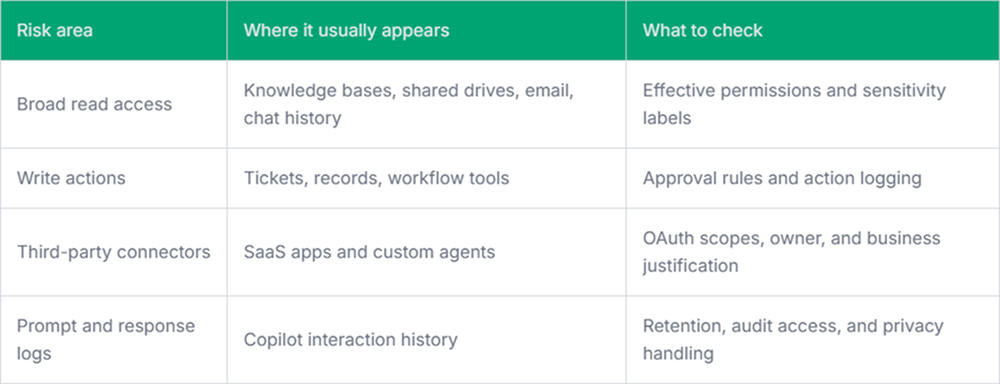
The risky part is not only the connector itself-it is the chain. A user asks a question in one interface, the copilot fetches context from another system, then a connected action updates a record somewhere else. Incident review becomes more difficult when logs are split across platforms. Microsoft Copilot security risks often show up here.
Prompt Injection and Context Poisoning
Prompt injection remains awkward for many teams because it does not appear to be a typical attack. There may be no malware, no stolen password, and no obvious exploit payload. A malicious instruction can sit inside a document, webpage, ticket, or shared file, waiting for the copilot to process it as context.
Defenses are not perfect. Teams should still reduce the blast radius. Treat untrusted content differently. Avoid giving AI workflows unnecessary write permissions. Log when external content influences internal answers. A copilot that can summarize a malicious document is one thing. A copilot that can summarize it and then update production records is a different problem.
Shadow AI and Unreviewed Copilots
Employees will not always wait for the approved tool to be available. They may use browser extensions, personal AI accounts, unofficial meeting assistants, or small internal copilots built by business teams. Some are harmless. Some quietly process regulated data outside approved controls.
This makes it harder to track copilot security risks because the official deployment is only part of the picture. A tool like Pluto Security fits here by giving security teams visibility into AI workspace activity, risk context, and guardrails for AI-driven workflows, rather than relying solely on policy and manual discovery.
Final Thoughts
AI copilots do not remove the need for normal security work. They make the weak spots easier to see, and sometimes easier to misuse.
The practical path is neither to block everything nor to trust everything. Start with access hygiene, connector review, logging, and clear ownership. AI copilot security becomes much easier when the underlying data estate is not already leaking through outdated permissions.