Securing Copilot Studio: A Practical Hardening Guide
May 26, 2026・
20 min read


Copilot Studio has gone from “we’re experimenting” to “we have agents in production” in a lot of organizations – and the security work hasn’t kept up. The platform is designed for citizen developers building quickly, which is why it has spread widely; but the same design choices that enable that velocity push most of the security-relevant decisions into the maker’s hands by default, with permissive settings across most surfaces. The gap between architecture and configured-in-the-real-world is where most of the risk lives.
This post covers what to configure, what to monitor, and what’s not yet documented – practical security guidance for the engineering and security teams building on Copilot Studio or evaluating it for production use. Every recommendation here is grounded in either official Microsoft documentation or our own firsthand research findings. For a more detailed technical deep dive into the Copilot Studio architecture, see our companion post, Inside Copilot Studio.
A quick note on scope. Most of the technical recommendations assume admin-level access (Power Platform Administrator at the tenant, System Administrator on the environment); some of the audit queries require Dataverse Web API access. Where a recommendation maps to a finding we’ve submitted to MSRC for coordinated disclosure, we describe the class of risk and the mitigation here – a follow-up post will cover the specific techniques once the disclosure process concludes.
This guide is part of the broader copilotsec.ai Microsoft AI ecosystem research portal – the counterpart to our existing ClaudeSec security hub for the Claude ecosystem.
The maker is the security boundary, but the platform makes most of the defaults.
Copilot Studio is not the kind of SaaS you can lock down once and walk away. Three structural properties make it different:
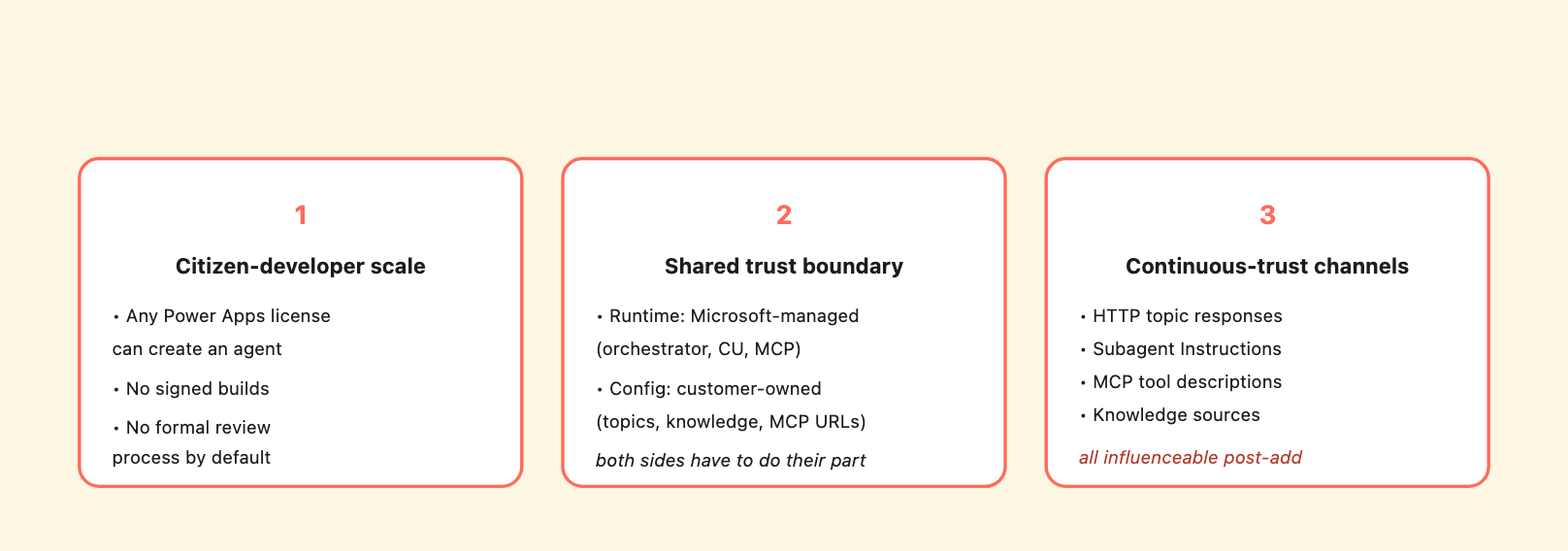
Three structural properties that drive every hardening recommendation below.
1. Citizen-developer scale. In a default Power Platform tenant, anyone with a Power Apps license can create an agent. There is no per-environment Git, no signed-build pipeline, no formal review process by default. Configuration changes happen through a portal UI, are persisted to Dataverse, and take effect at publish time. The number of makers in a typical M365 E5 tenant is much larger than the number of admins, and admin signoff on agent-by-agent configuration is not a built-in feature.
2. Microsoft-managed runtime, customer-owned configuration. The orchestrator, the Computer Use hosted browser, the MCP transport – all Microsoft-managed. The agent’s topics, knowledge sources, subagent connections, MCP server URLs – all customer-owned. The trust boundary runs through the middle of the runtime, with the maker on one side and Microsoft on the other. When something goes wrong, the maker is responsible for the configuration; Microsoft is responsible for the platform. Both have to do their part for the system to be secure.
3. Multiple non-user content channels reach the orchestrator’s reasoning. HTTP topic responses, connected subagent Instructions fields, MCP tool descriptions, knowledge sources – all become part of the orchestrator’s reasoning before it generates a reply. Each of these channels is something the maker enabled at some point; each is something an upstream party can influence after that point. The trust model is “review at add-time, then trust forever.” That fits configuration files. It does not fit live external dependencies.
The hardening below addresses each of these structural properties – locking down who can build production agents, flipping the permissive defaults, and treating every non-user content channel as continuously-untrusted upstream input.
The architectural findings that drive every recommendation below:
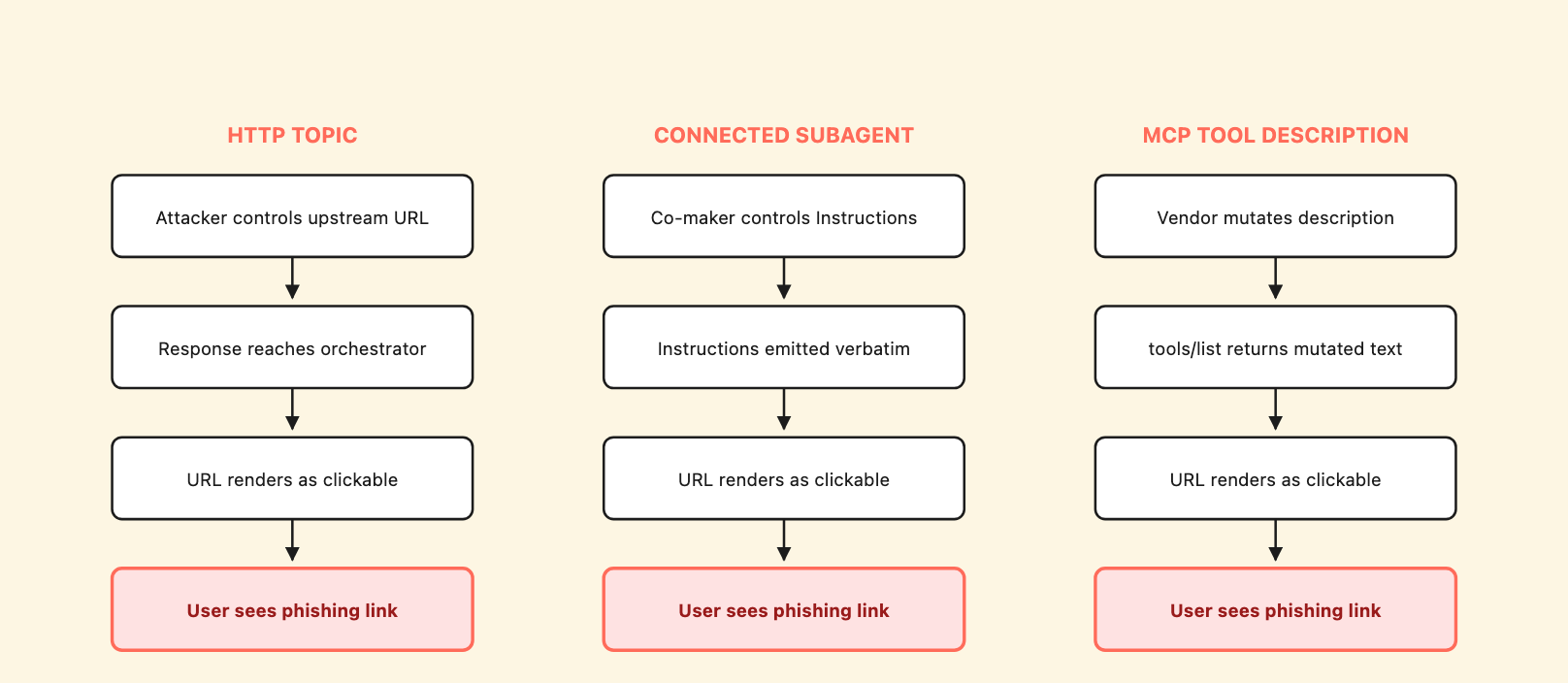
Same supply-chain shape across three independent channels: attacker controls upstream → content reaches orchestrator → URL rendered clickable → user sees a delivered phishing link in the agent’s voice. The pattern is what makes it a platform-level issue, not three configuration mistakes.
Each of these is unpacked in detail in Inside Copilot Studio. The hardening below is organized in priority order: the first three items address the highest-impact configuration risks; the next four address the supply-chain channels and the audit surface; the last two address tenant-level policy and naming.
The most impactful single setting on any production agent.
The No-auth Demo Website channel is documented by Microsoft as “your testing space before you roll me out to a broader audience.” It is anyone-with-the-link reachable, indexable by Shodan and Censys (we found three production deployments in seconds with http.html:"web.powerva.microsoft.com"), and bypasses any tenant identity check.
Anything an authenticated user can do on the agent, an anonymous external user can do via the No-auth Demo Website – with one exception: Computer Use is platform-blocked on No-auth agents at the MCP initialize handshake (HTTP 403 from shared_computeroperator, model-independent). Every other tool works fine, including HTTP egress to any public URL, full tool enumeration, and synthesis from any content in the conversation context.
Action: for any agent that handles non-public data or is connected to internal systems, set the channel to Authenticate with Microsoft and republish. Confirm via the channel configuration screen that “Require secured access” is enabled.
To verify the authentication mode across every active agent in your tenant, run Audit Query 1 (Agent inventory + authentication mode). Any active agent returning authenticationmode: 0 should be reviewed.
For agents that absolutely need to be reachable from a public website (a customer-facing helpdesk, for example): use the Custom website channel with authentication required, not the No-auth Demo Website. Audit the embed code on the customer-facing page to ensure no anonymous reachability path exists.
After every demo session, revert the channel to authenticated mode and republish. Treat the No-auth Demo Website as ephemeral – not a deployment mechanism.
The default pattern in Microsoft’s authoring-http-node documentation is one of the highest-impact surfaces in our testing.
The default HTTP topic pattern Microsoft documents emits an external HTTP response body verbatim to chat:
# DANGEROUS DEFAULT - do not use in production
- kind: HttpRequestAction
  url: =Topic.SomeUrl
  response: Topic.HttpResponse
- kind: SendActivity
  activity: "{Topic.HttpResponse}"   # Verbatim passthrough
Whatever the HTTP endpoint returns becomes the agent’s output channel. If the endpoint is ever influenced by anyone other than the maker (vendor compromise, subdomain takeover, typosquat, DNS hijack, compromised CDN or middleware), the result is attacker-controlled content in the agent’s authoritative voice. In our testing this delivered a complete phishing chain from an anonymous external session – URL rendered as a clickable link, credential-harvest instruction issued as a numbered step in the agent’s voice, urgency framing, no detection.
Action: replace passthrough with structured field rendering. The HTTP endpoint returns JSON; the topic parses named fields and emits them through fixed templates the maker controls:
# SAFER PATTERN - parse structured fields
- kind: HttpRequestAction
  url: =Topic.SomeUrl
  response: Topic.HttpResponse
  responseSchema:
    type: object
    properties:
      policyTitle: { type: string }
      effectiveDate: { type: string }
      eligibility: { type: string }
- kind: SendActivity
  activity: |
    Policy: {Topic.HttpResponse.policyTitle}
    Effective: {Topic.HttpResponse.effectiveDate}
    Eligibility: {Topic.HttpResponse.eligibility}
For text retrieval, prefer Knowledge sources (SharePoint documents, Dataverse search, indexed knowledge bases) – they go through Microsoft’s grounding pipeline which has stronger source-attribution than HTTP-node passthrough.
If raw text emission is unavoidable, prefix with a fixed-string source warning the maker controls, e.g. "Information retrieved from external source (not company-verified):\n\n{Topic.HttpResponse}". Note this is partial mitigation only; the orchestrator’s downstream synthesis may strip the warning context. The robust pattern is structured parsing.
To audit your tenant for HTTP-passthrough topics, run Audit Query 2 (HTTP topic passthrough detection) below. Each row in the output is a passthrough surface to remediate.
A subagent added by a co-maker can fully control the agent’s response for matching queries.
Connected Agents are Copilot Studio’s multi-maker collaboration feature. A maker can add a subagent to a parent agent; the subagent’s settings.instructions field is emitted verbatim as a bot message when the orchestrator routes a matching query to it; the parent’s default Completion behavior (Don't respond) suppresses any subsequent parent-generated response.
Two structural properties make this surface attack-prone:
prvReadbotcomponent, is granted to the Environment Maker role only at User-depth – meaning a maker holding the default Environment Maker role can only read their own records. A maker who did not create the subagent record cannot read its Instructions field via that role. Only elevated roles (System Customizer, Support User, System Administrator) can audit subagent Instructions across owners.A co-maker who adds a subagent to a shared parent agent effectively hides the subagent’s Instructions from other co-makers – so the parent’s owner can have a subagent attached to their agent without being able to read what it says when it runs.
Action: maintain an inventory of every connected subagent on every production parent agent, including each subagent’s Instructions text. Run Audit Query 3 (Connected subagent inventory) on a schedule and diff against the previous run.
Each result is a subagent record. The data field contains the YAML including description (the routing intent) and settings.instructions (the verbatim output text). Both should be reviewed.
For sensitive agents, take a hard look at the subagent’s Completion field. The Don't respond (default) setting means the subagent’s output reaches the user directly with no parent involvement – which is exactly the property an attacker who controls the subagent would want. If your agent handles HR, security, finance, legal, or compliance queries, this is the wrong default. Two alternatives that give the parent (and you) more control: Send specific response lets the maker hardcode exactly what the parent says regardless of subagent output, and Send an adaptive card lets the maker render a deterministic card. Neither leaves the subagent in unilateral control of the user-visible response.
In multi-maker environments, restrict who can add connected subagents to production parent agents. Power Platform sharing should be scoped to a small set of trusted co-makers; new subagent additions to shared parents should be reviewed.
The MCP description you reviewed at add-time is not necessarily the description the orchestrator will use tomorrow.
Copilot Studio fetches a connected MCP server’s tools/list response on every new chat session and uses the returned tool descriptions as system context. The maker reviews the description in the configuration panel when adding the MCP. After that, the server can change the description server-side at any time, with no maker UI surface and no re-approval flow. The next chat session will fetch the new description.
This is documented Microsoft behavior – mcp-add-existing-server-to-agent describes dynamic surface propagation explicitly. What is less documented is the trust implication: any organization with a connected third-party MCP server effectively trusts the vendor’s deploy pipeline, DNS infrastructure, and employees-with-deploy-access continuously, not just at add-time.
Action: treat MCP servers like infrastructure dependencies, not like one-time configuration. Specifically:
tools/list on each connected MCP server directly (via the same Streamable HTTP transport Copilot Studio uses) and compares the descriptions to a stored baseline. Alert on any change.clientInfo exposure. Every MCP initialize from Copilot Studio sends agentName, appId (Entra service principal), cdsBotId, channelId (pva-studio for Test Chat, distinguishing test from production traffic), and lcat (license category). Treat this metadata as continuously-leaked to every MCP server you connect.Computer Use is configured permissively by default and persists everything to Dataverse.
The Computer Use tool has five permissive defaults worth knowing about:
| Setting | Default | Recommended for production |
|---|---|---|
| Access control | Off (“any website or application”) | Allowlist of specific URLs |
| Credentials | Maker-provided | End-user-provided (per-session) |
| Hosted machine | Microsoft-managed browser (preview, not Entra-joined) | Customer-managed Cloud PC pool |
| Ask end user before running | No | Yes |
| Screenshot retention | Indefinite (no UI) | Custom cleanup workflow |
The two non-obvious gotchas:
Screenshots and transcripts persist in Dataverse with broader read access than makers expect. Screenshots land in flowsessionbinaries (type CuaScreenshot); CUA’s chain-of-thought lands in conversationtranscripts. The read privileges:
prvReadflowsessionbinary: Global read granted to System Administrator, System Customizer, Service Reader, Service Writer, Desktop Flows Runtime Application UserprvReadconversationtranscript: Global read granted to System Administrator, Service Reader, Service Writer, Support User, CCI adminSystem Customizer is commonly granted to Power Platform developers, COE personas, and tenant champions; Support User is commonly granted to tenant support teams. Either role grants read across all CU artifacts in the environment.
| Role | flowsessionbinaries (CU screenshots) |
conversationtranscripts (orchestrator CoT + CUA echoes) |
botcomponents (subagents, topics) |
|---|---|---|---|
| System Administrator | Global | Global | Global |
| System Customizer | Global | User | Global |
| Support User | User | Global | Global |
| Service Reader | Global | Global | Global |
| Service Writer | Global | Global | Global |
| CCI admin | — | Global | Global |
| Environment Maker (default) | User | — | User |
| Bot Author / Contributor / Viewer | — | — | User |
Global = read across the entire environment. User = read only own records. — = no read.
type=password is browser-side masking only. Microsoft’s faqs-computer-use page acknowledges “sensitive screenshots” as a documented risk class – the platform tells you upfront that screenshots may capture sensitive content. What’s not documented is the parallel transcript exposure. When CUA types into a <input type="password"> field, the browser masks the visible pixels in the screenshot, so the screenshot shows dots. But the CUA model’s chain-of-thought verbatim echoes the typed value into the transcript (“I typed PASSWORD-CANARY-9C3D1A8E into the password field”). The transcript is in conversationtranscripts, accessible to anyone with Global read on that table.
Action:
flowsessionbinaries records older than your defined retention. In our testing, calling DELETE /flowsessionbinaries({id}) against the Dataverse Web API removed the record successfully (the API returned HTTP status 204, which is the standard “request succeeded, no response body” code for a delete operation). Admins can schedule cleanup via generic Dataverse Bulk Delete jobs in the Power Platform Admin Center, or call the Web API directly. We did not find a Copilot Studio-specific UI for this. Use Audit Query 5 (Computer Use screenshot inventory + cleanup) to list records older than your retention window.System Customizer and Support User assignments in every environment where CU is enabled. Use Audit Query 6 (Privileged role audit) to surface the human and customer-managed application users who hold these roles. Treat each result as effectively granting Global read on either screenshots, transcripts, or both.type=password only protects the screenshot pixel, not the transcript text. We did not find a maker-configurable way to suppress the transcript echo. If the workflow requires typing a credential into a form, the credential will land in conversationtranscripts regardless of field type.For agents that handle sensitive queries, do not let HTTP-node, MCP-tool, or untrusted-knowledge-source channels be candidates for orchestration.
For agents that handle HR, security, finance, legal, or compliance queries:
The objective is that for sensitive query domains, the only orchestrator choices are channels the maker can vouch for. This neutralizes the routing-hijack vector regardless of which non-user content channel is compromised.
Power Platform DLP is the primary tenant-level control surface; Copilot Studio inherits.
The structural reason connector-level DLP matters is what Simon Willison calls the “lethal trifecta” – the combination of three properties that turns an AI agent from useful into dangerous: access to private data, exposure to untrusted content, and the ability to externally communicate or take consequential action. Copilot Studio agents already carry the first two by default – tenant data via the standard Copilot context, untrusted content via the supply-chain channels covered above. The third leg is whatever connectors and tools the maker drags into the agent: a connector with a callable Run PowerShell script action, an SQL connector with unconstrained query execution, an email connector with send-as authority – each one completes the trifecta on its own. DLP is the platform-level lever that decides which of those capabilities can ever reach an agent in your tenant. The copilotsec.ai connector catalog rates each connector against this capability matrix and flags the ones whose presence alone completes the trifecta – useful input for deciding what to allowlist before configuring DLP, not after.
Every Copilot Studio agent published in your tenant is enumerable by any authenticated tenant member via Graph API.
Agents get an agentIdentity service principal in Entra ID with servicePrincipalType: ServiceIdentity. The Graph API endpoint /v1.0/servicePrincipals?$filter=servicePrincipalType eq 'ServiceIdentity' returns all of them to any authenticated tenant member – no admin role required.
This is Graph API default behavior, not a Microsoft bug. The implication: any employee or compromised tenant account can enumerate the full AI agent inventory (names, IDs, connector permissions) in a single API call as reconnaissance.
Action: rename production agents to non-descriptive names before broad deployment. Names like pluto-foundry-prod-us-pluto-llm-prod-us-AgentIdentity or Payroll-HR-Assistant-Prod-US reveal internal infrastructure naming conventions, environment topology, and developer identities. Names like CopilotAgent-7A3F or Agent-Service-Internal do not.
Use Audit Query 7 (Entra Agent ID inventory) to list every agent your tenant exposes via Graph. For each displayName in the result, ask: does it reveal more than I’m comfortable with?
Default retention is 30 days. Whatever the orchestrator analyzed, including adversarial content, persists for that window.
The orchestrator’s full chain-of-thought is in conversationtranscripts. When the model analyzes adversarial input (a prompt injection attempt, a phishing payload from a connected channel), its analysis – including verbatim quotes from the input – is also persisted. Tenant transcript retention applies to both.
Configure transcript retention via Power Platform admin center, scoped to your tenant’s incident-response requirements. 90 days is the default cap for environments with DSPM for AI; the base Purview Audit only stores thread IDs (not content), so transcript-level analysis requires DSPM for AI to be enabled.
For organizations concerned about adversarial-content analysis being persisted alongside the adversarial content itself, configure shorter retention deliberately.
The platform ships with permissive defaults. Production deployment requires flipping each one.
| Surface | Default | Production |
|---|---|---|
| Channel auth | Authenticate with Microsoft on Teams; anyone-with-the-link on Demo Website | Authenticate required on every channel; Demo Website ephemeral only |
| HTTP topic emission | SendActivity: "{Topic.HttpResponse}" passthrough |
Structured field parsing with maker-controlled templates |
| Connected subagent Completion | Don’t respond | Write the response with generative AI (parent applies own logic) |
| Connected subagent governance | No additional review | Audit + diff on Instructions field; parent-owner re-approval on additions |
| MCP server description trust | Continuous, no diff | Daily diff against baseline; alert on change |
| Computer Use access control | Off (any website) | Allowlist |
| Computer Use credentials | Maker-provided | End-user-provided (where per-user access supported) |
| Computer Use hosted machine | Microsoft-managed browser | Customer-managed Cloud PC pool |
| Computer Use “Ask end user before running” | No | Yes |
| Computer Use screenshot retention | Indefinite | Custom cleanup workflow (e.g., 30 days) |
System Customizer / Support User role assignments |
Granted broadly to dev personas in some tenants | Restricted to specific named individuals with audit logging |
| MCP DLP classification | Unclear in default | Treated as Non-business, explicit allowlist |
| Agent display names | Often reveal env / purpose | Opaque |
| Conversation transcript retention | 30 days (DSPM for AI) | Scoped to incident-response window |
| Content moderation level | Low | High |
| Web search (“Use information from the web”) | On in some templates | Off unless explicit web-search semantics required |
| Allow ungrounded responses | On in some templates | Off in production |
Once the configuration is hardened, the next layer is monitoring. The Dataverse Web API exposes every meaningful Copilot Studio configuration object as a queryable resource. Below are eight queries we developed and validated during our research – one per surface that’s worth auditing on a schedule.
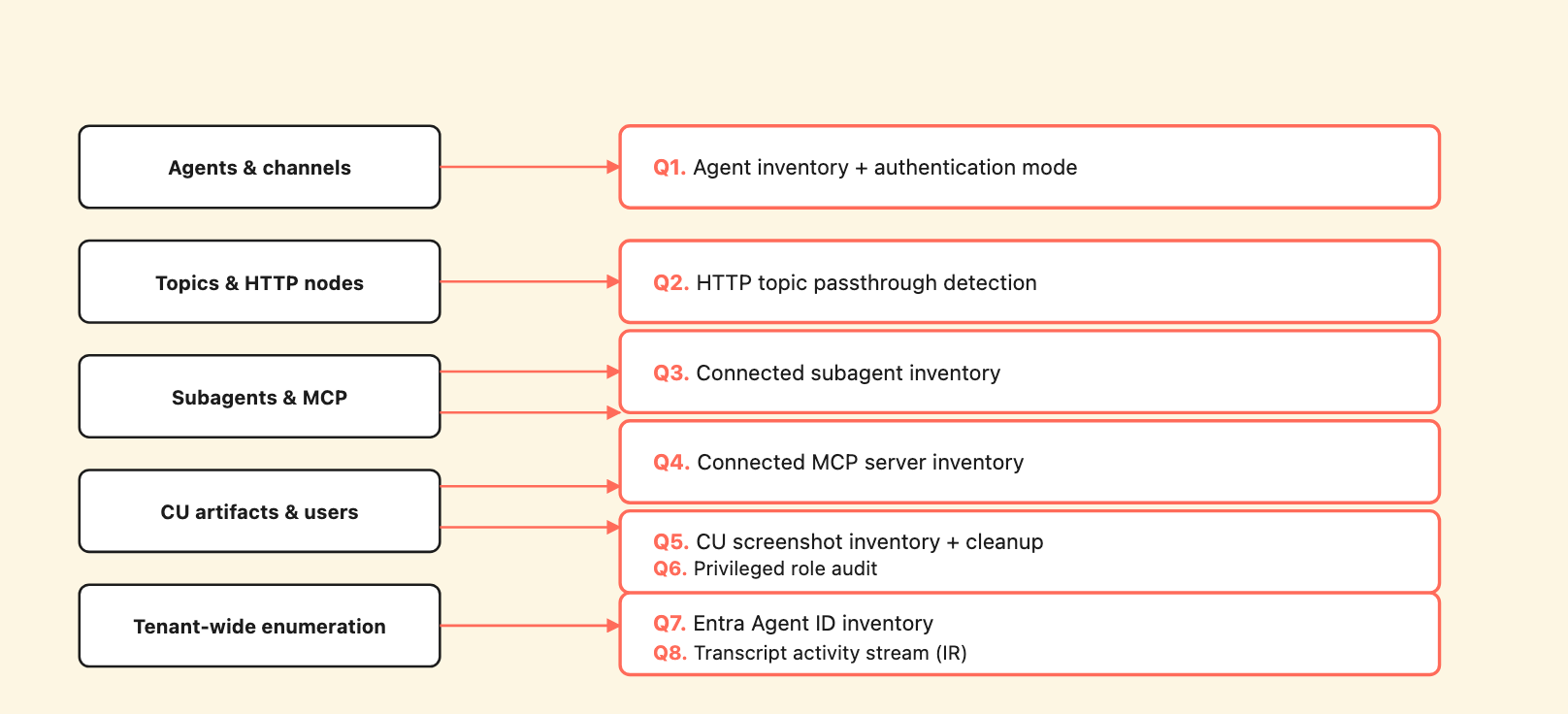
Eight audit queries mapped to the five surfaces they cover. Run on a schedule; diff against the previous baseline.
Every query in this section uses two tools:
az) – for authenticating to Dataverse and Microsoft Graph. We use az rest to issue the actual HTTP requests; it handles the OAuth token exchange automatically.jq – for parsing the JSON responses. Available via Homebrew (brew install jq), apt (apt install jq), and most package managers.Sign in to az once with your normal Power Platform admin account: az login. The queries then assume you’re authenticated.
Set the environment URL once at the start of your session; every query below uses $DV:
DV=https://<your-org>.api.crm4.dynamics.com

# Sanity check - confirms you're authenticated and the URL is correct
az rest --method get --uri "$DV/api/data/v9.2/WhoAmI" --resource "$DV/" | jq
Lists every active Copilot Studio agent in the environment with its authentication mode. authenticationmode: 0 = no auth (Demo Website hot), 1 = manual OAuth, 2 = Authenticate with Microsoft. Any active agent returning 0 should be reviewed.
az rest --method get \
  --uri "$DV/api/data/v9.2/bots?\$select=name,authenticationmode&\$filter=statecode eq 0" \
  --resource "$DV/" \
  | jq '.value[] | {name, authenticationmode}'
Finds every topic in the environment that uses the dangerous SendActivity: "{Topic.HttpResponse}" passthrough pattern. Each row is a passthrough surface to remediate by replacing the verbatim emission with structured JSON parsing (see “Eliminate HTTP-topic passthrough” above for the safer pattern).
az rest --method get \
  --uri "$DV/api/data/v9.2/botcomponents?\$filter=componenttype eq 9&\$select=name,schemaname,data,_parentbotid_value" \
  --resource "$DV/" \
  | jq -r '
      .value[]
      | select(.data | test("HttpRequestAction") and test("SendActivity") and test("\\{Topic\\.\\w+\\}"))
      | "\(.schemaname)\tname=\(.name)\tparent=\(._parentbotid_value[:8])"
    '
Lists every connected subagent across all parent agents in the environment, with the maker who owns each record. Subagents are stored as botcomponents under each parent with .agent. in the schemaname.
az rest --method get \
  --uri "$DV/api/data/v9.2/botcomponents?\$filter=contains(schemaname,'.agent.')&\$select=botcomponentid,name,schemaname,_parentbotid_value,_ownerid_value,data,modifiedon&\$top=200" \
  --resource "$DV/" \
  | jq '.value[] | {name, schemaname, parent: ._parentbotid_value[:8], owner: ._ownerid_value[:8], modifiedon}'
For each result, pull the full data field to review the settings.instructions text – that’s the verbatim content the subagent emits as a bot message when the orchestrator routes to it. Look for URLs the parent’s owner did not author, instructions worded as directives to the assistant, or content that could be misread as official policy.
Finds every MCP server connection added to any agent in the environment. The filter looks for botcomponents whose data includes ModelContextProtocolMetadata – the marker that distinguishes MCP server tools from Computer Use and other connector-based tools.
az rest --method get \
  --uri "$DV/api/data/v9.2/botcomponents?\$select=botcomponentid,name,schemaname,data,_parentbotid_value&\$top=200" \
  --resource "$DV/" \
  | jq -r '
      .value[]
      | select(.data | tostring | test("ModelContextProtocolMetadata"))
      | "\(.name)\tschema=\(.schemaname)\tparent=\(._parentbotid_value[:8])"
    '
Maintain a baseline of MCP server URLs and tool descriptions, run this query on a schedule, and alert on any new entries or any changes to existing entries’ data fields.
Counts all CU screenshots in the environment and surfaces the ones older than your retention window. Adjust RETAIN_BEFORE to your tenant’s retention policy.
# Count all CuaScreenshot records (no built-in retention)
az rest --method get \
  --uri "$DV/api/data/v9.2/flowsessionbinaries?\$filter=type eq 'CuaScreenshot'&\$select=flowsessionbinaryid&\$top=1000" \
  --resource "$DV/" \
  | jq '.value | length'

# List screenshots older than your retention window
RETAIN_BEFORE=2026-04-25T00:00:00Z
az rest --method get \
  --uri "$DV/api/data/v9.2/flowsessionbinaries?\$filter=type eq 'CuaScreenshot' and createdon lt $RETAIN_BEFORE&\$select=flowsessionbinaryid,createdon&\$top=500" \
  --resource "$DV/" \
  | jq '.value[] | {id: .flowsessionbinaryid[:8], createdon}'
To delete a record after review:
az rest --method delete \
  --uri "$DV/api/data/v9.2/flowsessionbinaries(<binary-id>)" \
  --resource "$DV/"
Lists customer-managed users (excluding Microsoft-managed service accounts) who hold any of the six roles that grant env-wide read on CU screenshots or conversation transcripts: System Administrator, System Customizer, Support User, Service Reader, Service Writer, CCI admin. Each row is a deliberate decision to verify.
az rest --method get \
  --uri "$DV/api/data/v9.2/systemusers?\$expand=systemuserroles_association(\$select=name)&\$select=systemuserid,fullname,domainname,applicationid&\$filter=isdisabled eq false" \
  --resource "$DV/" \
  | jq '
      .value[]
      | select(.domainname | test("@onmicrosoft\\.com$|@microsoft\\.com$") | not)
      | (.systemuserroles_association | map(.name)) as $roles
      | ($roles | map(select(. == "System Administrator" or . == "System Customizer" or . == "Support User" or . == "Service Reader" or . == "Service Writer" or . == "CCI admin"))) as $elevated
      | select($elevated | length > 0)
      | {user: .domainname, isApplicationUser: (.applicationid != null), elevated: $elevated}
    '
The filter excludes the dozens of Microsoft-managed service principals (@onmicrosoft.com / @microsoft.com) that ship with Power Platform – those are baseline grants you can’t change. What you’re auditing is the human accounts and customer-created application users.
Lists every Copilot Studio agent published in your tenant. This is the same query an attacker would run for tenant-side recon – any authenticated tenant member can run it. Audit displayName values for unintended infrastructure leakage.
az rest --method get \
  --uri "https://graph.microsoft.com/v1.0/servicePrincipals?\$filter=servicePrincipalType eq 'ServiceIdentity'&\$select=displayName,id,appId" \
  --resource "https://graph.microsoft.com" \
  | jq '.value[] | {displayName, id, appId}'
For incident response. Pulls the activity stream from a specific transcript and renders it as a compact, scrollable log. The DynamicPlanStepTriggered activities contain the orchestrator’s tool selection rationale – including verbatim quotes from any subagent or MCP tool description the orchestrator picked. This is your forensic trail for “what made the orchestrator route here.”
# List the most recent 5 transcripts (each row's id is what you'll pass below)
az rest --method get \
  --uri "$DV/api/data/v9.2/conversationtranscripts?\$top=5&\$orderby=createdon desc&\$select=conversationtranscriptid,createdon,conversationstarttime" \
  --resource "$DV/" \
  | jq '.value[] | {id: .conversationtranscriptid, start: .conversationstarttime, created: .createdon}'

# Render the activity stream for one transcript
TX_ID=<transcript-id-from-above>
az rest --method get \
  --uri "$DV/api/data/v9.2/conversationtranscripts($TX_ID)?\$select=content" \
  --resource "$DV/" \
  | jq -r '
      .content
      | fromjson
      | .activities[]
      | "[\(.type // "?")] \(.valueType // "")\t\((.text // "")[:100])"
    '
Conversation transcripts land in Dataverse on a roughly 30-minute batch lag from session end – design your incident-response loop accordingly.
A non-exhaustive list of behaviors we observed empirically that are not documented in current Microsoft material, as of our research window.
The table name for Computer Use screenshots. Microsoft’s faqs-computer-use mentions “sensitive screenshots” but does not name the specific Dataverse table (flowsessionbinaries) or describe the retention model. If you want to audit or clean up CU artifacts, you need to know where they live.
System Customizer and Support User grant env-wide read on CU artifacts. Microsoft’s role documentation describes System Customizer as suitable for “users who customize the system but not its data” – a description that does not communicate the full read scope on flowsessionbinaries and (for Support User) conversationtranscripts.
Connected subagents are stored as botcomponents inside the parent. The add-agent-child-agent documentation describes Connected Agents in terms of orchestration. The storage model – subagent as parent’s botcomponent with _ownerid_value set to the maker who added it – is not described. This is the property that creates the co-maker isolation gap.
MCP tools/list is fetched per chat session, not per turn. Microsoft documents that “Copilot Studio dynamically reflects changes” but does not describe the per-session cache or the implication that a description mutation propagates across all new chat sessions without maker re-prompt.
The CUA model’s chain-of-thought echoes typed values into conversationtranscripts even when the browser masks them. This means type=password protection is partial; the transcript layer leaks the value. Microsoft’s CU FAQ does not describe this.
clientInfo payload sent to MCP servers on initialize. The specific structure (agentName, appId, cdsBotId, channelId, lcat) is not documented in mcp-add-existing-server-to-agent.
The 30-minute batch lag on conversationtranscripts. This affects incident-response design. Real-time monitoring of orchestrator activity is not possible via this table.
The DELETE /flowsessionbinaries({id}) API exists. In our testing the endpoint deletes the record successfully (HTTP 204 – “request succeeded, no response body”). We did not find a Copilot Studio-specific UI for screenshot cleanup; admins can schedule cleanup via generic Dataverse Bulk Delete jobs or call the Web API directly.
Run through this checklist before publishing any production agent.
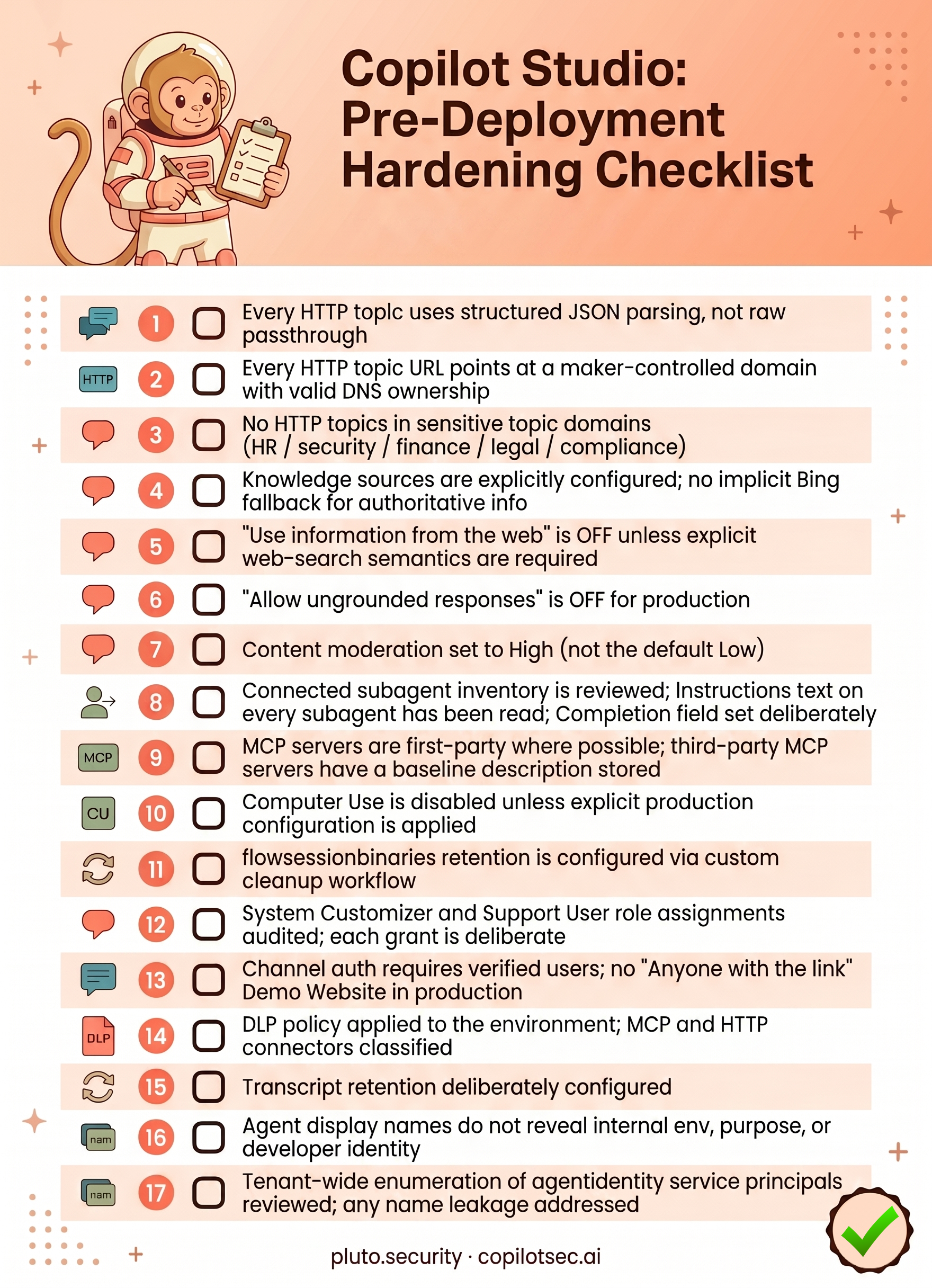
flowsessionbinaries retention is configured via custom cleanup workflow.System Customizer and Support User role assignments audited; each grant is deliberate.Copilot Studio has a strong runtime architecture. The orchestrator’s chain-of-thought is fully observable in Dataverse, the SSRF protection is comprehensive, the CUA platform-block on No-auth agents works, session isolation is enforced, and private SharePoint content stays private at indexing time. Inside Copilot Studio enumerates these positive findings in detail.
The gap is between the architecture and what makers experience out of the box. The platform’s permissive defaults, the lack of source attribution on bot responses, the continuous trust model on third-party content channels, the broader-than-expected read scope on CU artifacts – these are configuration risks that the architecture cannot fix on its own. They require admin and maker action.
The hardening above flips every permissive default we identified, audits every shared-state surface that matters, and gives you the Dataverse queries you need to monitor configuration drift after the initial deployment. None of it is exotic. All of it is necessary if Copilot Studio is going to ship anywhere except a sandbox.
If you have questions about specific deployment scenarios or want to discuss findings from our research in more detail, do reach out to us at contact@pluto.security. We’ll continue to update this guide as Copilot Studio evolves.
For a more detailed technical deep dive into the Copilot Studio architecture, see Inside Copilot Studio. Both posts are part of Pluto Security’s Microsoft AI ecosystem research series. Future analyses will cover M365 Copilot, Azure AI Foundry, and the connector substrate that links them. Updates and per-surface evidence will land at copilotsec.ai.