
Security tools have always been good at finding problems. Fixing them is the slower part. A scanner can report an injection issue, a vulnerable package, or an unsafe configuration in a few seconds. The finding then lands in a ticket, someone has to understand it, and a developer has to make a change without breaking the application. That is where the real work starts.
AI vulnerability remediation tries to reduce that gap. Not by replacing developers, but by turning security findings into fixes that are easier to understand, review, and apply.
What is AI Vulnerability Remediation?
AI vulnerability remediation is the use of AI-assisted tooling to help identify, explain, prioritize, and fix security weaknesses in code, dependencies, containers, or cloud workloads. The useful part is not just the detection. Most teams already have enough alerts. The value comes when the tool can move from “this is vulnerable” to “this is the likely fix, and here is why.”
In code, this may mean suggesting a safer API call, replacing unsafe string handling, adding validation, or updating a dependency to a newer version. In infrastructure, it may mean correcting an overly broad IAM policy or changing a container-based image. The fix still needs review. That part should not be skipped.
How AI Accelerates and Improves Remediation
Traditional vulnerability remediation often fails due to poor handoffs. Security reports a finding. Developers receive a ticket with a CVE, a severity score, and maybe a file path. Sometimes that is enough. Often it is not.
AI can help by doing the first layer of investigation before the developer opens the issue. It can summarize the risk, map the finding to the affected code, suggest a patch, and explain the tradeoff in plain language. That saves time, especially for repetitive issues.
A practical remediation flow usually looks like this:
- Finding context: The tool connects the alert to the affected file, package, container image, or runtime path.
- Fix recommendation: It suggests a change that aligns with the codebase rather than offering generic advice.
- Developer review: A developer checks correctness, tests the change, and looks for side effects.
- Pipeline validation: Tests, scans, and policy checks confirm that the fix did not introduce any new problems.
This is where automated remediation is useful, but only when it is bounded. A dependency patch in a low-risk service may be safe to open as an automated pull request. A change to authentication logic should move more slowly. Nobody wants an AI-generated fix quietly changing how authorization works on a Friday afternoon.
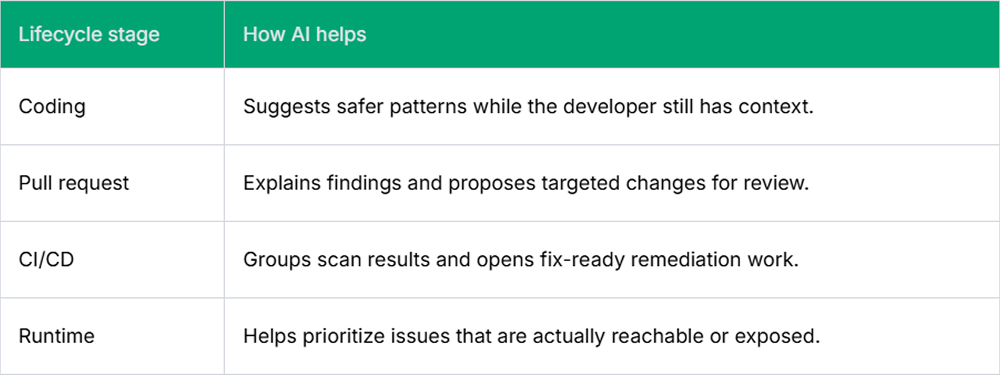
AI Remediation Across the Development Lifecycle
AI remediation is more useful when it appears where developers already work. If the tool appears only in a separate security dashboard, it can still become another queue that people forget to check.
During development, AI can flag unsafe patterns before they are merged into code. For example, AI code remediation can flag direct SQL string construction and suggest parameterized queries inside the pull request, while the developer still has the code fresh in mind.
In CI/CD, AI can turn scan results into actionable changes rather than failing a build due to vague findings. It can group related issues, suggest a smaller set of fixes, and generate remediation pull requests for developers to approve or reject.
In production, runtime context helps teams decide what to fix first. Not every vulnerable package is used, and not every critical CVE is on an exposed path, so this context is useful when the backlog is too large to clear in a single sprint.
Limitations and Considerations When Using AI for Remediation
AI remediation can be wrong in boring ways. It may suggest a package version that conflicts with another dependency. It may fix the vulnerable line but overlook the surrounding behavior. It may remove a warning while leaving the real risk in place.
That is why teams should treat AI-generated fixes like any other code change. Review it. Test it. Check the diff. Assess the blast radius. A clean-looking patch can still break an edge case that only appears in production traffic.
There is also the question of trust and control. Security teams may like fast remediation, but developers are the ones who live with the code after the fix lands. A tool like Pluto Security can help by providing teams with visibility, risk context, and guardrails for AI-driven workflows, so AI-generated fixes do not become another untracked path.
Conclusion
AI vulnerability remediation is not a magic fix for AppSec backlogs. It is a way to remove some of the slow, repetitive work between detection and repair.
Used carefully, it helps developers understand security issues faster and helps security teams move beyond alert reporting. The best results come when AI supports the existing engineering workflow, not when it tries to replace it.
FAQs
1. How does AI-assisted remediation handle false positives?
AI-assisted remediation is most effective when it checks the finding against the surrounding code. Is the package actually used? Is the path reachable? Is the issue tied to real data flow? Those checks can cut down noise, but someone still needs the option to mark a finding as invalid.
2. Can AI remediation tools integrate with existing CI/CD pipelines?
Yes, and that is usually where they make sense. The tool can read scanner output, comment on a failed build, or open a pull request with a suggested fix. I would still start with recommendations first. Let the team see the quality before allowing low-risk fixes to move faster.
3. How do security and development teams share responsibility in AI-driven remediation workflows?
Security teams set the rules: what matters, what blocks a release, and what needs review. Developers handle the actual code change because they understand the side effects. AI helps bridge those two points by turning a finding into something easier to review, test, and either accept or reject.