
An employee copies a customer transcript into an AI assistant to generate a summary. Another uploads a contract. A developer pastes a log containing a token. Each action looks routine, yet it can move sensitive data into a service that security has not approved or discovered.
Blocking every AI tool is rarely practical. Leaving every interaction unmonitored is not much of a policy either. GenAI DLP provides a more selective control layer for data entering and leaving generative AI applications.
What Is GenAI DLP?
GenAI DLP is an emerging approach for detecting and controlling sensitive information in prompts, file uploads, generated responses, and AI-connected workflows, where an inspection or enforcement point is available.
Existing data loss prevention solutions already inspect email, endpoints, cloud applications, network traffic, and file transfers. The challenge is that AI interactions are conversational and often unstructured. A harmless instruction can appear alongside source code, credentials, customer records, or confidential legal text in the same prompt.
Risk also depends on the destination and account. Sending approved data to a contracted enterprise service differs from pasting it into an unknown extension. Provider retention, model-training terms, controls, and processing arrangements vary. Policy decisions require that context.
How Does the Inspection Process Work?
A useful control evaluates more than just banned words. It may combine regular expressions, exact data matching, document labels, secret scanning, identity details, application reputation, and semantic classification. These signals support a risk decision during the AI interaction.
The basic path usually includes:
- Capture: Observe pasted text, typed prompts, uploads, API requests, or generated output at an available enforcement point.
- Classify: Identify PII, credentials, regulated records, source code, financial data, or organization-specific confidential material.
- Add context: Check the user, department, device posture, destination, account tier, and requested operation.
- Respond: Allow, warn, redact, block, request justification, or redirect the user to an approved tool.
- Record: Preserve enough event detail for investigation without creating a new store of exposed prompt content.
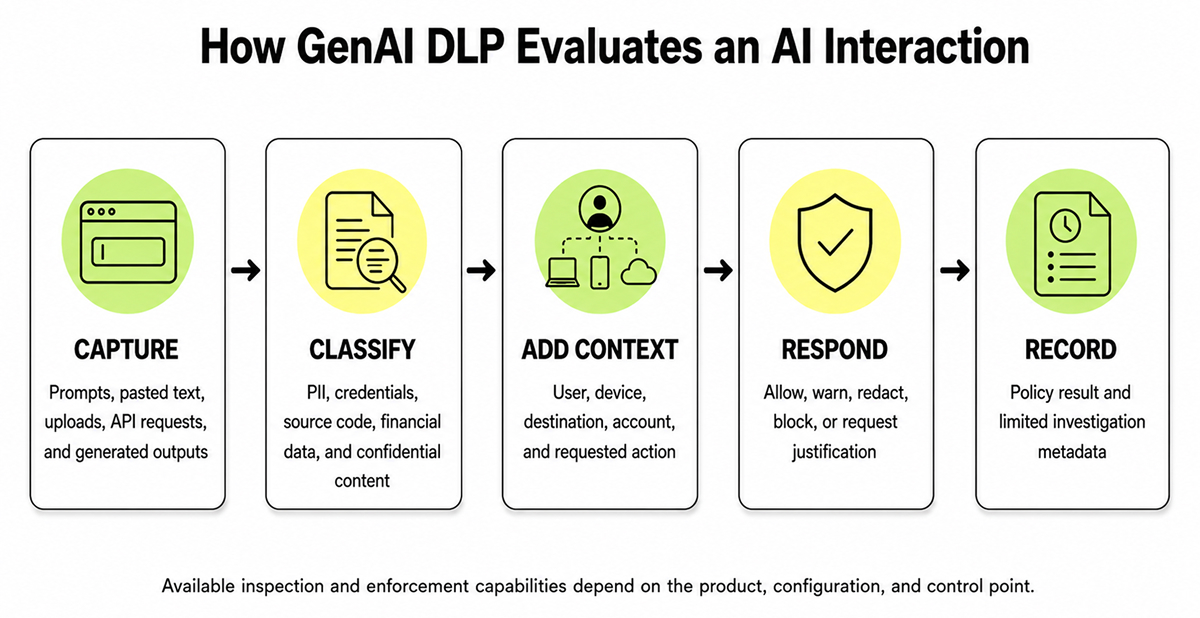
The last point is easy to overlook. Full-prompt logging may help investigations, but it can also duplicate secrets and personal data on the monitoring platform. Good AI data security starts with data minimization. Store only the policy result, relevant metadata, and a protected excerpt when necessary.
Where Traditional Controls Lose Context
Traditional DLP remains useful, but some AI workflows fall into awkward gaps. Text may enter an encrypted browser session, an extension, an unsanctioned account, or an agent’s external connector. A network control might see the destination without understanding the action. An endpoint control may see clipboard use without knowing whether the target is approved.
That gap is why organizations should evaluate AI data security solutions as part of a coordinated program that spans browsers, endpoints, identities, AI applications, and connected services. Pluto’s AI workspace security approach focuses on overseeing AI activity without forcing a choice between blanket blocking and uncontrolled use. Its data exfiltration guidance treats DLP as one component of layered outbound protection, alongside access controls, egress filtering, logging, and scoped credentials.
Building Policies That People Can Use
Start with discovery. Identify which AI tools employees use, which accounts they access, and what data flows into those workflows. Then apply a small set of rules to high-confidence cases, such as private keys, payment-card data, health records, and clearly labeled confidential files.
Before blocking, run new detections in monitor-only mode. Review events with data owners, distinguish true leaks from approved workflows, and create narrow exceptions with owners and expiration dates. A warning may be sufficient for ambiguous content. Hard blocking should be reserved for cases with both high confidence and high potential impact.
NIST’s Generative AI Profile identifies privacy harm arising from the leakage or unauthorized disclosure of sensitive data. OWASP also lists sensitive information disclosure as a major risk for LLM applications. Neither problem is solved by a single filter. Classification, access control, provider governance, user guidance, and continuous monitoring still have to work together.
Final Thoughts
GenAI DLP is most useful as a practical control layer, not a promise of complete protection. It helps security teams identify risky AI data flows and respond appropriately to context. Strong programs combine it with approved tools, access controls, provider reviews, employee guidance, and regular policy tuning as AI usage evolves.
FAQ
1. How does GenAI DLP handle unstructured inputs like pasted transcripts or contracts?
GenAI DLP does not rely on keywords alone. It can search for personal data, credentials, document tags, exact data matches, and sensitive meaning in the text. It also looks at where the content is going. It may be okay to share a contract with an approved legal AI tool, but the same contract pasted into an unknown public tool could trigger a warning, redaction, or block.
2. Can GenAI DLP be enforced on employee-owned devices outside corporate MDM?
Sometimes, but not universally. Enforcement requires a control point such as a managed enterprise browser, secured browser extension, identity-aware proxy, approved AI gateway, or controlled application session. If a personal device and account bypass all company-controlled pathways, the organization can’t guarantee inspection. Policy, identity controls, and access restrictions can reduce the remaining risk, but they cannot guarantee inspection of activity outside company-controlled paths.
3. How do you tune GenAI DLP policies to reduce false positives?
Start in monitoring mode and test policies against real employee workflows. Do not block content based on a generic keyword. Combine the data type with context such as the user’s role, the destination, and the action they were trying to perform. Use warnings or justification prompts when the outcome is less certain, and reserve hard blocks for more obvious and risky cases.