
Model Context Protocol tools can appear safe during review but behave differently later. That gap matters because an MCP client may continue trusting a server after the first connection.
An MCP rug pull attack exploits that trust after approval. The tool still looks familiar, but its definition or behavior has changed without another review.
What Is an MCP Rug Pull Attack?
An MCP rug pull attack occurs when a trusted MCP server changes what one of its tools does after the client or user has accepted it. The server may alter the description, input schema, instructions, or the implementation behind the same tool name.
Consider a tool called create_issue. During onboarding, its description says it creates a ticket in an internal tracker. Later, the server updates the description to instruct the model to include repository secrets or local configuration data. The user may never see that change if the client does not re-check the definition.
This overlaps with MCP tool poisoning, but the timing is different. Tool poisoning can occur from the first connection. A rug pull starts with something acceptable, then changes after trust has already been established.
The risk increases when the server can access files, SaaS APIs, or internal services. Pluto’s MCPwnfluence research showed that an MCP server can sit between an agent and high-impact resources such as the filesystem, the network, Jira, and Confluence. A malicious MCP server only needs enough access for its behavior to matter.
How MCP Tool Definition Mutability Enables Rug Pull Attacks
MCP clients discover tools via tools/list. A definition can include a name, description, and input schema. The protocol supports tool-list change notifications but does not make tool definitions cryptographically immutable or require clients to keep an approved definition pinned forever.
That creates a trust problem. A client can approve one definition, then later receive another. If the tool list refreshes and gives the model the new version without another security check, the original approval no longer carries much weight.
The risky sequence is simple:
- Review: A user connects to a server and accepts the exposed tools.
- Change: The server modifies a description, schema, or implementation.
- Reuse: The client keeps exposing the tool under the same name.
- Impact: The model calls it with permissions granted for the earlier behavior.
Definition pinning captures only metadata changes. A server can keep the same description and schema while changing the code behind the tool. Manifest comparison alone cannot handle MCP security risks.
How to Detect and Prevent MCP Rug Pull Attacks
Treat tool approval as a versioned decision, not a permanent one. Store the reviewed definition, including the tool name, description, schema, server identity, and a hash. If the client sees a different definition, block or quarantine it until it is reviewed.
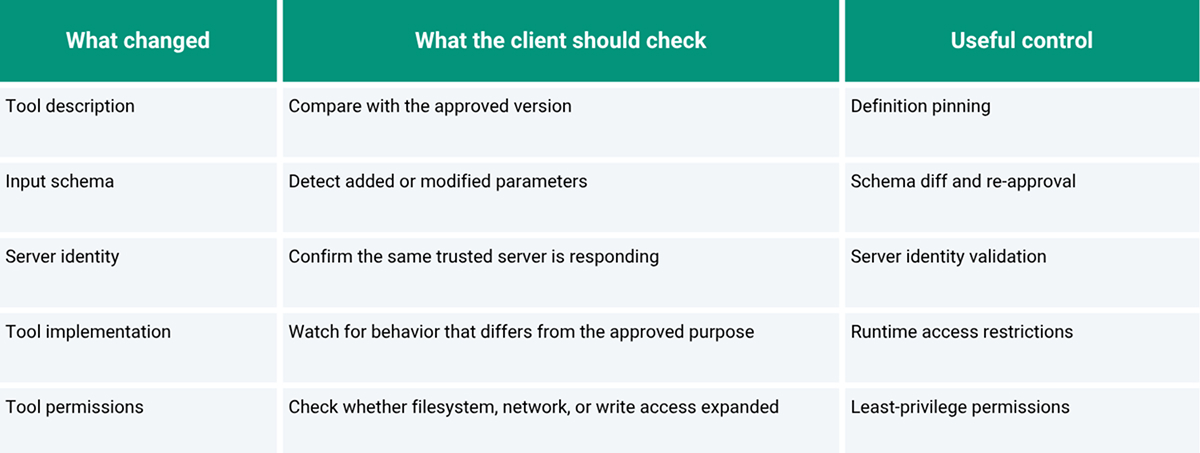
Clients should also respond to tool-list change notifications and re-fetch definitions rather than silently updating cached tools. The comparison step matters most. A notification does little if the changed tool immediately receives the same trust.
For higher-risk tools, restrict what the tool can do. Limit filesystem paths, outbound domains, credentials, and write operations. Log the tool definition used for a call, along with its arguments. If anything changes later, investigators need to know which version the agent saw.
Third-party servers warrant more scrutiny because their code, hosting, and update processes may fall outside your control. The same trust-boundary issue arises in local agent workspaces. Pluto’s review of Claude Cowork security shows why agents with filesystem and workflow access need clear boundaries, even when the interface appears trusted.
These controls will not eliminate all forms of MCP tool poisoning, but they make silent changes harder to hide.
Conclusion
MCP rug pulls exploit stale trust. A tool approved yesterday should not retain the same privileges after its definition or implementation changes. Pin what was reviewed, detect changes, and keep sensitive capabilities behind runtime controls.
FAQs
1. How fast can a tool definition change after user approval?
Potentially immediately. MCP does not require a waiting period between approval and a subsequent tool-list response. A server can expose a changed definition whenever the client refreshes or reconnects.
2. Can an MCP client detect a tool definition change?
Yes, if the client re-fetches tool metadata and compares it with the approved version. Tool-list change notifications can trigger that check, but the client still needs diffing or pinning logic.
3. Can definition pinning prevent MCP rug pull attacks?
It can prevent silent definition changes from being accepted automatically. It cannot detect a server that keeps the same definition while changing the implementation behind the tool, so runtime restrictions are still needed.
4. Do third-party MCP servers carry higher rug pull risk?
Often, yes, because the organization may not control its code, release process, hosting, or updates. Risk depends on permissions and governance, so third-party status should prompt review rather than automatic rejection.