Securing Claude Cowork: What Security Teams Actually Need to Know
Apr 16, 2026・
13 min read

Claude Cowork is Anthropic’s autonomous desktop agent. Unlike a chatbot that responds to prompts, Cowork takes a goal, then independently reads files, writes code, browses the web, and executes tasks on your machine to deliver a finished result. For knowledge workers, it’s a productivity leap. For security teams, it’s a fundamentally different threat surface than anything you’ve governed before.
We recently conducted an in-depth technical analysis of Cowork’s architecture – examining its VM sandbox, network stack, browser integration, and logging mechanisms from the inside. This guide distills what we learned into practical security guidance for teams evaluating or deploying Cowork in their organization.
This isn’t a theoretical framework. Every recommendation here is grounded in either official Anthropic documentation or our own firsthand research findings.
Before diving into controls and configurations, it’s worth understanding what makes Cowork genuinely different from a security perspective. This isn’t about hype – it’s about threat modeling accurately.
It executes, not just generates. Traditional AI assistants produce text. Cowork produces outcomes. It runs code in a local VM, manipulates files on your system, and interacts with applications on your behalf. The security implications shift from “what data did the user paste into a chatbot” to “what actions is an autonomous agent performing on our infrastructure.”
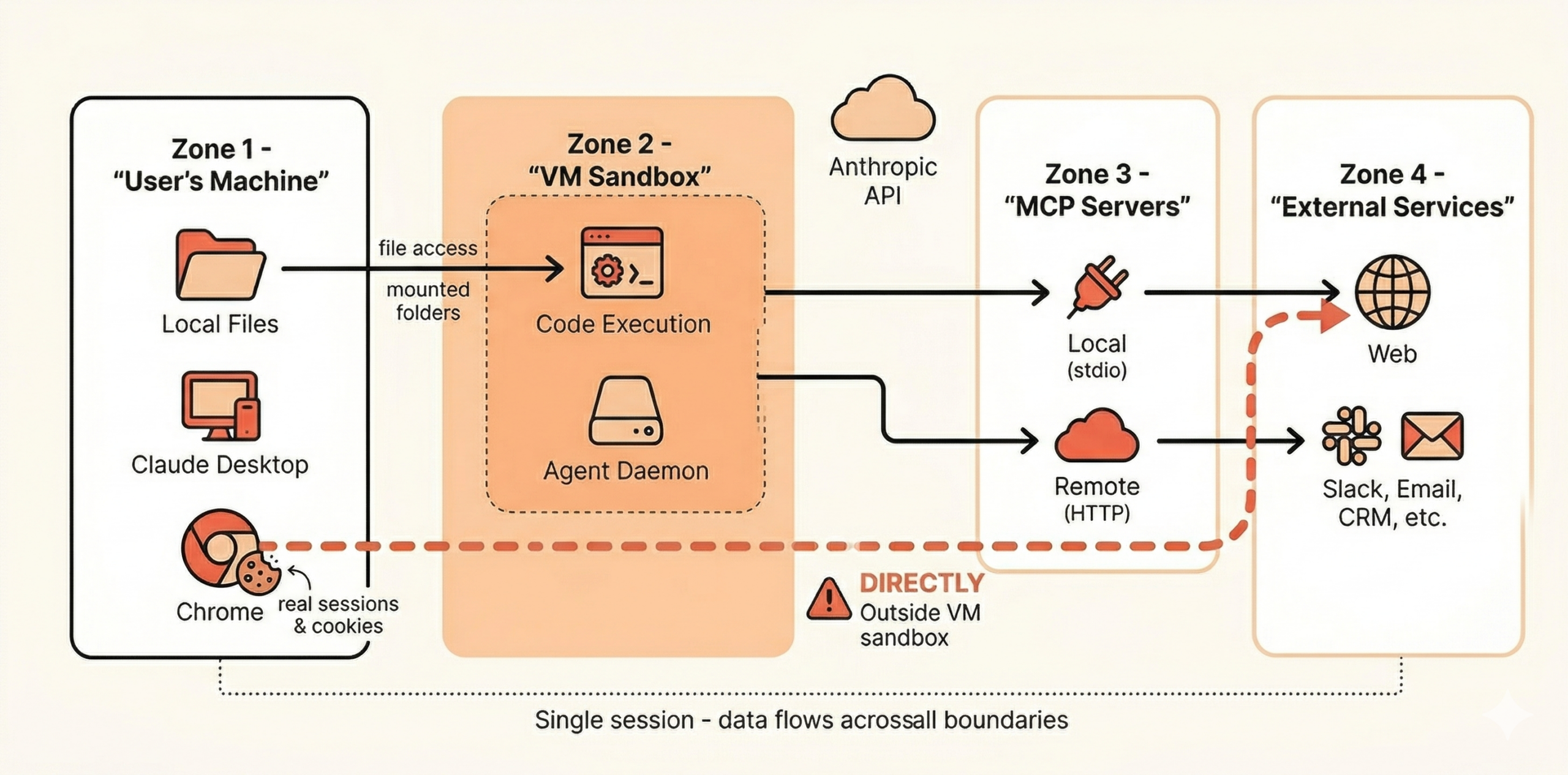
It bridges multiple trust boundaries in a single session. In a typical Cowork session, data can flow from a local spreadsheet, through a browser session authenticated with the user’s cookies, into an MCP-connected service, and back – all without per-step approval. Each of those transitions crosses a trust boundary that your existing controls likely treat as separate.
It operates with the user’s full context. Cowork’s large context window means it holds substantial amounts of information within a single session. If sensitive data enters the session – intentionally or not – it remains accessible for every subsequent action the agent takes. There’s no per-action memory isolation.
It can run unattended. Scheduled tasks execute while the desktop app is open, but the user may not be actively watching. An agent operating without real-time human oversight is a qualitatively different risk from one that requires a human to press “send” for each interaction.
Our research into Cowork’s internals revealed several architectural decisions that directly inform how you should think about securing it. We’ll keep this focused on what matters for practitioners – for the full technical deep-dive, see our detailed analysis.
Cowork executes code inside an isolated virtual machine running Ubuntu 22.04. This is genuinely good security design – the VM itself is the trust boundary, and it effectively contains code execution from reaching the host system.
However, inside that VM, the security posture is deliberately permissive. The agent daemon runs as root, and conventional hardening measures (like restrictive firewall rules) are relaxed within the VM. This is an intentional architectural choice – Anthropic treats the VM boundary as the security perimeter rather than relying on defense-in-depth within it.
What this means for you: The sandbox is solid for its intended purpose – preventing Cowork from escaping to your host system. But don’t assume that anything happening inside the VM has granular security controls. Files shared with Cowork via mounted folders are fully accessible to the agent within that environment.
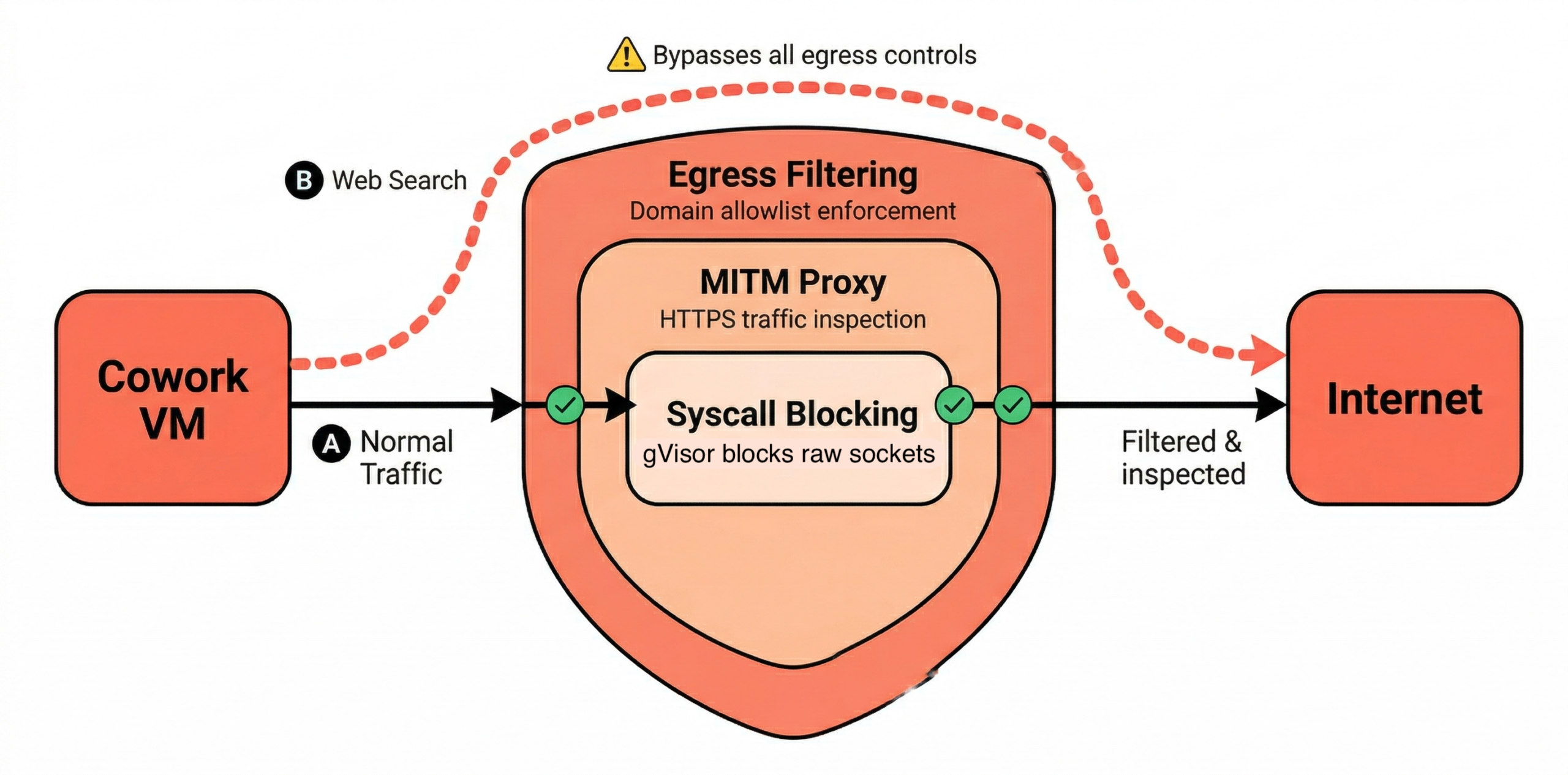
Cowork’s network security uses a multi-layered approach: syscall-level blocking, a MITM proxy for traffic inspection, and host-side egress filtering. On Enterprise and Team plans, outbound traffic is restricted to a small set of hardcoded domains (api.anthropic.com, pypi.org, github.com, npmjs.org, and a few others), with admins controlling the allowlist.
This is well-designed, with one important caveat: web search bypasses network egress controls entirely. This is documented by Anthropic, but easy to miss. If your security model depends on controlling what data leaves the Cowork environment via network restrictions, web search creates a gap. Admins can disable web search in Organization settings, and we recommend doing so unless it’s explicitly required for approved workflows.
This is the finding from our research that has the most direct security implications. Claude’s Chrome integration – the feature that lets Cowork interact with web pages using the user’s browser – operates outside the VM sandbox. It runs through actual Chrome with real cookies and active sessions.
This is an architectural choice that makes sense from a functionality perspective. Users want the agent to interact with their authenticated web applications. But it means that when Cowork browses the web, it’s not contained by the same VM boundary that protects code execution. It’s operating in the user’s actual browser context, with access to their real sessions.
What this means for you: Browser automation is arguably Cowork’s highest-risk capability. Any web page Claude visits can attempt prompt injection, and successful injection occurs in a context that has access to the user’s authenticated sessions. We’ll cover specific mitigation steps below.
Our research found that Cowork generates detailed audit logs (audit.jsonl) containing complete tool interaction transcripts, including bash commands, file operations, and browser actions. Two things stood out:
main.log) survive on disk. This is relevant both for incident response (useful) and for data retention compliance (potentially problematic).What this means for you: For incident response, these local logs are a valuable forensic resource that many teams may not know exists. For data governance, the persistence and permissiveness of these files means your endpoint security posture matters – full-disk encryption is a baseline requirement for any machine running Cowork.
This deserves its own section because it’s the single most consequential limitation for enterprise deployments.
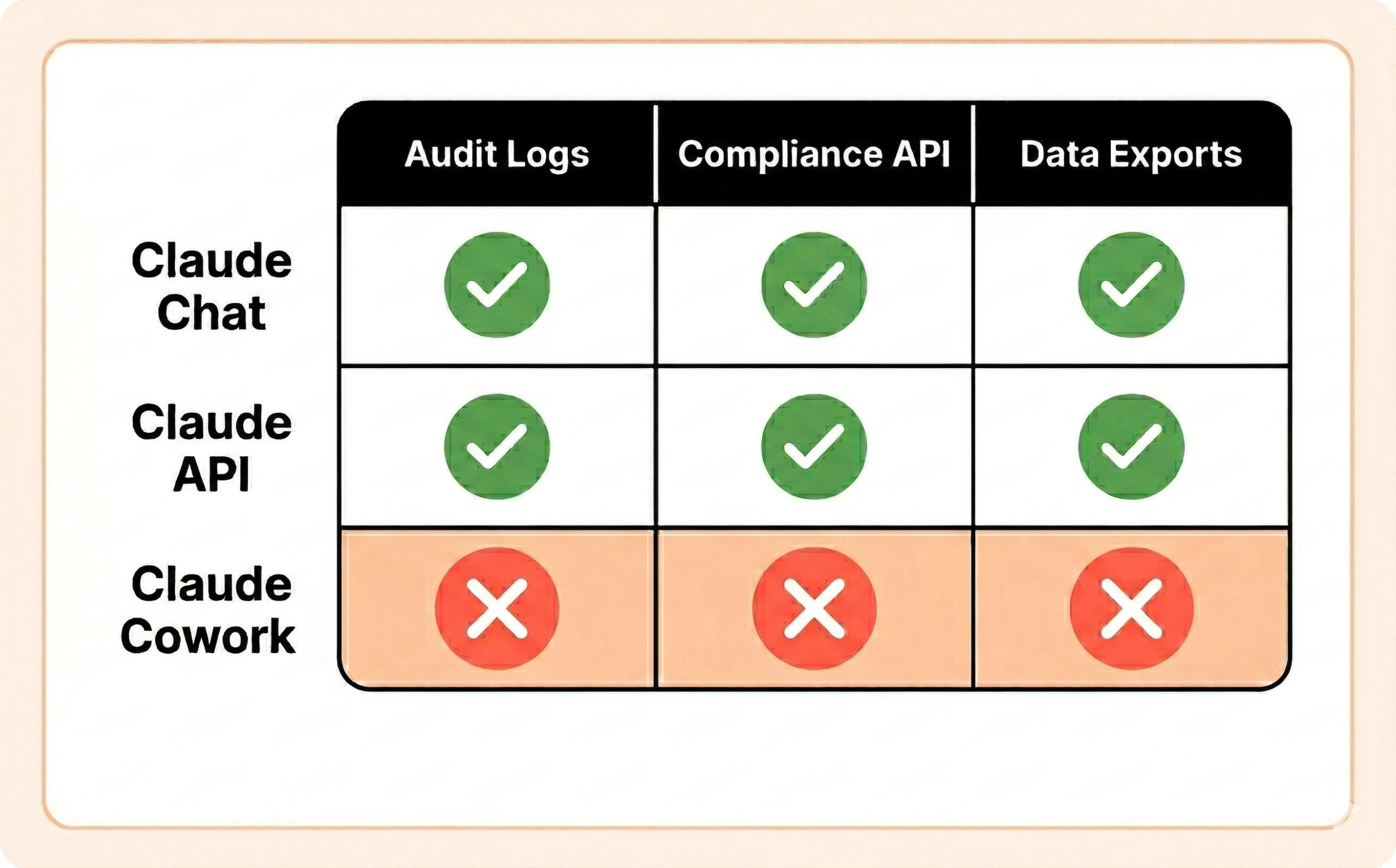
Cowork activity is not captured in Anthropic’s Audit Logs, Compliance API, or Data Exports. This is explicitly stated in the official documentation and applies across all plan tiers – Enterprise included.
Let that sink in. Your organization may have invested heavily in Anthropic’s enterprise compliance tooling for Claude Chat and API usage. None of that coverage extends to Cowork. There is currently no way to close this gap through configuration alone.
This doesn’t mean you’re flying completely blind. The local audit logs we described above provide forensic data, and there are monitoring approaches that can give you partial visibility. But if your organization requires a compliance-grade audit trail for regulatory purposes (SOX, HIPAA, PCI-DSS, SOC 2), Cowork should not be used for those workloads until Anthropic closes this gap.
For non-regulated workloads, we recommend building compensating controls:
audit.jsonl files. They contain rich session data that can inform both security and compliance reviews.With the architectural context covered, here’s what we recommend. We’ve organized this by priority – start at the top and work down.
This sounds obvious, but the defaults vary by plan tier in ways that matter:
On both Enterprise and Team plans, if you haven’t explicitly reviewed these settings, your users may already have access. If you’re not ready to deploy Cowork, explicitly disable it in Admin Settings > Capabilities. Don’t assume “we haven’t rolled it out” means “nobody is using it.”
Based on our analysis, browser automation is the highest-risk capability. It combines the largest prompt injection attack surface (the open web) with the most sensitive context (the user’s authenticated browser sessions), and operates outside the VM sandbox.
Our recommendation: disable Chrome integration unless you have a specific, justified use case. If you do need it:
MCP servers are the integration layer that gives Cowork access to external services. Each server or plugin you add expands the agent’s capability surface. Real-world supply chain attacks against this layer have already been demonstrated – CVE-2025-59536 (CVSS 8.7) allowed remote code execution through malicious hooks in project settings files that bypassed the trust dialog when opening a cloned repository, and CVE-2026-21852 (CVSS 5.3) enabled API key exfiltration by overriding the API base URL in project settings to redirect traffic to an attacker-controlled server. Our own research team at Pluto has also identified and disclosed multiple high and critical severity CVEs in popular MCP servers. These include CVE-2026-27825, an arbitrary file write vulnerability in a Confluence MCP server where an unconstrained download path could be exploited to achieve arbitrary code execution, and CVE-2026-33032, where an unauthenticated MCP endpoint allowed remote Nginx takeover. The MCP ecosystem is young, and supply chain risks are real and actively exploited.
Admin-level controls:
managed-mcp.json through your MDM solution so users can’t override it.When evaluating individual MCP servers, we recommend applying the same rules we use in our Claude Code hardening bundle:
stdio) servers over remote (url) servers. A local server is a process you control on the machine. A remote server is a third-party endpoint you’re trusting not to return malicious content – including prompt injection payloads embedded in tool results./ or the user’s home directory. Limit to the specific project directory the task requires.run_shell_command tool gives Claude – and any injected prompt – shell access. Understand exactly what capabilities you’re granting.Cowork can only access files in folders you explicitly share with it. This is a good default – but it only works if users exercise discipline.
Scheduled tasks are where autonomy risk compounds. A task running on a schedule operates without real-time human oversight, and if that task involves browser automation or external integrations, a prompt injection could potentially persist across multiple executions.
Cowork supports global instructions that apply to all sessions via Settings > Cowork > Global Instructions. These aren’t a security boundary – they’re system-level prompts, and like all prompt-based controls, they can potentially be overridden through injection. But they do raise the bar, and they establish organizational norms.
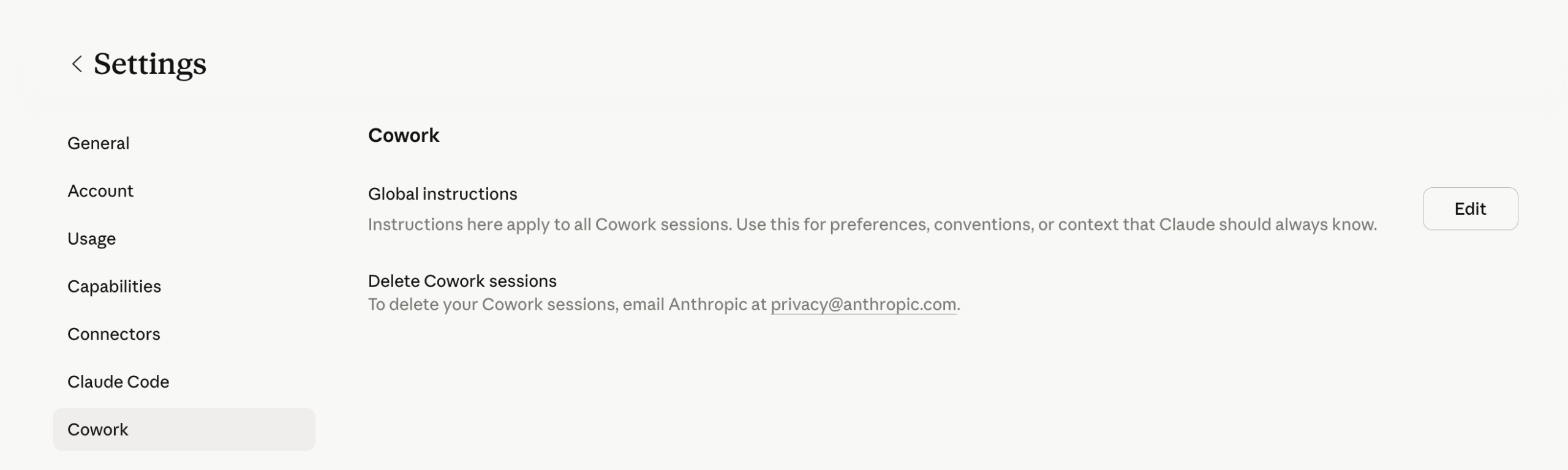
We maintain a battle-tested set of defensive instructions for Claude Code, and the key principles translate directly to Cowork. Here’s a starting point you can copy into your global instructions:
These are not foolproof – no prompt-based defense is. Treat them as one layer in a defense-in-depth approach, not as a primary control. But in our experience hardening Claude Code deployments, well-crafted instructions meaningfully reduce the success rate of casual prompt injection attempts.
This is a major gap that’s easy to overlook. Without tenant restrictions, a user on your corporate network can simply switch to a personal Claude account where Cowork, Chrome, and all plugins are fully enabled with zero admin oversight – effectively bypassing every organizational control you’ve configured. Every toggle you’ve carefully set, every blocklist you’ve curated, every plugin you’ve restricted – none of it applies when someone logs into their personal account on the same machine.
On Enterprise plans, Anthropic supports tenant restrictions to close this gap. Here’s how it works: your network proxy injects an anthropic-allowed-org-ids HTTP header into all HTTPS requests to claude.ai, claude.com, api.anthropic.com, and anthropic.com. When this header is present, Claude will only allow authentication with accounts belonging to your organization – attempts to switch to a personal account are blocked with a tenant_restriction_violation error.
To set this up:
anthropic-allowed-org-ids: <your-org-uuid>The prerequisite is a proxy capable of TLS inspection – which most enterprises already have deployed. If you have the infrastructure, this is straightforward to implement and we consider it a must-have for any Enterprise Cowork deployment.
On Team and Pro/Max plans, tenant restrictions are not available. This is a significant control gap. Compensating options include blocking claude.ai at the proxy level entirely (heavy-handed but effective), using Chrome enterprise policies via GPO or MDM to prevent the Claude browser extension from being installed on managed browsers, or relying on endpoint-level monitoring to detect personal account usage.
Prompt injection – where malicious instructions hidden in documents, web pages, or external data sources hijack the agent’s behavior – is the most discussed risk in agentic AI, and for good reason.
Our research confirmed that Anthropic has invested significant effort into hardening prompt injection defenses. The architecture includes multiple layers: reinforcement learning training for instruction recognition, content classifiers that scan untrusted inputs, and action review systems that evaluate proposed actions before execution. These are real, substantive mitigations.
However, we strongly recommend that organizations do not treat these defenses as a security boundary. Prompt injection is a fundamentally unsolved problem in large language models. Defenses can and do reduce the success rate significantly, but no current approach can guarantee 100% prevention. Your security posture should assume that prompt injection will occasionally succeed and focus on limiting what a successful injection can accomplish.
This is exactly why the controls above matter. Tight file scoping limits what data an injection can access. Disabled browser automation removes the most dangerous execution context. Restricted MCP servers limit what actions are available. Read-only connectors ensure that even a successful injection can’t write to external systems. Each control reduces the blast radius of the attacks that get through.
Your Anthropic plan tier fundamentally determines what security controls are available to you. This table covers the most security-relevant differences:
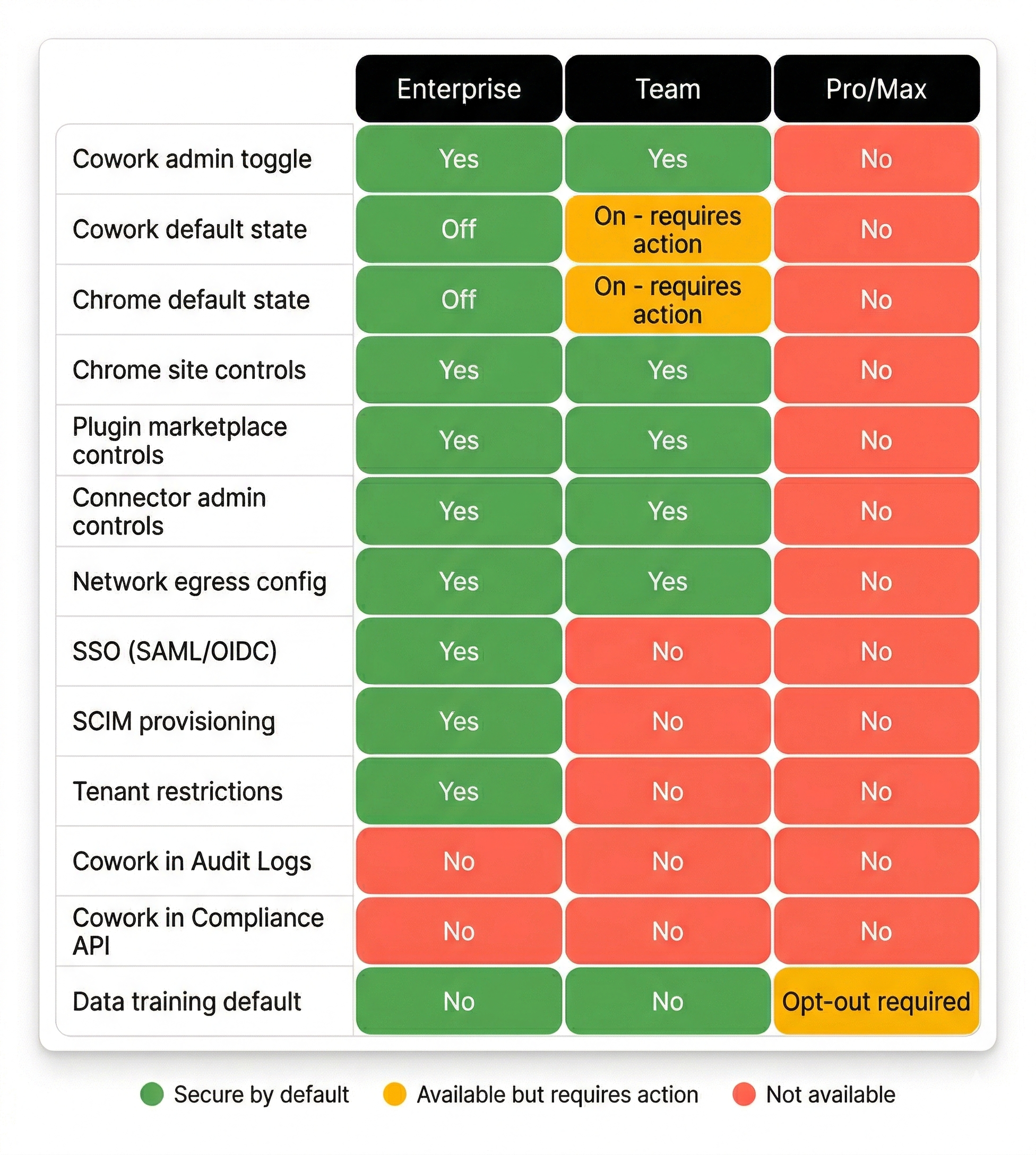
The bottom line: Cowork is on by default across all plans – the difference is what you can do about it. Enterprise gives you the most controls (Chrome off by default, groups/custom roles, SSO, tenant restrictions). Team gives you basic admin controls but permissive defaults that require immediate attention. Pro/Max users have essentially no organizational security controls available.
If you’re evaluating Cowork for any deployment where security governance matters, Enterprise is the only tier that provides a reasonable starting point.
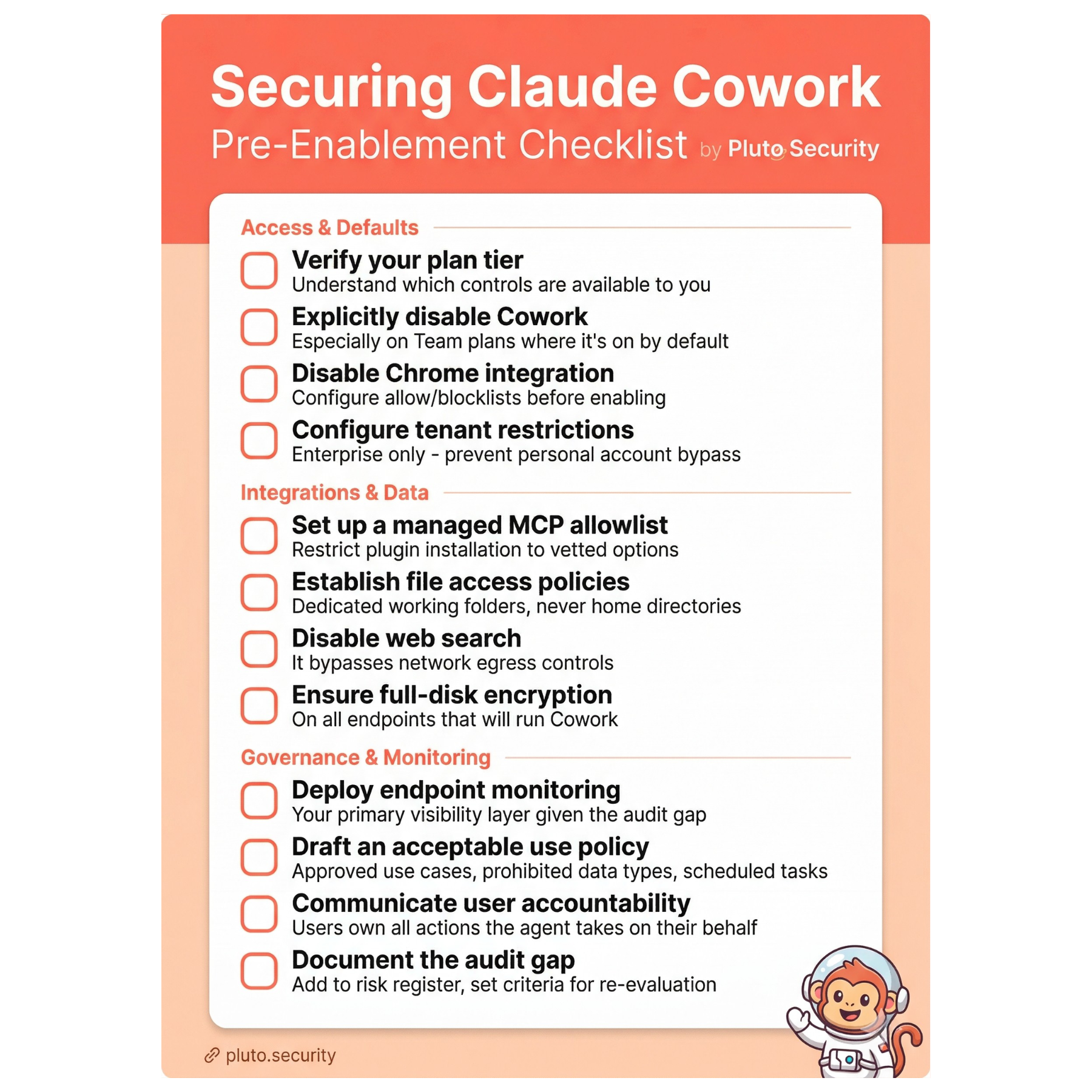
Claude Cowork represents a real step forward in what AI agents can do for knowledge workers. The security architecture shows genuine thought – the VM sandbox, network controls, and prompt injection defenses are substantive, not theatrical. But it’s also a fundamentally new kind of tool that operates across trust boundaries in ways that existing security frameworks weren’t built to handle.
The good news is that the most impactful security measures are also the most straightforward: disable what you don’t need, scope access tightly, assume prompt injection defenses will occasionally fail, and build your controls around limiting blast radius. You don’t need to solve every theoretical risk before deploying Cowork – you need to understand the architecture well enough to make informed decisions about which risks you’re accepting.
We’ll continue to update this guide as Cowork evolves and as Anthropic addresses current gaps – particularly around audit visibility. If you have questions about specific deployment scenarios or want to discuss findings from our research in more detail, reach out to us at contact@pluto.security.
This guide is based on our independent security research into Claude Cowork’s architecture, combined with official Anthropic documentation. Cowork is currently in research preview, and capabilities and controls may change. All official documentation references are current as of April 2026.
Official documentation referenced:
Our research and tools: