
SaaS applications are where much of a company’s work now happens. Sales data resides in CRM tools. Product plans live in workspaces. HR, finance, support, engineering, and legal all run parts of their day-to-day through SaaS.
That makes SaaS security harder than it used to be. The risk is not only whether someone can log in. It also includes how each app is configured, who has admin access, which third-party apps are connected, and which sharing rules changed last week.
What is SSPM?
SSPM stands for SaaS Security Posture Management. It is a way to continuously check how SaaS applications are configured, used, and exposed.
A good SSPM solution looks within SaaS platforms and finds issues that standard inventory tools may miss. It may flag a disabled MFA policy, an overly broad admin role, public file sharing, stale user accounts, risky OAuth apps, or API tokens that haven’t been reviewed since the original setup.
The continuous part matters. A SaaS misconfiguration is not always created on day one. More often, it appears later. Someone changes a setting during rollout. A team connects a workflow tool for a project. Temporary permission remains in place because the cleanup task was never assigned to anyone.
Why SaaS Applications Create Unique Security Challenges
SaaS does not operate like a small set of servers owned by a single infrastructure team. Each application has its own admin console, permission model, audit log format, and integration system. Even simple words like “admin,” “owner,” and “viewer” can mean different things depending on the product.
This creates a practical problem. Security teams may be responsible for SaaS security, but the configuration work is often spread across IT, sales operations, HR systems teams, engineering managers, and department admins. Nobody is usually trying to create risk. It just happens as part of normal work.
A common example is external sharing. One team enables link sharing so a partner can review files without waiting for accounts. Another team adds a workflow app because it saves time, but the app requests more access than anyone expected. Then an ex-employee still owns a few dashboards because offboarding caught the main tools, but missed one smaller application.
What SSPM Tools Monitor and Manage
SSPM tools usually focus on the settings and relationships that shape SaaS risk. They do more than list which apps exist. The useful part is determining whether those apps are configured to match how the company expects them to be used.
The checks usually start with areas like these:
- Identity and access: User roles, dormant accounts, privileged users, guest users, and places where least privilege has slowly drifted.
- Configuration drift: MFA changes, password rules, sharing defaults, audit settings, and security controls that no longer match the baseline.
- Third-party integrations: Connected apps, OAuth scopes, API access, service accounts, and old integrations that still have live permissions.
- Data exposure paths: Public links, external collaborators, broad group access, and files that are easy to reach but hard to justify.
- Compliance evidence: Policy checks, audit logs, control mapping, and reports that help during reviews without turning every request into a manual hunt.
AI tools add another layer here. If employees use browser-based AI tools with internal files or customer notes, a tool like Pluto Security can help teams see that data movement and apply guardrails without blocking normal work.
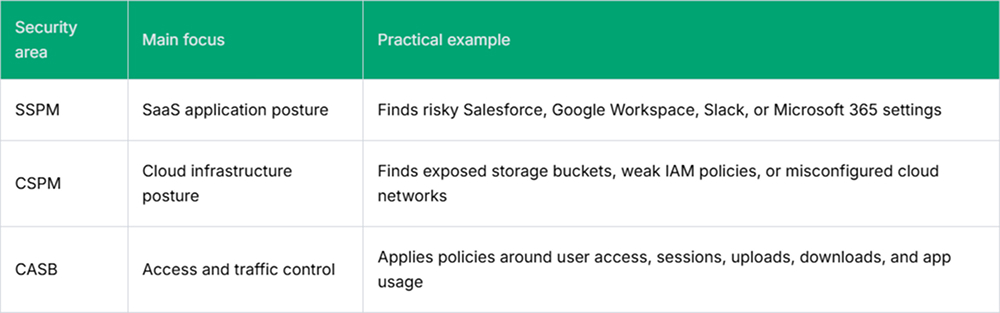
How SSPM Differs from CSPM and CASB
While SSPM is often compared with CSPM and CASB because all three sit somewhere in the cloud security conversation, they are not the same tool with a different label.
Key Benefits of Deploying an SSPM Solution
The main benefit is not a cleaner dashboard. There are fewer blind spots in systems that already hold important company data.
- Misconfiguration visibility: Security teams can catch weak SaaS settings before they turn into incident work. This helps when application owners make frequent small changes, and manual reviews are always a few weeks behind.
- Permission cleanup: SSPM surfaces users, admins, groups, and service accounts that have accumulated excessive access over time. The fix still requires human judgment, especially in busy teams, but the starting list is much easier to defend.
- Better ownership: SaaS risk is easier to route when the finding points to a specific app, setting, user, or integration. Instead of sending a broad warning, security can show the team what changed and why it needs to be reviewed.
- Incident support: When something suspicious happens, the team can check nearby configuration changes, connected apps, exposed data paths, and privileged accounts without first opening 10 admin consoles.
Conclusion
SSPM is useful because SaaS risk is easy to create and hard to see. Most issues are not dramatic at first. A setting changes. A user keeps access. An integration stays connected.
Over time, those small gaps add up. SSPM gives security and IT teams a way to find them sooner, fix the most important ones first, and keep SaaS security from becoming guesswork.
FAQs
1. How does SSPM handle security across hundreds of SaaS applications simultaneously?
SSPM handles this by connecting to SaaS apps via APIs and consolidating useful details into one place: settings, users, permissions, integrations, and activity. Nobody is opening two hundred admin consoles every week. The tool helps teams see which changes actually need review first.
2. What is the difference between SSPM and traditional IT asset management?
Traditional IT asset management is mostly about inventory. It tells teams which tools exist, who owns them, and sometimes how they are licensed. SSPM looks at the condition of those tools. It checks risky settings, broad access, connected apps, and small misconfigurations that can expose data.
3. How does SSPM support incident response when a SaaS misconfiguration is detected?
When a SaaS misconfiguration is found, SSPM gives responders a cleaner starting point. They can check what changed, who touched it, which integrations were involved, and whether data access widened. That matters during the first hour, when the team is still separating a small mistake from a real incident.