



Model Context Protocol makes it easier for AI applications to access tools, files, APIs, and internal services. That convenience shifts the security boundary. An assistant that once generated text can now query a database, inspect a repository, or trigger an operational action.
A secure MCP integration therefore requires controls over identity, permissions, data paths, and tool execution.
Start With Identity, Not the Tool List
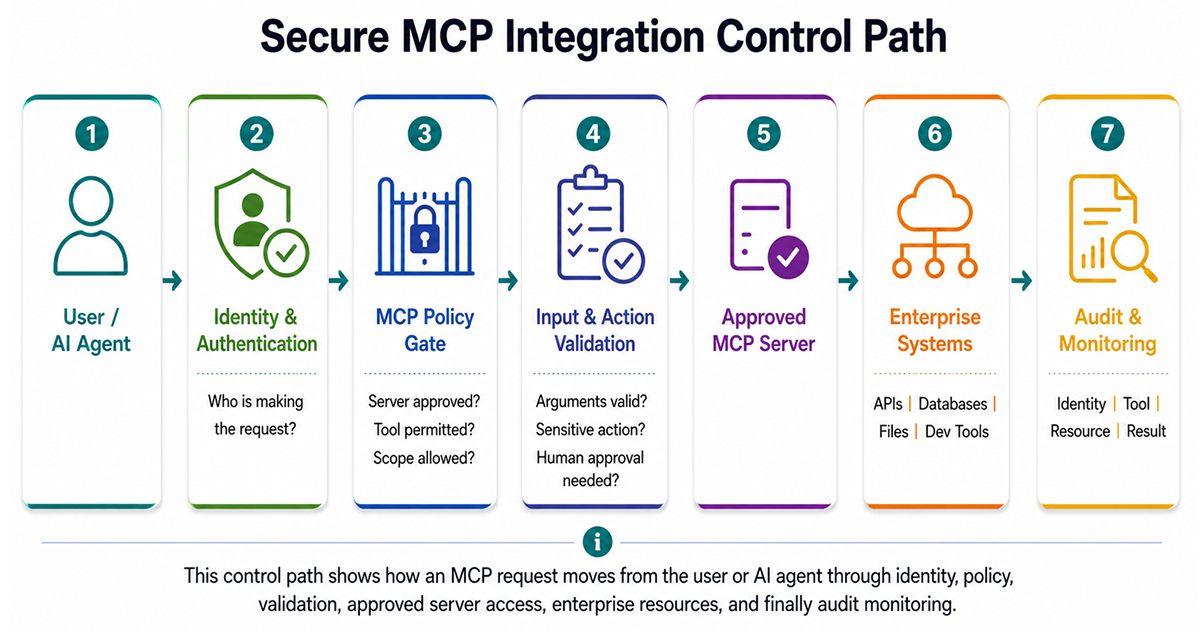
The first design question should be who is making the request and whose authority the agent is acting under. A shared service credential is easy to wire into an MCP server, but it removes useful context and often grants more access than the user actually has.
For remote MCP servers that use authorization, the MCP specification follows OAuth 2.1-style flows. Servers should validate that access tokens were issued for the specific resource rather than accepting arbitrary bearer tokens. Token passthrough is explicitly considered unsafe because it can allow one service to reuse credentials intended for another.
MCP access control should preserve user or workload identity as much as the downstream system allows. If an engineer can read production logs but cannot modify infrastructure, an AI client acting on that engineer’s behalf should not be granted infrastructure write access.
Keep Tool Permissions Narrow
An MCP server may expose ten tools even when a workflow needs only two. Server access should not imply permission to use every capability.
For each integration, define:
- Who may connect
- Which tools they may invoke
- Which resources those tools may access
- Which actions require explicit approval
Read and write operations should be separated whenever possible. High-impact actions, such as deleting records, changing deployment settings, rotating credentials, or sending external messages, require stronger controls than retrieval operations.
The MCP tools specification also requires proper access control, input validation, rate limiting, output sanitization, audit logging, and user confirmation for sensitive operations.
Verify the Server Before You Trust It
Enterprise clients should not connect to any MCP server a user discovers. Maintain an approved server registry, and before enabling a server, review the server owner, deployment source, authentication method, requested permissions, and network destinations.
Local servers deserve the same scrutiny because they can execute with the client’s privileges. Where possible, isolate them with restricted filesystem and network access. Remote servers should also be limited to expected services rather than having unrestricted network access.
Treat Tool Calls as Untrusted Input
The model’s decision to call a tool does not make the request safe. Tool arguments may be influenced by malicious content in a document, repository, ticket, or webpage that entered the model’s context.
Validate tool inputs at the server boundary, just as you would validate an external API request. Check types, paths, identifiers, query limits, destination hosts, and allowed operations. Do not rely on the prompt to enforce these restrictions.
The same applies to results. A tool response may include instructions or sensitive data that later influence the model. Returned content should not automatically be granted authority simply because it came from an internal system. MCP security guidance also warns about token misuse, session hijacking, and unsafe authorization patterns.
Put Governance Around the Server Lifecycle
MCP governance becomes difficult when teams add servers without proper inventory, ownership, or review. Treat each MCP server like an internal integration or service account.
Every approved server should have an owner, purpose, data classification, authentication method, permitted tools, and a review date. Changes to tool definitions or required permissions should trigger a review. A read-only server can become materially different after a write tool is added.
Centralized inventory also helps security teams distinguish approved integrations from unknown or locally configured servers.
Monitor What the Agent Actually Does
Static approval is not enough. Even a correctly configured integration can still behave unexpectedly when users, models, and toolchains interact.
Log the requesting identity, MCP server, tool name, target resource, authorization result, and outcome. Retain sufficient context to reconstruct sensitive actions without storing unnecessary prompt content. Watch for unusual tool sequences, repeated denials, large data reads, new destinations, or sudden increases in privileged operations.
This runtime view often reveals weak MCP governance. A permission may look reasonable on paper but prove too broad once the agent starts using it. That is where an AI workspace security layer can help. Pluto Security provides visibility, risk context, and guardrails for AI-driven workflows, enabling teams to identify and control risky behavior as it happens.
Conclusion
Secure enterprise MCP use depends on applying familiar security disciplines to a new execution path. Bind actions to identities, keep permissions narrow, validate tool calls, review servers as they change, and monitor actual usage.
MCP should make systems easier for agents to use. It should not make it easier for enterprise authority to be bypassed.