
Monitoring an AI agent is not the same as watching a typical backend service. A backend service usually follows code paths that engineers have already designed. An AI agent has more room to move.
It may decide which tool to call, which context to retrieve, whether to use memory, how to interpret a prompt, and when to stop. Two similar requests can lead to different execution paths. That is what makes AI agent monitoring a distinct operational problem.
What Is AI Agent Monitoring?
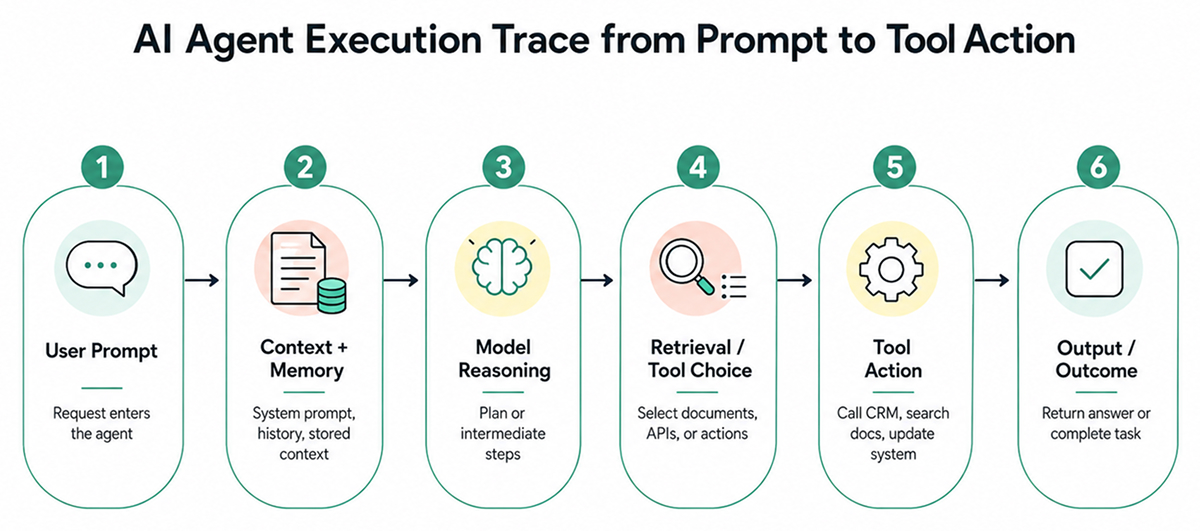
AI agent monitoring means tracking what happens during an agent run, not just whether the service is online. Teams need to see what the agent received, what it decided, which tools it used, and whether the final result was correct.
For example, a support agent may check a CRM, retrieve a refund policy, and send a reply. The request may succeed, but the answer can still be incorrect if the agent used the wrong policy document.
The same applies to engineering agents. An agent may read a ticket, edit code, and open a pull request while skipping a failing test or modifying files outside the expected scope.
Effective AI agent tracking links prompt versions, model responses, reasoning traces where available, tool calls, retrieval steps, memory access, latency, cost, failures, and outcomes. Without that path, teams have only scattered logs and guesswork.
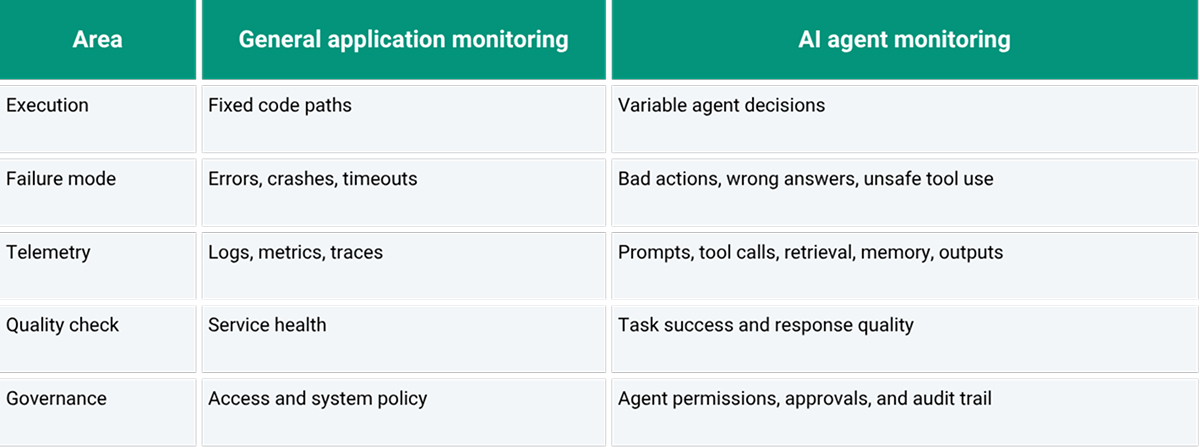
AI Agent Monitoring vs. General Application Monitoring
General application monitoring remains necessary. Teams need logs, metrics, traces, error rates, uptime checks, resource usage, queue depth, and latency. These signals indicate whether the service is reachable and whether the infrastructure is under stress.
AI agents need that same base layer, but AI agent observability has to go further. An agent may complete a request while choosing a poor plan. It may call the right tool with incorrect parameters. It may answer confidently with stale context. It may satisfy the user’s wording while violating an internal policy.
That is the main difference. General monitoring often tells you when software fails. AI agent monitoring also has to tell you when the agent succeeded technically but failed operationally.
Key Signals and Telemetry in Agent Monitoring
The useful signals are not always the loudest. A timeout is easy to notice. A wrong document retrieved at step three is harder to handle. A tool call with a broad permission scope may not fail, but it may still pose a risk.
Teams need telemetry that explains what happened during a run and why the final output was reasonable or unreasonable.
- Prompt and input context: What the agent was asked to do, including limits, instructions, and any missing context.
- Model response: The answer, plan, or intermediate step the model produced before the run advanced.
- Tool calls: Which tools were called, what parameters were passed, how long they took, and where they failed.
- Retrieval and memory access: The documents, chunks, or saved context that may have shaped the answer.
- Task outcome: Whether the agent actually completed the task or only appeared to complete it.
- Cost and latency: Token usage, slow steps, repeated retries, and workflows that cost more than expected.
- Policy and approval events: Locations where the agent was stopped, reviewed, approved, or allowed to continue.
Telemetry is only useful if it can trace the full path from the user request to the agent action. A single log line is not enough when an agent makes several decisions before taking action. Engineers need the run history, not just the final response.
Security Monitoring vs. Performance Monitoring for AI Agents
Security monitoring and performance monitoring examine the same agent from different perspectives. Both matter, but they answer different questions.
Security monitoring assesses whether the agent handled access, data, and actions safely. It should cover tool permissions, exposure of sensitive data, prompt-injection attempts, unsafe actions, unusual access patterns, approval bypasses, and instances where the agent attempts to use a tool outside its intended scope.
Performance monitoring assesses whether the agent is reliable and efficient. It should cover latency, token usage, cost, task completion rate, failed tool calls, model errors, retry loops, retrieval misses, and degraded answer quality. This is where AI monitoring tools are useful, especially when teams need to identify slow steps, retry loops, or expensive agent runs before they become part of normal operating costs.
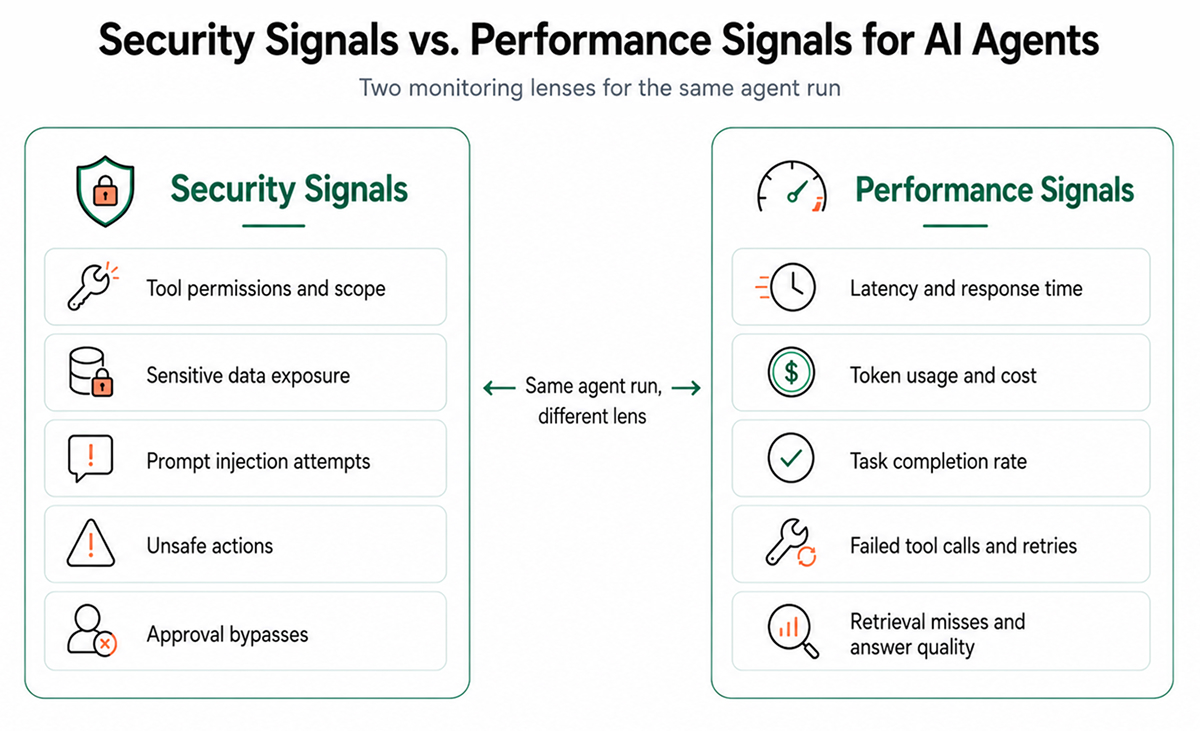
The distinction matters in production. An agent can be fast yet unsafe. For example, it may quickly send sensitive customer data to the wrong internal tool because permissions were too broad. The latency chart looks fine, but the security review does not.
The reverse is also possible. An agent can be safe but unreliable. It may stay within policy, seek approvals, and avoid risky actions, yet still retry repeatedly, miss relevant documents, or fail to complete routine tasks. From a governance perspective, it behaves well. From an operational perspective, it wastes time.
This is where AI agent management goes beyond dashboards. Teams need practical controls: scoped tools, approval gates, replayable traces, prompt version history, cost limits, and review workflows. Monitoring should help engineers improve the agent, not just flag that something was strange.
Final Thoughts
AI agent monitoring is not only about uptime. It is about understanding what the agent saw, what it decided, which tools it used, and whether the final action was safe and useful.
As agents move closer to production systems, teams need visibility into decisions, context, permissions, and outcomes. Without it, debugging becomes guesswork, and small failures can hide behind successful requests.
FAQs
1. How does AI agent monitoring differ from observability?
Monitoring tracks behavior. Observability explains why behavior happened.
2. What metrics matter most in agent monitoring?
Tool use, task success, latency, cost, and unsafe actions.
3. Can existing tools monitor AI agent behavior?
Partly, but agents need prompt, tool, and decision traces.