
AI agents are easy to connect to one or two tools. The problem arises when that access spreads across databases, repositories, internal APIs, and cloud services.
Direct agent-to-server connections also scatter credentials, policies, and logs across clients. An MCP gateway gives us a single place to control that path.
What Is an MCP Gateway?
An MCP gateway sits between MCP clients and the MCP servers they use. It is an infrastructure layer that proxies tool discovery and tool calls and adds identity, authorization, logging, and routing controls.
Instead of configuring an agent with multiple MCP servers, we can expose a single gateway endpoint. The gateway presents only the tools the agent can use and routes approved calls to the appropriate backend. This gives us a consistent point for MCP authentication and policy enforcement.
That matters because an MCP server may store database credentials, read local files, call internal services, or act on a user’s behalf. The broader MCP security risks are therefore not limited to the model.
How MCP Gateways Control Agent Access to Tools and Data
Effective MCP access control starts before a tool call reaches the server. The gateway needs to know who is making the request, which tool is requested, and whether that identity should be allowed to use it.
A support agent, for example, may need a customer lookup and a ticket.update, but not employee.search or billing.refund. The backend servers can host all four operations. The gateway exposes a more limited toolset.
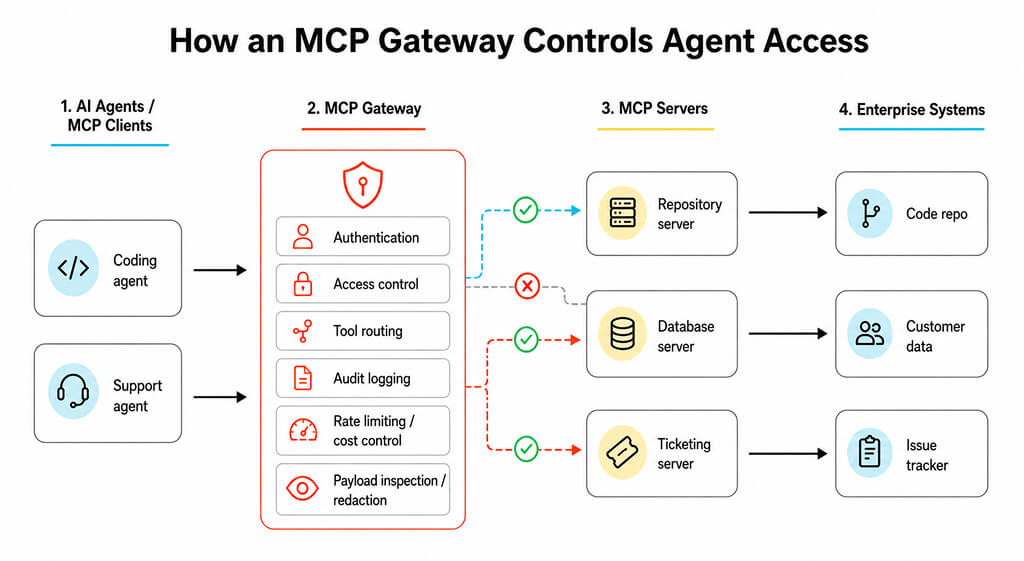
A practical policy can check:
- Agent or user identity and role
- Requested server and tool
- Allowed repositories, schemas, or destinations
- Rate and execution limits
- Whether a sensitive action needs approval
This does not prevent prompt injection. A malicious document may still influence an agent. The gateway limits what the agent can access and what actions it can perform. That is a useful MCP server security control, but not a replacement for prompt-injection defenses.
MCP Gateways vs. LLM Gateways
These gateway types operate across different traffic paths. An LLM gateway manages requests to models. An MCP gateway manages requests from agents to tools and data sources.
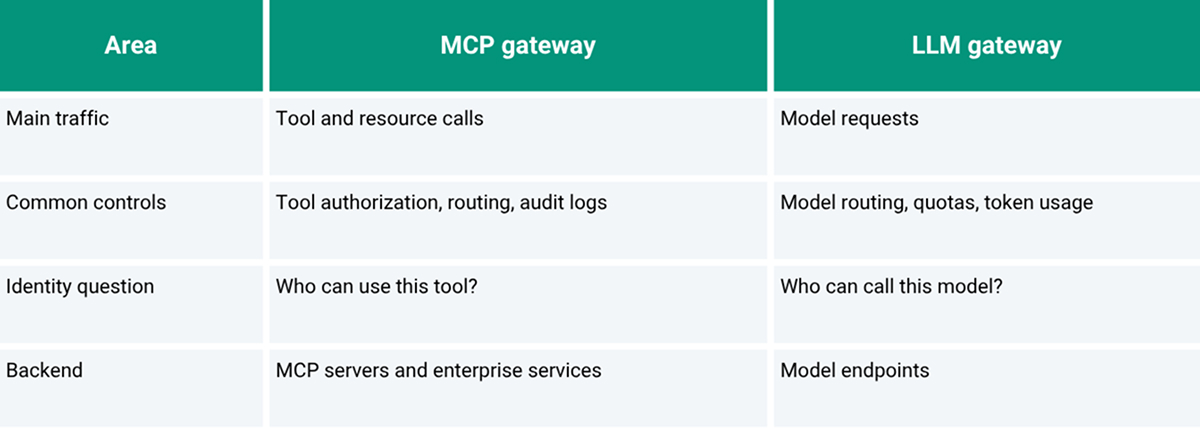
Both can coexist on the same agent platform. One controls model access, while the other controls tool execution. Keeping those responsibilities separate usually makes policy design and troubleshooting cleaner.
How to Deploy an MCP Gateway in an Enterprise Environment
Start with identity. Agents should authenticate using short-lived workload or user-bound identities rather than shared static tokens. The gateway can use separate credentials for downstream MCP servers, so broad backend secrets do not need to be stored in every agent.
Then build tool access around actual jobs. A coding agent may need repository search, CI status, and issue tracking, but not finance or HR tools. This becomes even more important with managed agents that continue working without a developer watching each call.
Standard production controls still apply. Use TLS, restrict network paths to approved servers, record tool calls, set timeouts, and place approval gates around high-risk actions. Tool schemas should also be monitored for changes, as new capabilities or parameter changes can alter agent behavior. This also gives security teams a single, consistent place to review failed tool requests and investigate unexpected agent behavior across environments during incidents.
Do not treat the gateway as the sole security boundary. Downstream MCP servers still require input validation, least-privilege credentials, authentication where appropriate, and logging. The gateway narrows access. It does not make an unsafe server safe.
Conclusion
An MCP gateway becomes useful when direct MCP connections are difficult to manage. It centralizes identity, MCP access control, routing, and auditability while keeping backend access more deliberate.
FAQs
1. Does an MCP gateway prevent prompt injection attacks?
No. It can restrict tools, destinations, and sensitive actions, reducing impact. Prompt injection still requires separate defenses for untrusted content, approvals, agent behavior, and data handling.
2. Can a single MCP gateway serve multiple AI agents?
Yes. One gateway can serve many agents while exposing different tools and permissions to each agent. Policies should be tied to workload, user, agent, or role identities rather than to a shared credential.
3. What happens when an MCP server changes its tool definitions?
The gateway can rediscover tools, compare schema changes, and hold unexpected updates for review. Without that control, changed parameters or new tools may reach agents before they are evaluated.
4. Does an MCP gateway add latency to agent tool calls?
Usually, yes. The request crosses another network and policy layer. The added latency can remain small with efficient policy checks, connection reuse, local placement, and sensible logging.
5. Can an MCP gateway enforce data residency requirements?
It can help by routing requests only to approved regional servers and blocking disallowed destinations. Residency still depends on downstream services, logs, caches, and storage remaining within the required region.