The MCP Debrief – What’s Actually Running on Your Endpoints
Aug 24, 2026・
13 min read

MCP has quickly become the default way enterprise AI agents reach internal systems, and most security teams do not yet have a real inventory of what is installed or what it can reach. In this blog, you will learn how installing a server can hand over a laptop’s files and credentials, how an internal tool can turn into an unauthenticated remote API, how a tool’s own description can be used to redirect what an agent does, and what security teams should do about all of it now.
An MCP server is unreviewed code running on an employee’s laptop, bridging internal systems to whatever an AI agent is asked to do next. For the last few months our special agent Cosmo has been hunting them across live production environments. What he found shows that most security teams are underestimating the risk.
MCP has moved fast since Anthropic introduced it in late 2024, spreading from engineering teams into desktop assistants, internal platforms, and enterprise software used by technical and non-technical employees alike. It is familiar, but not mature: MCP turns AI from something that answers questions into something that can take action. It can search internal documents, modify source code, open tickets, query databases, change infrastructure, and operate SaaS applications on a user’s behalf. That is exactly why installing a server often means running someone else’s unreviewed code, code that can inherit access to internal files, credentials, and networks while communicating with external services by design. For many users, this still feels like turning on an integration, not granting a new program broad access to their machine.
Over the last few months we have been following MCP servers back to the machines that run them, focusing on the ordinary case: a server somebody installed in a minute, that nobody reviewed, holding a token with more reach than the task required. The typical organization is running hundreds of them, most pulling in text written by people outside it. This article maps the risk that makes those findings matter. It is the first of several, each examining a different part of the same system: the code we install, the services we expose, the identities we delegate, and the instructions we trust.
Here is what that looks like in practice. An employee is connected to a shared airport or office Wi-Fi network when they install an MCP server so an AI assistant can work with Jira and Confluence. The server starts a process on the employee’s laptop, opens a network port, and receives a powerful personal access token. If that port is bound to every interface and has no authentication, somebody else on the same network may not need to compromise the model at all. They can talk to the server directly.
One request can be enough to use the employee’s identity, reach internal services, steal files, or execute code. Pluto’s research keeps finding versions of this pattern.
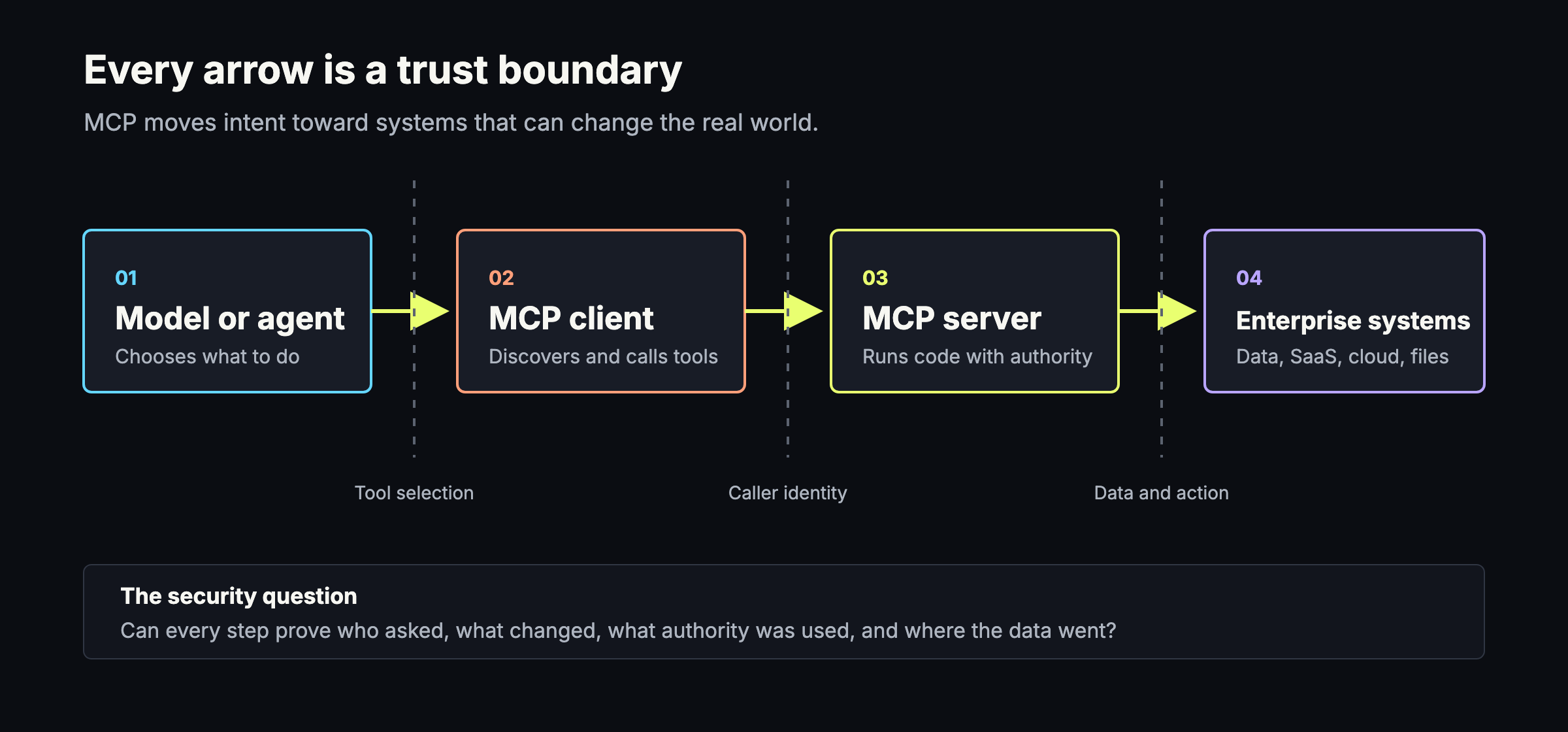
On a whiteboard, MCP looks simple:
Agent -> MCP client -> MCP server -> tool or data source
But each arrow is a trust boundary.
The client discovers tools and presents them to the model. The server turns the model’s request into an action. That action might run locally, call a cloud API, read a repository, search company documents, or administer production infrastructure. To do the job, the server often receives exactly what an attacker wants: filesystem access, network access, long-lived credentials, and broad permissions.
MCP did not invent SSRF, missing authentication, path traversal, permissive CORS, unsafe defaults, or command injection. What MCP changes is where those bugs sit. They now live in a bridge between an agent and the organization’s most useful systems.
The bugs are familiar. Putting them in this position gives them a new reach.
Many readers already use MCP every day, sometimes through several clients and servers. At the same time, its assumptions, transports, and security guidance are still maturing. Implementations built against several protocol revisions now run side by side, and adoption often moves faster than inventory.
Our own production telemetry shows what that looks like. Across four customer environments, the number of distinct MCP servers on employee endpoints grew by 72% to 98% between May and August 2026.
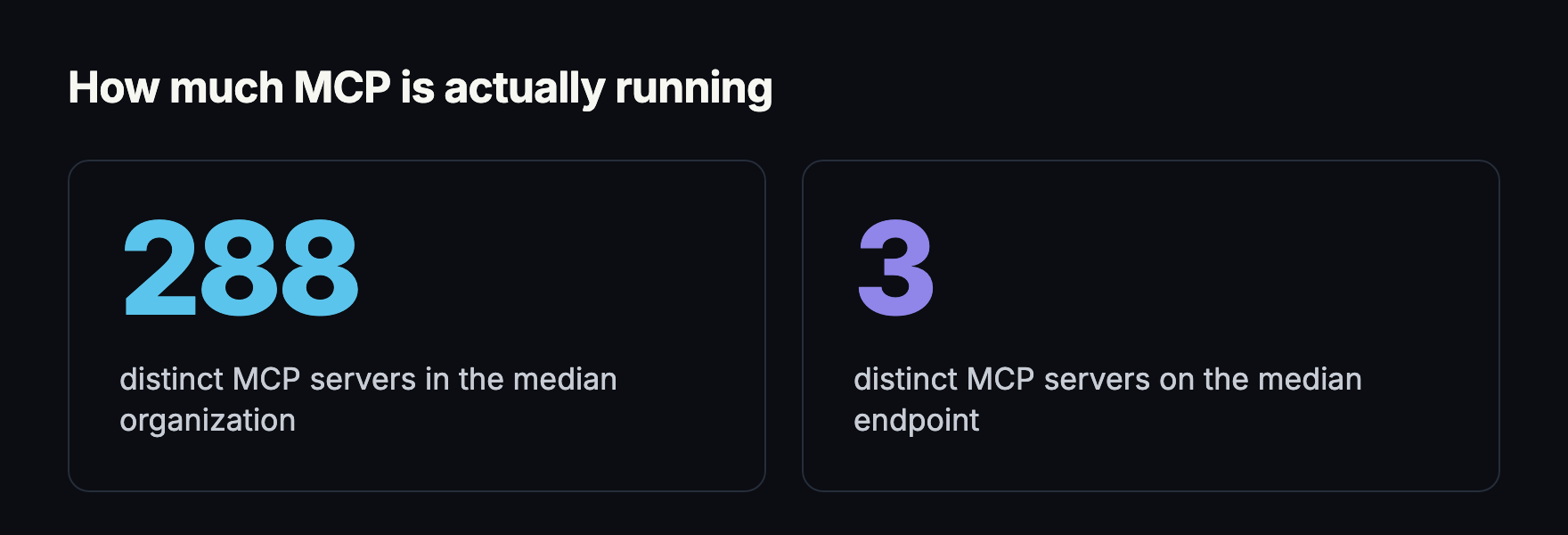
Growth is only half the picture. How much is running right now matters more, and the answer is larger than most inventories suggest. The median organization runs 288 distinct MCP servers across its endpoints, and the median endpoint runs three.
Many local MCP servers are installed with a one-line command or a small configuration snippet copied into an AI client. That experience feels closer to enabling a plugin than installing software.
This pattern is no longer limited to developers. Anyone using a desktop assistant can be asked to paste a command or configuration block that downloads and launches a server.
Underneath, the client may download a package and launch a binary or script with the user’s privileges. The server can inherit the user’s environment variables, home directory access, network position, and credentials. If the package, startup command, dependency tree, or update channel is malicious or compromised, the attacker does not need a clever prompt. The user has already executed their code.
Pluto saw the impact of that trust in MCPwnfluence, our research into mcp-atlassian, a server with more than four million downloads. Its HTTP mode bound to all interfaces without authentication. An SSRF issue let an attacker control outbound requests, while an arbitrary file write let them place files anywhere the process could write. Chained together, the two flaws enabled unauthenticated remote code execution from the local network. The model did not need to be tricked. The server was already running with everything the attacker needed.
Before a local MCP server is approved, teams should ask:
The MCP security guidance now treats local server compromise as a distinct threat. It recommends showing the exact startup command, requiring explicit consent, warning on dangerous operations, and restricting filesystem and network access. Those are sensible controls. In practice, many deployments still begin with copy, paste, run.
An MCP allowlist that records only a server name is therefore not enough. Security teams need to know what artifact ran, which version ran, how it was launched, what changed, and what it could access at that moment.
A developer may wrap an internal API to make a team faster. A data scientist may expose a database search tool. An operations engineer may add tools for cloud administration. The server works locally, so it gets moved to a shared host. Authentication is left for later. The process binds to 0.0.0.0. A development tunnel, permissive firewall rule, reverse proxy, or cloud deployment makes it reachable from somewhere nobody intended.
The internal productivity tool is now shadow infrastructure. It does not need a visible dashboard to be dangerous. Its message endpoint may be enough. If that endpoint lacks authentication, every tool behind it can become a remote API for the attacker.
That is what happened in Pluto’s nginx-ui research. The main application required authentication, but one MCP message endpoint did not. The missing check exposed 12 tools, including configuration writes followed by an automatic nginx reload. One unauthenticated call could take over the web server. Pluto found 2,689 publicly exposed nginx-ui instances across more than 50 countries, and reports of exploitation in the wild followed soon afterward.
DNS rebinding makes even “localhost only” assumptions fragile. A malicious website can cause a victim’s browser to resolve an attacker-controlled hostname to a local address, then interact with a server that trusts its network location instead of authenticating the caller. The current MCP guidance explicitly calls out DNS rebinding alongside SSRF and unsafe local HTTP servers.
Pluto’s Vicious Circle research showed how this can play out in a widely used official integration. CircleCI’s MCP server, with more than 142,000 npm downloads a month, did not validate the Host or Origin headers. A malicious web page could use DNS rebinding to reach the server on a developer’s laptop and drive the developer’s CircleCI account with the token already held by the server. The same research found that a caller-controlled filename was inserted into shell commands without quoting, creating a path to code execution inside the CI pipeline. We will return to this attack pattern later in the series.
Security teams should assume that employees are both installing and publishing MCP servers. One creates unvetted code execution on endpoints. The other can expose internal capabilities to the network. Software inventory may see the package, API security may see the endpoint, and endpoint tools may see the process. None of them necessarily sees the whole MCP workflow.
Both risks are common. Of endpoints running at least one MCP server, 86% connect to a remote server and 57% run a local process.
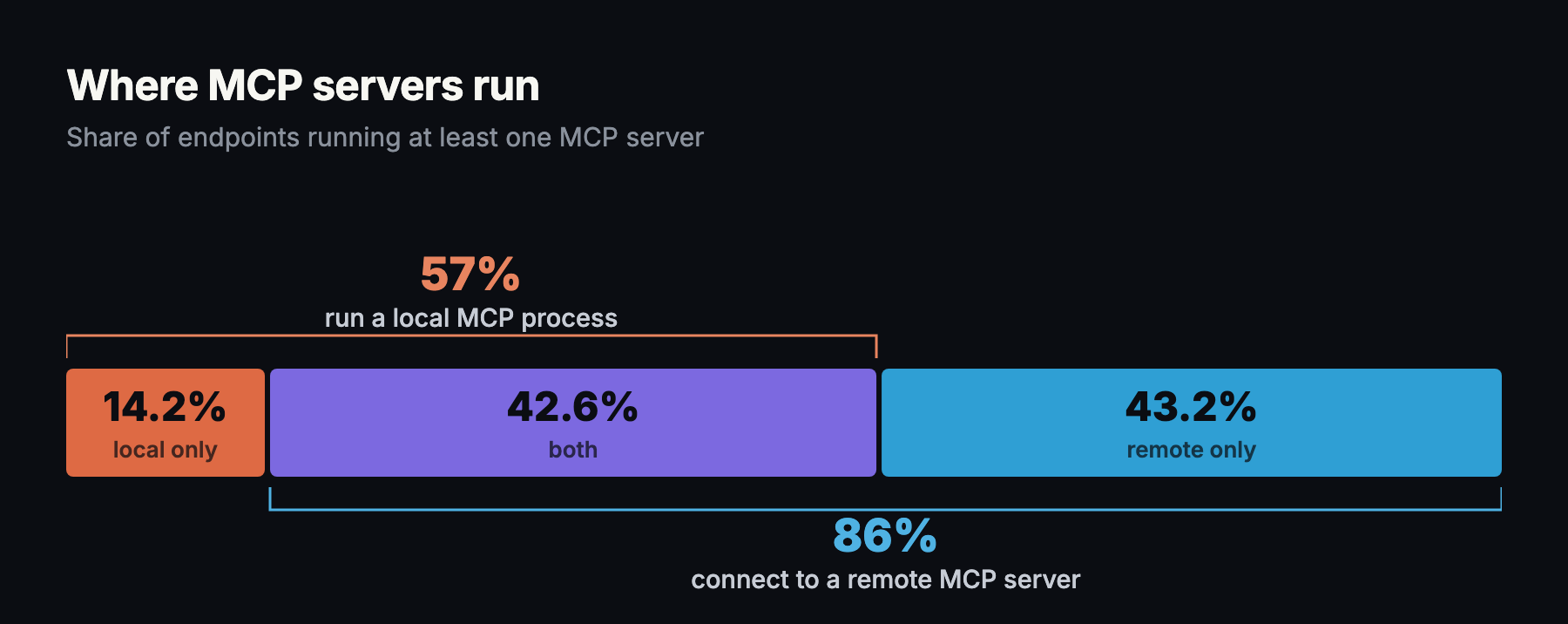
43% do both at once: unreviewed code from a package registry and a networked server, on the same machine, under the same user. Both threat models land on the same laptop.
In both cases, the failure happened before the tool’s business logic. The tool did what its author intended, but for the wrong caller. The capabilities transferred. The controls did not.
MCP servers often sit between a user and a downstream API. That makes identity handling part of the security boundary, not plumbing.
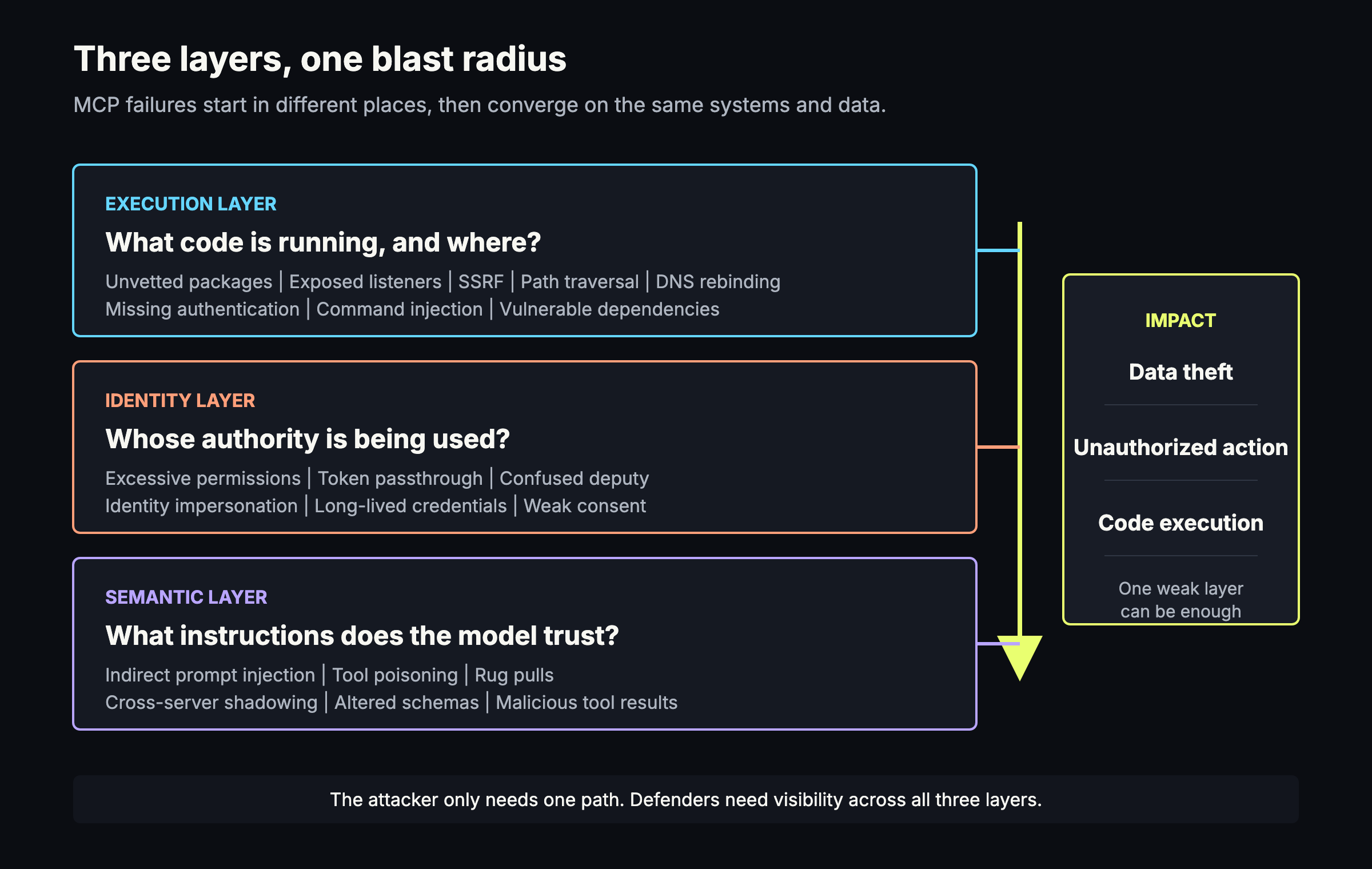
Excessive permissions are the most direct amplifier. A server with organization-wide document search, full repository access, database administration, or cloud administrator rights makes workflows smoother. It also means that one compromised server, stolen token, or manipulated agent can affect far more than the task requires. Least privilege must apply to the server, the user, the tool, and the individual invocation.
Token passthrough breaks this boundary in a subtler way. In this anti-pattern, an MCP server accepts a token from a client without verifying that the token was issued for that server, then forwards it to a downstream API. The official MCP security guidance forbids this because it can bypass controls, destroy reliable attribution, confuse trust boundaries, and turn stolen tokens into a route for data exfiltration.
The proxy confused deputy problem appears when an MCP proxy uses its trusted position with a third-party API on behalf of multiple clients. Under the wrong combination of static client identity, dynamic registration, weak redirect validation, and reused consent state, a malicious client can obtain authorization without the user’s meaningful approval. The proxy has authority, but it cannot reliably distinguish the party asking it to use that authority.
Identity impersonation follows weak authentication and poor credential handling. An attacker who steals an agent credential, hijacks a trusted session, or registers a rogue server can make unauthorized actions look like normal automation. Logs may show the MCP server or the victim user, not the attacker who shaped the workflow.
When a human clicks a button in an administrative console, security teams know which interface, identity, and policy produced the action. In an MCP chain, intent may pass through a user, a model, a client, a server, and a downstream API. If identity is flattened along the way, accountability disappears.
MCPwnfluence showed how quickly this becomes concrete. Once the attacker reached the unauthenticated server, requests to Atlassian services were made with the victim’s personal access token. The downstream service saw a valid credential even though the attacker had initiated the action.
Classic vulnerabilities are only half of the story. Models discover MCP tools through natural-language names, descriptions, schemas, metadata, and results. Those fields help decide which tool the agent selects and how it uses it, making language part of the security boundary.
Indirect prompt injection begins in content the user may never suspect: a document, web page, email, knowledge-base entry, issue description, or API response. When an agent retrieves that content, hidden or persuasive instructions can compete with the user’s request. In an MCP workflow, the result is not limited to a bad answer. The injected content may influence which tool is selected, what data is passed to it, and which action is executed.
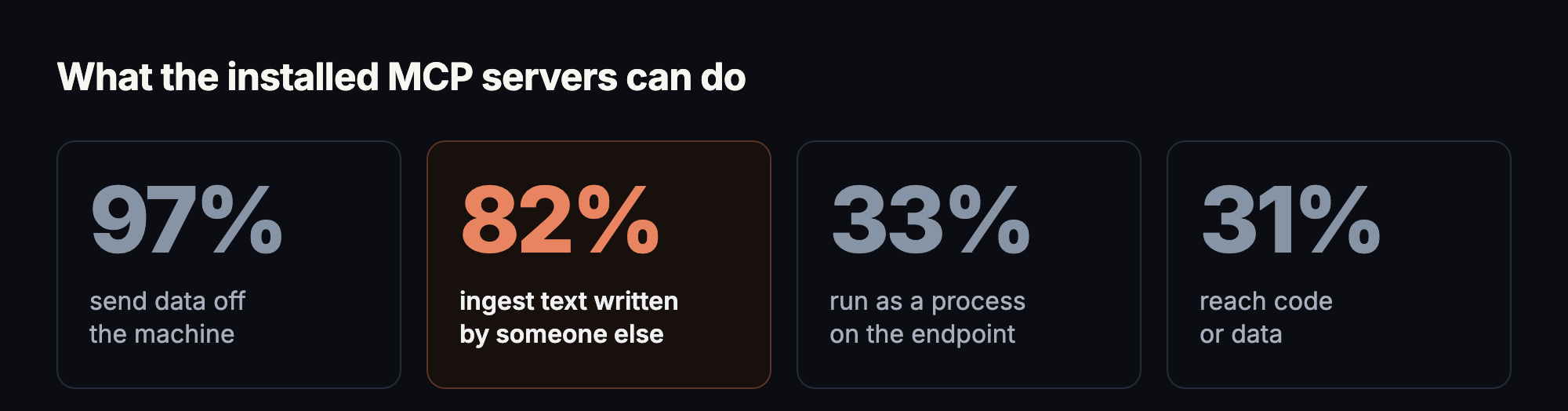
82% of MCP installations are on servers whose normal operation pulls in text written by somebody else: search results, inbound email, chat messages, support conversations, tickets, library docs, logs, stack traces. The injection surface is the default configuration.
Tool poisoning attacks what the model reads about a tool. An attacker can modify a description, schema, metadata, API response, plugin, or server so the agent makes a decision the user never intended. The model may believe it is following trusted instructions even though those instructions have changed.
Rug pull: A server presents a benign tool definition when the user or administrator approves it, then changes that definition later. Approval is a point-in-time decision, but tool definitions are mutable. An allowlist can still say “approved” while the model is being shown a different instruction. Tool definitions should be versioned or hashed, and any drift should trigger review before the new definition is trusted.
Cross-server tool shadowing: A malicious server uses its own tool description to manipulate how the agent calls a different, trusted server’s tools. The malicious server does not need the trusted server’s credentials or code. It influences the shared model that chooses between both. This crosses a boundary most security architectures do not yet model: one integration can alter the effective behavior of another integration through language alone.
Traditional plugin isolation asks whether plugin A can directly call plugin B. Cross-server shadowing adds another question: can server A persuade the model to misuse server B?
Pluto’s Total Recall research found a more direct form of context manipulation in mcp-memory-service. A permissive CORS policy let any website write to the assistant’s memory store. An attacker could add false memories that would later be retrieved as trusted context, changing what the assistant believed to be true without modifying the model itself.
Once an attacker can influence a privileged MCP workflow, data exfiltration can take several forms.
A compromised local server can read files or environment variables. SSRF can reach internal services or cloud metadata. A poisoned tool can ask the model to include secrets in an apparently legitimate argument. Indirect prompt injection can steer retrieved data toward an external endpoint. Token passthrough can let a stolen identity move across services. A broadly permissioned search tool can collect regulated data at machine speed.
The same Total Recall chain let a normal web page search, read, change, and delete everything stored in the memory service. The individual bugs were an information leak and wildcard CORS, both familiar web security failures. Their location in front of an AI memory store turned them into one-click access to credentials, private notes, meeting summaries, and any other sensitive context a user had asked the assistant to remember.
Traditional DLP products may see only fragments: the AI client reading a file, the MCP server making an HTTPS request, or the downstream SaaS API returning data. They may not see the full causal chain or the natural-language instruction that initiated it.
Scanning model output is not enough. Enterprises need telemetry across server installation, tool discovery, definition changes, identity, invocation, arguments, responses, and network destinations. Without that chain, a legitimate-looking tool call can hide an illegitimate workflow.
Here is what this adds up to. The risk sits in three places: unreviewed code with too much access, identity that gets flattened somewhere along the chain, and tool descriptions that can quietly redirect what an agent does. The OWASP MCP Top 10 has started mapping that risk into named categories, and Pluto’s own research points to a smaller set of controls that close most of it. The goal is not to block MCP. The goal is to treat it according to the authority it carries.
Discover it. Build an inventory of local and remote MCP servers, their owners, versions, startup commands, transports, listening interfaces, and clients. Find servers employees have published as well as those they have installed.
Vet the code that runs. Review provenance and dependencies. Pin versions where possible. Scan for malicious startup commands and known vulnerabilities. Run local servers in sandboxes with explicit filesystem and network grants.
Make reachability intentional. Bind locally by default. Require authentication on every HTTP and SSE endpoint, including message handlers. Test for DNS rebinding. Apply SSRF controls to discovery, redirects, metadata, and tool-driven outbound requests. Do not rely on the network location as identity.
Constrain authority. Use short-lived, audience-bound credentials. Do not pass client tokens through to downstream services. Separate users and clients, preserve attribution, require per-client consent, and grant each tool only the scopes needed for its task.
Treat tool definitions as security-sensitive code. Record and hash names, descriptions, schemas, and metadata at approval time. Alert on drift. Review changes before use. Isolate trust across servers so an untrusted description cannot silently redirect use of a trusted tool.
Monitor the complete workflow. Capture tool discovery, invocation, arguments, responses, identity, destination, and policy decisions. Detect unusual cross-server behavior and sensitive data movement. Give responders enough context to reconstruct why an action happened, not only that an API call occurred.
Test the control plane. Assess the transport and authorization flow before the tool handler. Look for missing authentication, fail-open middleware, exposed listeners, weak redirect validation, SSRF, unsafe file operations, CORS mistakes, and default configurations that optimize for convenience at the expense of isolation.
The current OWASP MCP Top 10 beta groups the risk into ten categories:
The list is still a beta and will change with the protocol. Its categories also overlap in real incidents. A shadow server may have insufficient authentication. It may run a vulnerable dependency with excessive permissions. An indirect prompt injection may then select a poisoned tool that uses a mishandled token to exfiltrate data. Real incidents cross those category boundaries, so investigations and controls need to follow the full chain.
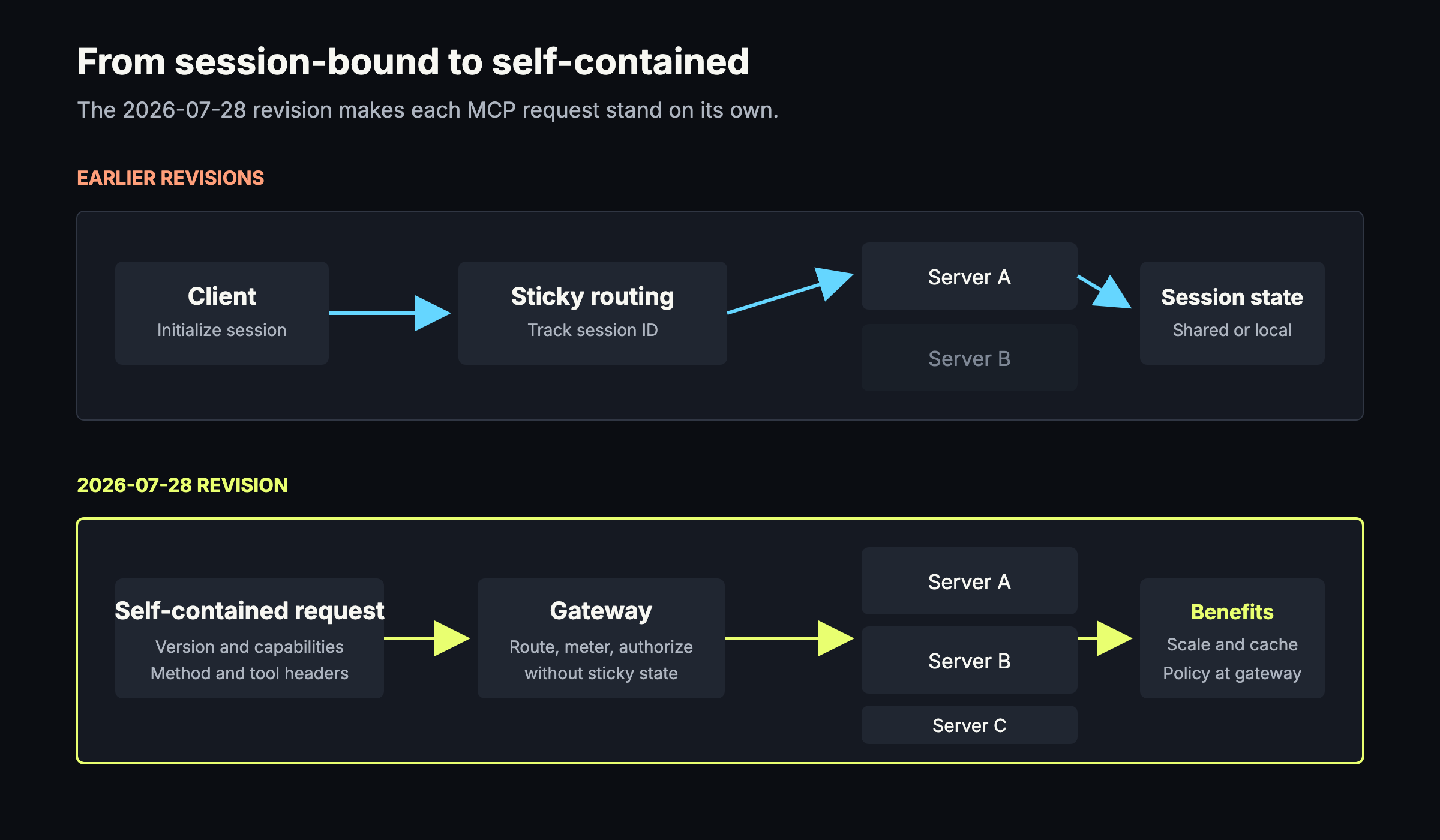
The newest protocol revision, 2026-07-28, shipped only a few weeks before this article. Its biggest change is a stateless core: each request carries its own protocol version and client capabilities, so it can be handled by any compatible server instance without a sticky session or shared session store. The revision also brings a few practical benefits: method and tool names now appear in HTTP headers, so gateways, rate limiters, and authorization layers can make decisions without parsing every JSON body; tool, prompt, and resource lists can be cached, keeping tool catalogs stable across reconnects; OAuth handling is tighter, including issuer validation and a move away from Dynamic Client Registration toward Client ID Metadata Documents; and a formal extension model with a minimum deprecation window gives implementers a cleaner way to add features and plan migrations. For defenders, the main gain is a better set of places to apply policy. It does not make an exposed or poorly written server safe. Clients and servers will adopt the revision at different speeds, and older protocol versions will remain in use through version negotiation.
Most of these controls will look familiar to security teams. MCP does not need a new security religion. It needs old lessons applied to a young layer with an unusually large blast radius.
MCP is becoming infrastructure faster than most organizations are learning to govern it. Attackers do not need every layer to fail. They need one forgotten endpoint, one overpowered token, one poisoned description, or one server nobody knew was running.
Every environment Pluto has examined already had MCP running in it, more of it than the inventory showed. The work now is finding out what it can reach, before somebody else does.
That is the same question Pluto exists to answer, across every tool a builder ecosystem produces, not just MCP: the software people install, the agents they run, and the artifacts those agents leave behind. Pluto gives security teams discovery, risk assessment, and enforcement across all of it, with MCP as one surface among many. Book time with Pluto to see what is actually running in your own environment.