

Most enterprise work now runs through the web browser. Email, SaaS tools, cloud consoles, internal dashboards, support systems, code repositories, and file sharing are often accessed via browser tabs. That makes the browser more than a simple application. It has become part of the daily workspace.
This is why browser vulnerabilities are becoming harder for security teams to treat as a small endpoint issue. A browser bug, unsafe extension, stolen session, or malicious web page can reach business data very quickly.
Why the Browser Is Now the Primary Enterprise Attack Surface
Many security models still focus on endpoints, networks, and identity providers. Those controls still matter, but much of the actual work now happens inside the browser.
A developer may move between GitHub, cloud dashboards, CI tools, and internal admin screens from the same browser profile. Finance and support teams often do the same with customer records, ERP systems, chat tools, and email. The browser sees all of it.
That creates a gap. Endpoint tools can see files and processes. Network tools can inspect traffic. Identity tools can confirm who logged in. But many browser security risks appear after access has already been granted.
A user may pass MFA, open an approved SaaS app, and paste sensitive data into an unapproved AI tool in another tab. From the login layer, nothing looks unusual. This is where enterprise browser security comes into play. For AI-heavy workflows, a tool like Pluto Security can make this easier by providing teams with real-time visibility, risk understanding, and guardrails for how employees use AI tools in the workspace.
Most Common Browser Vulnerabilities Targeting Enterprise Users
Browser vulnerabilities are not always rare zero-day bugs. Some are ordinary browser features that are abused in ways teams did not anticipate.
Common problem areas include:
- Malicious or over-permissioned extensions: Some extensions can read and modify data on every site the user opens.
- Session hijacking: Stolen cookies or session tokens can let attackers get into an active account without going through the full login flow.
- Phishing inside trusted workflows: A fake login page can slip into normal SaaS, email, or file-sharing activity.
- Drive-by downloads and browser exploits: If the browser or a plugin is out of date, a user may still be exposed just by opening the wrong page.
- Data leakage through copy, paste, upload, or print actions: Sensitive data can leave managed apps through small everyday actions, often without anyone noticing.
The issue is not that these risks are new. The issue is how much business activity now depends on the browser.
The Extension Problem Is Easy to Miss
Extensions are useful. Developers rely on them for API debugging, accessibility checks, token handling, and layout testing. Business users install tools for writing, taking screenshots, creating PDFs, and meetings.
The risk is visibility. Many companies do not know which extensions are installed, what permissions they have, or whether the publisher has changed.
An extension that can “read and change all data on all websites” can expose internal tools, customer portals, cloud dashboards, and admin pages. A basic review process helps by inventorying extensions, checking permissions, blocking risky ones, and allowing exceptions only when there is a real business need.
Where Existing Security Controls Fall Short
Most enterprises already use endpoint detection, identity controls, secure web gateways, and DLP tools. These controls are still needed, but they do not always provide enough browser-level context.
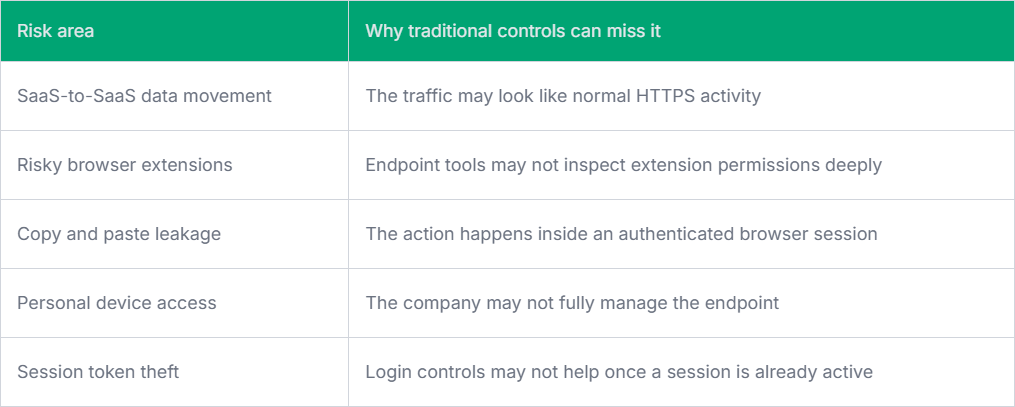
This gap is one reason browser vulnerabilities are now receiving more attention from security leaders. The browser sits close to identity, data, SaaS applications, and user behavior.
Practical Steps Engineering and Security Teams Can Take
The answer is not to lock down every browser feature to the point that people cannot work. That usually leads to workarounds. A better approach is to start with visibility. Teams can review managed browser policies, enforce updates, restrict unsafe extensions, monitor downloads from sensitive apps, and apply stronger controls to unmanaged devices.
Developers may need a different policy. They often need more extensions and broader web access, so approved tooling and periodic review are usually more practical than blocking everything.
Final Thoughts
The browser has become a daily workspace for the enterprise, not just a way to access the web. That is why browser vulnerabilities now carry more weight. Good enterprise browser security needs visibility, sensible controls, and enough flexibility for real development and business work.