
An AI agent that works in a demo can still fall apart in production. It can get stuck calling the same tool, consume far too many tokens, or start giving worse answers after a model update. Nothing crashes, so nobody notices. AgentOps helps teams catch these problems and keep agents reliable, affordable, and safe once real users depend on them.
What Is AgentOps?
AgentOps is the practice of running AI agents in production. It borrows from DevOps and MLOps but adds what agents bring with them: they can behave differently on the same input, they use tools on their own, and their cost changes with every run. It covers AI agent lifecycle management from the first prototype to retirement, and it checks whether the agent did the right thing, not just whether the service stayed up.
How AgentOps Works
It starts by recording what the agent does. Each run is saved as a trace: the user request, every model call with its prompt and token count, every tool call with its inputs and result, and the final answer. These traces form the basis of AI agent observability.
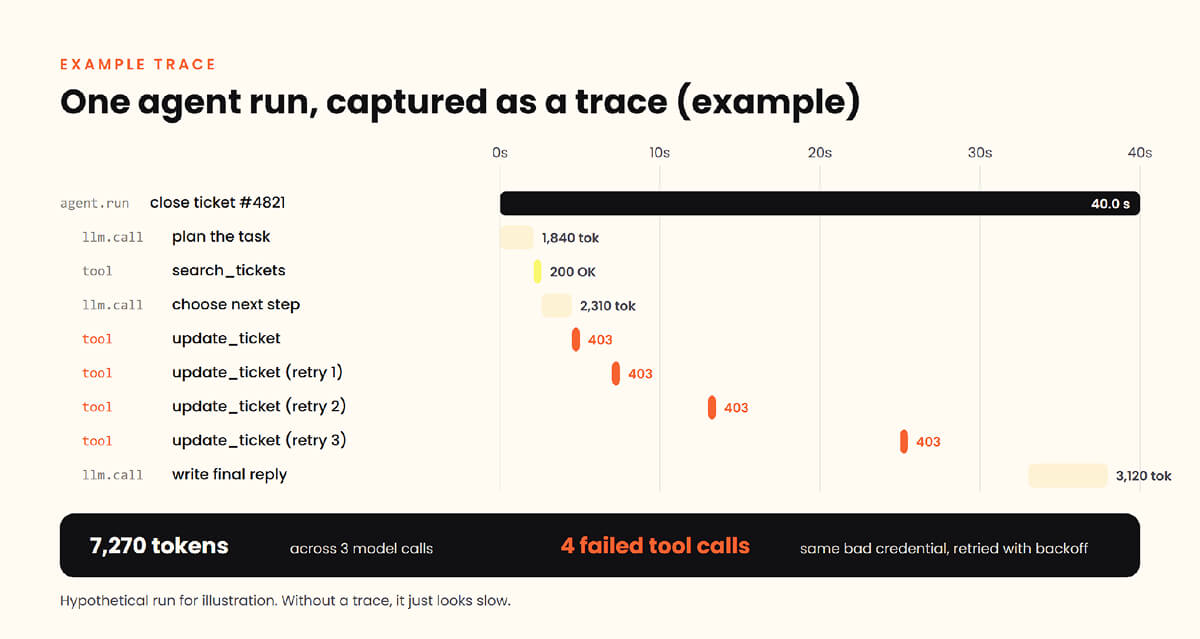
Suppose a support agent takes 40 seconds to close a ticket. The trace shows why: the ticketing API returned a 403 error, and the agent retried three times with the same bad credentials. Teams use traces to build dashboards and alerts, and they replay saved runs against new prompts or models before shipping a change.
Stages of the AI Agent Lifecycle
An agent goes through six stages, and each one needs its own checks:
- Design: define the task, the tools, and what success looks like
- Build: write prompts, connect tools, and set permissions
- Evaluate: run agent evaluation against test cases with known good answers
- Deploy: release gradually, starting with a small share of traffic
- Monitor: watch traces, costs, and failures in production
- Retire: revoke credentials and remove access when the agent is replaced
Good AI agent lifecycle management links monitoring back to evaluation, so every failure found in production becomes a new test case.
AgentOps Metrics to Track
Uptime tells you little about an agent, so AI agent observability tracks other metrics. These fall into four groups. Quality covers task success rate and agent evaluation scores. Cost covers tokens per task and cost per successful task. Performance covers end-to-end latency and tool-call error rate. Safety covers blocked actions, policy violations, and unusual tool access.
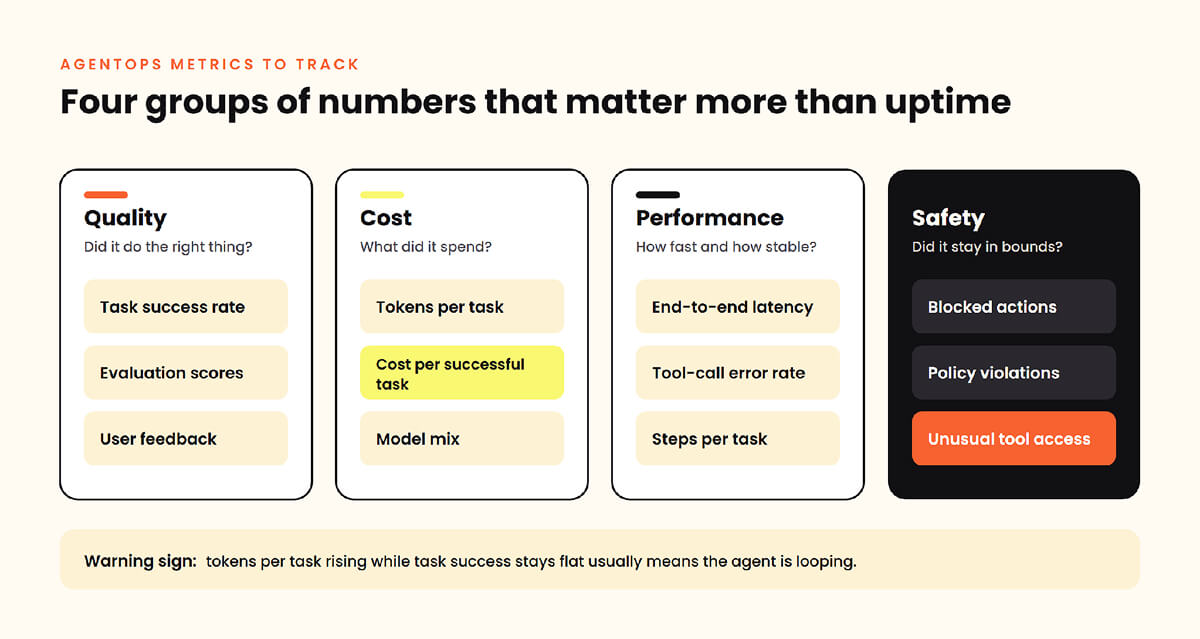
A rising token count with a flat success rate usually means the agent is looping.
AgentOps Security and Governance
Agents use real credentials, so each agent needs its own identity, limited permissions, and keys that can be changed or revoked independently. If an agent borrows a developer’s token, nobody can tell who did what. Log each tool call with enough detail to review it later.
Seeing what agents do is the hard part. Agent actions often look normal to an EDR because the agent uses approved tools with valid access; this is a gap Pluto addresses in its post on endpoint visibility for AI agents. Security teams need continuous monitoring across AI systems to spot prompt injection or abnormal behavior as it happens. Pluto Security gives teams visibility into the AI agents and tools running across their environment.
Final Thoughts
AgentOps is what turns an agent from a promising demo into something a team can trust. Trace every run, test changes before they ship, track cost per successful task, and give every agent an identity security can see and revoke.
FAQ
Which teams usually own AgentOps?
Ownership is typically shared. Platform or ML engineering teams run tracing, testing, and deployment. Product teams own the agent’s behavior and success criteria. Security owns identities, permissions, and audit logs. Smaller companies often start with a single engineering team handling all three, then split responsibilities as the number of agents grows.
Does AgentOps apply to multi-agent systems?
Yes, and it matters more there. When agents hand tasks to each other, a failure in one can surface several steps later in another. Traces need to follow the whole chain across agents, so you can see which agent made the bad decision. Each agent should also keep its own identity and permissions.
How is AgentOps different from DevOps?
DevOps manages how software is built, shipped, and kept running. Its code behaves the same way every time. AgentOps deals with reasoning software, so that the same input can lead to different actions. It adds checks for output quality, token costs, and tool use, plus tests for behavior changes after a model or prompt update.
Can AgentOps reduce LLM token costs?
Often, yes. Traces show where tokens go: oversized prompts, repeated context, retry loops, or a large model doing a job a smaller one could handle. Fixing those can lower spend noticeably. Watch cost per successful task, since cheaper runs that fail more often aren’t a saving.
Is AgentOps needed for off-the-shelf AI agents?
Yes, though the focus shifts. You cannot change how a vendor’s agent operates internally, but you still control what it can access and what it does in your environment. Monitor its actions, scope its permissions, review its audit logs, and test it after vendor updates, since a model change can alter its behavior overnight.